

Firefox 89 for Mac Released With Cleaner Design, Multi-Touch Zoom, and More - MacRumorsOpen MenuShow RoundupsShow Forums menuVisit ForumsOpen Sidebar
Skip to Content

Firefox 89 for Mac Released With Cleaner Design, Multi-Touch Zoom, and More

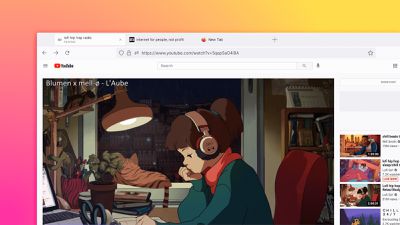
Mozilla today announced the public release of Firefox 89 for macOS with a redesigned and modernized core browsing experience.
firefox 89
The latest version of the browser features a simplified toolbar with less frequently used items removed, allowing the focus to be on the most important navigation items. Menus and prompts have also been streamlined across Firefox to have cleaner designs and clearer language. The more consistent styling extends to many other elements of the browser.

Firefox 89 also features floating tabs that contain information and other cues when you need them, like visual indicators for audio controls.


For macOS users, Firefox 89 now features the familiar "elastic" scrolling effect utilized in many other applications. A gentle bouncing animation will indicate that you reached the end of the page while scrolling.

Another feature added for macOS users is support for multi-touch "smart zoom." Users can double tap with two fingers on the trackpad, or with a single finger on the Magic Mouse, to zoom the content beneath the cursor into focus. This multi-touch gesture has long been supported by Apple's default Safari browser as well as Google Chrome.

Firefox 89 contextual menus are now native on macOS and support Dark Mode too.

The complete Firefox 89 release notes can be found on the Mozilla website.

Tag: Firefox

Popular Stories

Apple Card iPhone 16 Pro Feature

Apple Card Promo to Offer Free AirPods Pro 3

Friday May 15, 2026 8:59 am PDT by
Starting as early as next week, customers who sign up for an Apple Card at Apple's retail stores in the U.S. will receive $249 cash back when they purchase AirPods Pro 3, according to Bloomberg's Mark Gurman. The promotion has yet to be officially announced by Apple, so exact terms and conditions are not available at this time. AirPods Pro 3 are priced at $249 in the U.S., so customers who...
Apple WWDC25 iOS 26 CarPlay Light mode 250609

Six Popular iPhone Apps Now Available on CarPlay

Thursday May 14, 2026 9:10 am PDT by
Apple's CarPlay system for accessing iPhone apps on a vehicle's dashboard screen has received six popular apps in recent weeks: ChatGPT, Perplexity, Grok, Google Meet, WhatsApp, and the indie artist streaming platform Audiomack. Make sure you have the latest version of each app and they will automatically appear on CarPlay. ChatGPT Starting with iOS 26.4, CarPlay supports voice-based...
ipad mini 7 blue

OLED iPad Mini: Release Date, Pricing, and What to Expect

Thursday May 14, 2026 5:08 am PDT by
According to the latest rumors, Apple is close to launching its next-generation iPad mini. So what should we expect from the successor to the iPad mini 7 that Apple released over a year ago? Read on to find out. Processor and Performance Apple is working on a next-generation version of the iPad mini (codename J510/J511) that features the A19 Pro chip, according to information found in code...

Top Rated Comments

65 months ago
I hate when they keep changing UI's. Just ****ing leave it. Focus on the performance and stability.

EDIT: just updated and i love it lol. Looks and feels smoother and more mac native !!!
Score: 23 Votes (Like | Disagree)
65 months ago
The way the tabs look at the top looks really bad. Should take that back to the drawing board.
Score: 20 Votes (Like | Disagree)
65 months ago
Another application with a Sir Jony hide-and-seek interface? Ugh. I'm tired of of easter eggs being an integral part of UI/UX.
Score: 14 Votes (Like | Disagree)
star-affinity Avatar
65 months ago
Yes! The contextual menu is dark when in dark mode finally. :)
The browser now feels a little more macOS native?

I think the tabs looks OK, but will probably need a little getting used to.

Edit:
Hmm… Dropdown menus for bookmarks in a folder in the Bookmarks Toolbar are not dark – did they forget that? 🤔

Edit 2:
As of version 91.0 the menus for bookmarks in the Bookmarks Toolbar are now also dark. :) 👍
Score: 14 Votes (Like | Disagree)
macintoshmac Avatar
65 months ago
I have been using the nightly build for a while, and while the tab bar design initially comes as a shocker, I grew to like it surprisingly soon. Redesign is great. Most Mac-native as it has been in a while.
Score: 11 Votes (Like | Disagree)
Wildkraut Avatar
65 months ago

I MUCH APPRECIATE THIS REDESIGN. IT WAS VERY MARJORLY CONTRIBUTING TO THAT I DID NOT USE FIREFOX REGUALRLY THAT THE GRAPHICS IT PRODUCED WERE DISPLEASING TO ME. ESPOECIALLY, I HATED the custom context menu whose purpose was obviously to be similar to macOS’sUNFORTUNATELY THAT OURPOSE WASN’T STISFIED.

additional changes to make:
1. DON‘T SHOW A LIGHT MACOS WINDOW AFTER EVERY DOWNLOAD, especially in dark mode
2. DON’T SHOW LIGHT MACOS WINDOWS AT ALL WHILE DARK MODE IS ENABLED.
3. DON’T REACT TO SCROLLING GESTURES DIFFERENTLY TO EVERY OTHER MAC APP.
Your butterfly keyboard shift key seems to be broken.
Score: 9 Votes (Like | Disagree)
















