Apple Introduces iPadOS 15: First Look at New Features - MacRumorsOpen MenuShow RoundupsShow Forums menuVisit ForumsOpen Sidebar
Skip to Content

Apple Introduces iPadOS 15: First Look at New Features

Apple today unveiled iPadOS 15, its next-generation operating system for iPad that introduces a slew of new features like widgets on the Home Screen, an iPhone-style App Library, new multi-tasking features, and more. Here's a rundown of what to expect.
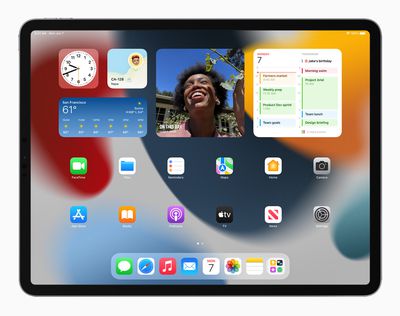
Apple iPadPro iPadOS15 springboard widgets 060721 big

Widgets

Like iOS 14, iPadOS 15 lets users place widgets anywhere on their ‌Home Screen‌ pages and among their apps.

Widgets are also getting a new larger format on ‌iPad‌ that make better use of the larger screens available, which should make showcasing media more enjoyable. There are also new ‌iPad‌ widgets for Find My, Contacts, Game Center, Mail, and the App Store.

App Library

App Library, which also debuted in iOS 14, is now coming to ‌iPad‌, allowing users to organize their apps into categories like Productivity, Games, and Recently Added. The App Library is built right into the Dock, so users can always get to it with a touch. App Library also lets users hide and reorder their Home screen pages.

Multitasking

iPadOS 15 also brings multitasking improvements with a new multitasking menu that allows users to switch between full screen, Split View, and Slide Over.

In Split View, for example, it's possible to swipe down to replace an app with a new one for either side of the screen, while the same thing works for apps with multiple windows.
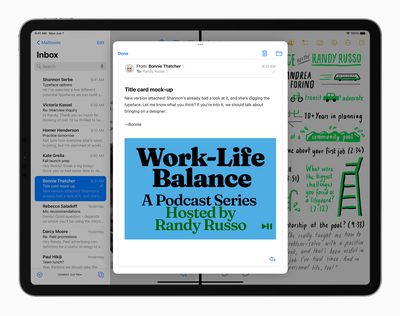
Apple iPadPro iPadOS15 multitasking splitview 060721 big
Meanwhile a new Shelf display gives you access to all open windows for any given app. For example, you can view multiple open Safari windows and even windows that are paired with other apps in Split View, for an at-a-glance overview.

Apple is also adding new key shortcuts for these new multitasking ‌iPad‌ functions. Users can quickly set up and switch between Split View and Slide Over with new shortcuts for multitasking right from the keyboard.

Notes

As for note-taking on ‌iPad‌, the Notes app is finally getting tags support. Tags will make it easier to categorize notes and find them quickly with an all-new Tag Browser and tag-based Smart Folders.
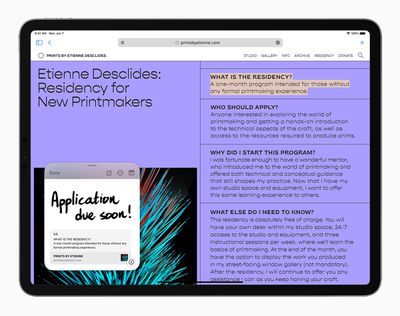
Apple iPadPro iPadOS15 QuickNote Safari 060721 big carousel
Users can also expect improvements in areas of collaboration and organization. With mentions, for example, you can tag people in shared notes and they'll receive a notification. You can add a tag anywhere in a note, and find it using the tag browser.

There's also a new Quick Notes feature whereby notes can be jotted down fast on ‌iPad‌ and Mac, and viewed and edited on iPhone. Whether browsing in Safari or finding a restaurant on Yelp, users can bring up Quick Note anywhere to jot down a thought and add links, providing an easy way to get back to exactly what they were looking at.

FaceTime

With iPadOS 15, users will be able to share experiences with SharePlay while connecting with friends on FaceTime, including listening to songs together with Apple Music, watching a TV show or movie in sync, or sharing their screen to view apps together.

Apple iPadPro iPadOS15 FaceTime groupfacetime 4person 060721 big carosuel
Shared playback controls let will users play, pause, or jump ahead, and users can extend playback to Apple TV, and watch it on their TV while sharing the moment with friends and family connected over ‌FaceTime‌. SharePlay will also let users share their screen.

Safari

Safari is gaining a new tab design that lets users see more of the page as they browse. The new tab bar takes on the color of the webpage and combines tabs, the toolbar, and the search field into a single, compact design.

Apple iPadPro iPadOS15 safari safariextensions 060721 big
Meanwhile, Tab Groups offer a new way to easily save and manage associated tabs. Tab Groups also sync across Mac and iPhone, allowing you to continue working on the same project on different devices, or easily share multiple tabs with friends and family. Safari on ‌iPad‌ also now supports web extensions, which will be available on the ‌App Store‌.

Focus

With iPadOS 15, Apple is introducing a new Focus feature that aims to help reduce distractions and zone in on a single thing. Focus does this by filtering notifications based on what you're doing.
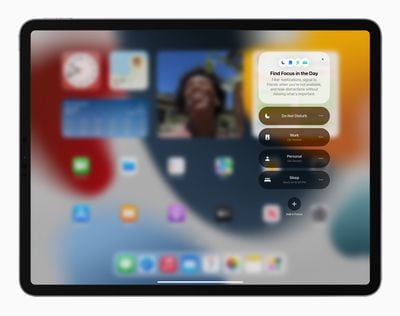
Apple iPadPro iPadOS15 springboard focus 060721 big
You can set your device to help you be in the moment by creating a custom Focus or selecting a suggested one based on the context, like during work hours or while you're winding down for bed. It's also possible to create ‌Home Screen‌ pages with apps and widgets that apply to moments of focus to only display relevant apps and reduce temptation.

Elsewhere, a new notification summary aims to offer an organized collection of notifications that can be delivered any time you choose, such as in the morning and evening, making it more convenient to catch up on the day's activity.

Live Text

A new Live Text feature can recognize text in a photo and let you do something with it. One example that Apple offers is a snapshot of a storefront revealing a phone number and the option to place a call. Live Text will also work with handwritten text, according to Apple. Meanwhile, with Visual Look Up, you can identify objects within a photo, such as a type of flower or dog breed.

Apple iPadPro iPadOS15 photos LiveText 060721 big

Other Features

In addition, Spotlight is getting the ability to search the Photos app and web images, offering results for contacts with context like recent conversations, shared photos, and their location if shared through ‌Find My‌.

iPadOS 15 will bring the Translate app to ‌iPad‌ for the first time. The Translate app detects when you're speaking and in what language, and will automatically translate it for you. Meanwhile, the systemwide translate function works anywhere, including with Live Text.

The ‌Photos‌ app is getting more advanced Memories, offering a new look, a more immersive and interactive interface, and integration with ‌Apple Music‌, which uses on-device intelligence to personalize song suggestions bring memories to life.

iPadOS 15 will also support Universal Control, which allows you to work with a single mouse and keyboard to move between ‌iPad‌ and Mac for a seamless experience, with no setup required.

Elsewhere, Swift Playgrounds is gaining the ability to build apps on ‌iPad‌, with improved code completion, new libraries, guides, and even the ability to submit your app straight to the ‌App Store‌.

The developer preview of iPadOS 15 is available to Apple Developer Program members starting today, and a public beta will be available to iPadOS users next month.


Related Roundup: iPad Pro
Buyer's Guide: iPad Pro (Caution)

Popular Stories

iPad Pro 2024 vs Air 2024 Feature

Three New iPads Rumored to Launch in First Half of 2027

Sunday November 1, 2026 7:27 am PST by
After announcing a new iPad mini with an OLED display earlier this month, Apple plans to release new iPad Air, iPad Pro, and entry-level iPad models in the first half of 2027, according to the latest word from Bloomberg's Mark Gurman. In his Power On newsletter today, Gurman said the next iPad Air will also feature an OLED display, while he expects the next iPad Pro to be equipped with a...

iPad mini 7 Review Thumb 1 sans text

Apple Raises iPad and Mac Trade-In Values

Monday October 26, 2026 8:17 am PDT by
Apple today updated its U.S. trade-in estimates, raising maximum values across the iPad lineup and for most Macs following today's announcement of the new iPad mini. Every iPad category has gained value, although the increases are relatively modest. The iPad mini and standard iPad both rise by $20, while the iPad Air gains $15 and the iPad Pro increases by $10. The revised maximum estimates...
new ipad cyber

New Entry-Level iPad Not Expected Until Early 2027

Sunday October 11, 2026 8:57 am PDT by
Apple's next entry-level iPad models, codenamed J581 and J582, will not arrive until early 2027, according to Bloomberg's Mark Gurman. He added that Apple plans a major iPad Air refresh to add an OLED display and a new iPad Pro in 2027. The latter could gain a vapor chamber to improve thermals and performance. A new iPad mini is still expected to arrive at the end of October this...

Top Rated Comments

collin_ Avatar
71 months ago
This is the most disappointing Apple keynote I’ve ever seen. M1 with up to 16 GB RAM in the iPad Pro and they did absolutely NOTHING to take advantage of it. No pro apps. Not even real external display support or an update to files. Wow.

EDIT: I am generally not one of the negative users on this forum, but iPadOS 15 is so disappointing that I couldn't help but rant. To be clear, iOS 15 and macOS Monterey look amazing. It’s just that, as someone who recently purchased a $1,200 iPad, iPadOS 15 kinda ruined the whole keynote for me. I really wish Apple would listen to their customers. :(
Score: 46 Votes (Like | Disagree)
71 months ago
which of these new features requires the M1 or 16GB of RAM?
Score: 35 Votes (Like | Disagree)
cryptonator Avatar
71 months ago
It appears that the M1 chip still isn't powerful enough to support a calculator app for the iPad.
Score: 33 Votes (Like | Disagree)
71 months ago
So disappointing
Score: 29 Votes (Like | Disagree)
oldmacs Avatar
71 months ago
What a let down. Not even any updates to the files app, which is still woeful.
Score: 28 Votes (Like | Disagree)
71 months ago
In before all the whining and complaining….

Edit: I was too late
Score: 26 Votes (Like | Disagree)
Latest Stories
Siri AI Rumored to Become 'More Like an Agent' as Early as Next Year
1 hour ago
Apple Taking New Approach to Developing iOS 28 and macOS 28
3 hours ago
Early Apple Black Friday Deals on Apple Watch, MacBook Air, and More
22 hours ago
'Backglow' Lets You Customize New MacBook Pro's Glowing Apple Logo
22 hours ago
Top Stories: Apple Product Launches, iOS 27.3 Beta, and More
1 day ago
More Fun iPhone Duo Apps: 30 New Picks to Try
2 days ago
Hands-On With Apple's New OLED Touchscreen MacBook Pro
2 days ago
Apple Store With All-New Design Opening Soon in Southern California
2 days ago
Control the Glowing Apple Logo on Your New MacBook Pro
2 days ago
Apple Shares New 'Apple Card: Apply and Use in Minutes' Ad
2 days ago
Apple Says More Than 100,000 Apps Optimized for iPhone Duo, Here's What's Still Missing
2 days ago
Early Black Friday Deals Kickoff With Steep Discounts on Apple Watch Ultras and More
2 days ago
The MacRumors Show: iOS 27.3 Looks Like a Huge Update
2 days ago
Best Buy's Black Friday Event Begins With Sitewide Savings on Apple, TVs, More
2 days ago
Apple Releasing Yet Another Two New Products Next Week
2 days ago
MacBook Air Drops to Lowest Price in Months With Amazon's $250 Discount
2 days ago
Apple Rumored to Drop the iPhone's Action Button Next Year
2 days ago
Apple's Extended Return Policy Now in Effect for 2026 Holiday Season
2 days ago
Apple Music Classical Updated With New Icon and Refreshed Design
2 days ago
OLED iPad Mini, M6 iMac, and New MacBook Pros Available From Today
2 days ago
Apple Surveys iPhone Duo Buyers About Crease and Camera
3 days ago
Apple's First Touchscreen Mac is Now Arriving to Customers
3 days ago
Claude Gets Personal Finance Feature With Bank Account Linking
3 days ago
Apple Arcade Adds Crossy Road Rush and NBA 2K27
3 days ago
Apple's New HomeView Smart Home Hub: Here's How Much RAM It Has
3 days ago
iPad Mini vs. iPad Air Buyer's Guide: Now Just $50 Apart
3 days ago
First iOS 27.3 and macOS Golden Gate 27.3 Public Betas Now Available
3 days ago
Apple Announces a New Mac Sales Record
3 days ago
Paid $200 for Logic Pro? Apple Says You Won't Get This New Feature
3 days ago
Instagram's Edits Video Editor is Now Available on Mac
3 days ago