iOS 15 Can Automatically Add and Remove Widgets to a Smart Stack - MacRumorsOpen MenuShow RoundupsShow Forums menuVisit ForumsOpen Sidebar
Skip to Content

iOS 15 Can Automatically Add and Remove Widgets to a Smart Stack

On iOS 14, Smart Stacks for widgets allow users to stack different widgets on top of each other and then allow iOS to display the most relevant widget depending on the time of day, location, and more. On iOS 15, Apple is taking Smart Stacks even further with Widget Suggestions, which automatically add and remove widgets in a Smart Stack depending on context.
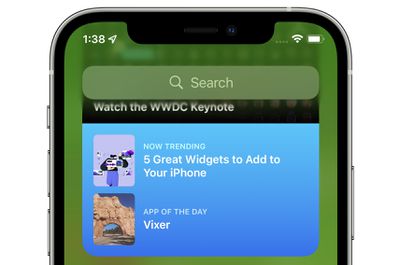
app store widget
For example, if a user has an existing Smart Stack which includes the Weather and Reminders widget, iOS 15 may add a Calendar widget to the stack if the user has an upcoming meeting. Then, after the meeting, iOS 15 will remove the widget from the Smart Stack, reverting it to the stack that the user had set up with Weather and Reminders. Apple says it hopes this new feature, which can be disabled on a per Smart Stack basis, will allow users to discover new and helpful widgets.

iOS 15 and iPadOS 15 introduces new widgets for Find My, Game Center, App Store Today, Sleep, Mail, and more. Developers interested in learning more about widget suggestions and how they can be implemented into their app can check out this WWDC session.

Related Forum: iOS 15

Popular Stories

iphone 18 pro blue%402x

iPhone 18 Pro: Dark Cherry, Light Blue, and Dark Gray Chassis Leaked [Update]

Thursday June 4, 2026 5:18 am PDT by
Update: Since publication, new information has come to light suggesting the images have been AI-manipulated and are not in fact iPhone 18 Pro chassis parts. The original article follows. The color options Apple is reportedly planning for the upcoming iPhone 18 Pro and ‌iPhone 18 Pro‌ Max have appeared online today in the form of images of chassis parts of unknown authenticity....
Aston Martin CarPlay Ultra Screen

Apple Says CarPlay Ultra is Coming to These Vehicle Brands

Thursday May 21, 2026 11:53 am PDT by
Last year, Apple launched CarPlay Ultra, the long-awaited next-generation version of its CarPlay software system for vehicles. Nearly a year later, CarPlay Ultra is still limited to Aston Martin's latest luxury vehicles, but that should change fairly soon. In May 2025, Apple said many other vehicle brands planned to offer CarPlay Ultra, including Hyundai, Kia, and Genesis. CarPlay Ultra...
iOS 27 All the New App Features

iOS 27: All the Rumored App Features

Wednesday June 3, 2026 3:48 pm PDT by
Siri is getting a major overhaul in iOS 27, but Apple also has some big updates planned for apps like Camera, Photos, and Wallet. There are multiple new AI features in the works, plus some non-AI upgrades. Camera Apple is moving Visual Intelligence from the Camera Control button to the Camera app in iOS 27, according to Bloomberg. There will be a Siri mode that will be available alongside...

Top Rated Comments

65 months ago
I hate this stuff. A good UI is predictable and boring.
Score: 3 Votes (Like | Disagree)
bchery21 Avatar
65 months ago

Hmm. Sounds like an okay idea to me, as long as I can disable it if I don't like the behavior. I was disappointed to not hear that the widgets will be interactive (checking items off a todo list, for example), but maybe that will still happen?
I hope so, especially with the example you gave. Checking something off the Reminders widget instead of bringing you into the app would be welcomed especially since that's how it use to behave.
Score: 2 Votes (Like | Disagree)
cmaier Avatar
65 months ago
A trend in Apple's UX designs lately - try and guess what will appear when you swipe the smart stack! Try and guess where the text box is to type a new address into safari! Try and guess where the keys are on the TouchBar!
Score: 2 Votes (Like | Disagree)
TheYayAreaLiving 🎗️ Avatar
65 months ago
I have to admit. The widgets are cool
Score: 2 Votes (Like | Disagree)
65 months ago

For iOS it’s kind of annoying. I just wish you could tell the system what to auto show and what not to. In CarPlay my wife’s calendar appts show up on the dashboard. I don’t care. However, I love the garage button that disappears when I leave home. That one is rock solid.
I find it incredible that hiding calendars is still not working as expected. I now get the invites from my partner’s calendar. And their appointments show up in widgets and Maps. Why Apple?! Why?
Score: 1 Votes (Like | Disagree)
QuarterSwede Avatar
65 months ago

A trend in Apple's UX designs lately - try and guess what will appear when you swipe the smart stack! Try and guess where the text box is to type a new address into safari! Try and guess where the keys are on the TouchBar!
For iOS it’s kind of annoying. I just wish you could tell the system what to auto show and what not to. In CarPlay my wife’s calendar appts show up on the dashboard. I don’t care. However, I love the garage button that disappears when I leave home. That one is rock solid.
Score: 1 Votes (Like | Disagree)