Newer Macs Can Use Another Mac as an External Display on macOS Monterey - MacRumorsOpen MenuShow RoundupsShow Forums menuVisit ForumsOpen Sidebar
Skip to Content

Newer Macs Can Use Another Mac as an External Display on macOS Monterey

One of the key new features of macOS Monterey is the ability to AirPlay content to a Mac from other Apple devices, such as an iPhone, iPad, or another Mac. According to the macOS Monterey features page, AirPlay to Mac works works both wirelessly or wired using a USB cable, with Apple noting that a wired connection is useful when you want to ensure that there's no latency or don't have access to a Wi-Fi connection.
imac macbook pro macos monterey
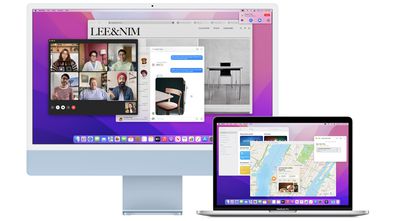
AirPlay to Mac also allows users to extend or mirror an Apple device's display to a Mac, and we've confirmed this works on a Mac-to-Mac basis. This makes it possible for supported Macs to use another Mac as an external display, and with AirPlay to Mac working both wirelessly or with a wired connection, Apple has come close to reviving Target Display Mode, which allowed 2009 to 2014 iMac models to serve as another Mac's external display.

It's worth noting that these new AirPlay features do not serve as a complete Target Display Mode replacement, as we've been told that AirPlay compresses video sent from one Mac to another, and at least some latency might still be possible.

Starting with macOS Monterey, a supported Mac can also function as an AirPlay 2 speaker source, allowing users to wirelessly stream music or podcasts from an Apple device to a Mac or use the computer as a secondary speaker for multi-room audio.

AirPlay to Mac works with a 2018 or later MacBook Pro or MacBook Air, a 2019 or later iMac or Mac Pro, an iMac Pro, and the 2020 Mac mini.

macOS Monterey is available now in beta for developers, with a public beta to follow in July. The software update will likely be publicly released for all compatible Macs at some point between late September and early November.


Related Forum: macOS Monterey

Popular Stories

iPhone 18 Pro and Pro Max Feature

'Apple Upgrade' Program Reportedly Launching Next Week

Tuesday July 21, 2026 8:30 am PDT by
Apple and Klarna are partnering on a new "Apple Upgrade" leasing program set to launch in the U.S. on Tuesday, July 28, according to Bloomberg's Mark Gurman. The program will allow you to finance most iPhone, iPad, Mac, and Apple Watch models, with a 24-month term for iPhones and Apple Watches and a 36-month term for iPads and Macs. Customers will be able to pay off the device early during...
iPhone 18 Pro Deep Red Feature

iPhone 18 Pro Launching in Two Months With These 12 New Features

Tuesday July 21, 2026 6:22 am PDT by
It is now mid-July, and that means the iPhone 18 Pro and iPhone 18 Pro Max are now just two months away. The devices are expected to look similar to the iPhone 17 Pro and iPhone 17 Pro Max, but there will still be many year-over-year changes, with rumored features including a smaller Dynamic Island, 5G via satellite, and more. Apple is expected to unveil the iPhone 18 Pro, iPhone 18 Pro Max, ...
iPhone 18 Pro Deep Red Feature

iPhone 18 Pro Launching in Two Months With These 12 New Features

Friday July 17, 2026 10:39 am PDT by
It is now mid-July, and that means the iPhone 18 Pro and iPhone 18 Pro Max are now just two months away. The devices are expected to look similar to the iPhone 17 Pro and iPhone 17 Pro Max, but there will still be many year-over-year changes, with rumored features including a smaller Dynamic Island, 5G via satellite, and more. Apple is expected to unveil the iPhone 18 Pro, iPhone 18 Pro Max, ...

Top Rated Comments

iObama Avatar
67 months ago
Ugh. Wish I could use my 2017 4K iMac as an external display for my M1 Pro. It’s a beautiful monitor that now just sits on my desk, while I use a 24” 1080p monitor with my M1. Boo.
Score: 32 Votes (Like | Disagree)
67 months ago
Here are the supported devices since it didn't seem to be included in the article:


"Available on MacBook Pro (2018 and later), MacBook Air (2018 and later), iMac (2019 and later), iMac Pro (2017), Mac mini (2020 and later), Mac Pro (2019), iPhone 7 and later, iPad Pro (2nd generation and later), iPad Air (3rd generation and later), iPad (6th generation and later), and iPad mini (5th generation and later). Older iPhone, iPad, and Mac models may share content at a lower resolution to supported Mac models when “Allow AirPlay for” is set to “Everyone” or “Anyone on the same network” in Sharing preferences." (https://www.apple.com/macos/monterey-preview/features/#footnote-6)
This is great for my use, as I have wanted to use my 2020 iMac as a display for my work MacBook Pro when I'm at home (which is most of the time now). I tried out Luna Display, but it has some issues that don't work for me. My hope this works well, and with a hardwired connection the latency is not too bad.

Formatting the list better:

* MacBook Pro (2018 and later)
* MacBook Air (2018 and later)
* iMac (2019 and later)
* iMac Pro (2017)
* Mac mini (2020 and later)
* Mac Pro (2019)
* iPhone 7 and later
* iPad Pro (2nd generation and later)
* iPad Air (3rd generation and later)
* iPad (6th generation and later)
* iPad mini (5th generation and later)
Score: 13 Votes (Like | Disagree)
casperes1996 Avatar
67 months ago
Yeah, no I would've loved Target Display mode for my 2020 iMac to connect a PlayStation or something to it. This is alright for some things, but frankly I don't see myself using it
Score: 12 Votes (Like | Disagree)
EugW Avatar
67 months ago
I can still use my Target Display Mode 2010 iMac as a second display with any Mac, or even a Windows PC.

The main problem is that Apple has killed subpixel anti-aliasing, which makes any recent version of macOS look bad on non-Retina screens.
Score: 9 Votes (Like | Disagree)
67 months ago
For those getting a little too enthusiastic after reading the headline:

It's worth noting that these new AirPlay features do not serve as a complete Target Display Mode replacement, as we've been told that AirPlay compresses video sent from one Mac to another, and at least some latency might still be possible.
Plus, forget about connecting a PC, which you could do with non-Retina iMacs.
Score: 9 Votes (Like | Disagree)
JippaLippa Avatar
67 months ago
That's a very cool feature for people with desktop and a macbook on the side, for portable use.
Score: 9 Votes (Like | Disagree)