Apple Putting a Stop to Email Tracking Pixels With Mail Privacy Protection in iOS 15 and macOS Monterey - MacRumorsOpen MenuShow RoundupsShow Forums menuVisit ForumsOpen Sidebar
Skip to Content

Apple Putting a Stop to Email Tracking Pixels With Mail Privacy Protection in iOS 15 and macOS Monterey

Tracking when you've opened up an email and what you've read is something that many companies and advertisers rely on for their marketing efforts, plus there are email clients out there designed to let users know when the emails they've sent have been opened up.
ios15 mail privacy feature
Much of this tracking is facilitated by remote images that load when viewing an email, and some of it is even sneakier, with advertisers using invisible tracking pixels. Tracking pixels are hidden graphics that you might not see in an email, but your email client loads them, allowing senders to gather data from you. Senders can see that you've opened an email get other information, such as your IP address.

With iOS 15, iPadOS 15, and macOS Monterey, Apple is putting a stop to email tracking with a suite of Mail Privacy Protection features.

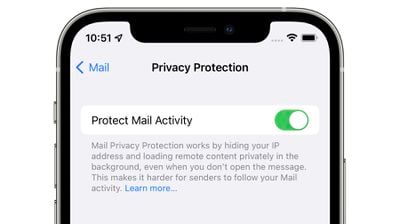
Mail Privacy Protection is not enabled by default, but Apple will highlight it as an option when you upgrade to iOS 15 or iPadOS 15. If you're running one of these updates, you can turn it on in Settings > Mail. Tap on "Privacy Protection" and then toggle on "Protect Mail Activity." In macOS Monterey, open up Mail, go to the Mail Preferences, and then click on Privacy. From there, toggle on Protect Mail Activity.
mail privacy protection
When enabled, Mail Privacy Protection hides your IP address and loads all remote content privately in the background, routing it through multiple proxy services and randomly assigning an IP address.

Here's how Apple describes the feature in full:

Emails that you receive may include hidden pixels that allow the email's sender to learn information about you. As soon as you open an email, information about your Mail activity can be collected by the sender without transparency and an ability to control what information is shared. Email senders can learn when and how many times you opened their email, whether you forwarded the email, your Internet Protocol (IP) address, and other data that can be used to build a profile of your behavior and learn your location.

If you choose to turn it on, Mail Privacy Protection helps protect your privacy by preventing email senders, including Apple, from learning information about your Mail activity. When you receive an email in the Mail app, rather than downloading remote content when you open an email, Mail Privacy Protection downloads remote content in the background by default - regardless of how you do or don't engage with the email. Apple does not learn any information about the content.

In addition, all remote content downloaded by Mail is routed through multiple proxy servers, preventing the sender from learning your IP address. Rather than share your IP address, which can allow the email sender to learn your location, Apple's proxy network will randomly assign an IP address that corresponds only to the region your device is in. As a result, email senders will only receive generic information rather than information about your behavior. Apple does not access your IP address.

It's worth noting that senders will see an IP address that corresponds to the region where you're located, giving them generic information about your behavior that is non-specific and cannot be used for building a profile of your behavior.

You could previously block email trackers by blocking the loading of remote content in the Mail app on iOS and macOS, but Apple's new feature is superior because you can still view all email content as normal while Mail Privacy Protection works in the background with no visual compromises.

Email senders can still monitor your behavior with tracked links that you will need to be mindful of, but the behind the scenes tracking that you might not notice won't happen.

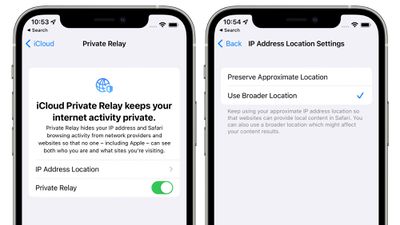
Mail Tracking Privacy pairs well with iCloud Private Relay, a feature that's included in ‌iCloud‌+. ‌iCloud‌+ is just Apple's name for its paid ‌iCloud‌ plans, which start out at $0.99 per month. With that $1 per month, all the traffic that leaves your device is routed through two separate internet relays so advertisers can't see your IP address or location, nor can they link your browsing history to this information to build a profile about you.
icloud private relay
‌iCloud‌ Private Relay is not quite a VPN, but it's similar, and it's an incredible feature for the less technically inclined that would not think to use a VPN or wouldn't know how, such as elderly people who need the most protection from tracking and scams.

Apple's plans for ‌iCloud‌ Private Relay and Mail Tracking Privacy are already worrying advertisers, according to a report earlier this week from The Wall Street Journal. Ad-measurement firm Branch Metrics' CEO Alex Austin said that Private Relay could be "vastly more damaging to the advertising ecosystem than the App Tracking Transparency measures implemented early this year. "If IP were to go away entirely, it would be very challenging for a lot of companies to operate," he said.

As for Mail Privacy Protection, advertisers are "surprised" that Apple blocked tracking in emails because of how much harder it will be for brands to know if their emails are working.

These new privacy features could spur Google to adopt similar measures for Chrome, and a Google spokesperson confirmed that Google is indeed considering similar features for blocking IP addresses.

‌iCloud‌ Private Relay and Mail Privacy Protection alone are enough reason to upgrade to the newest software when it becomes available this fall, but the rest of the features coming in iOS 15 and macOS Monterey can be found in our roundups.


Related Forums: iOS 15, macOS Monterey

Popular Stories

apple pro tell logo

Apple Launching Five New Products Today

Thursday November 5, 2026 12:59 am PST by
Apple is launching five new products on Friday, November 6, following pre-orders that opened last week, including its first touchscreen MacBook Pro models. The following new products will be available from today: iPad mini with OLED display and A20 Pro chip iMac with M6 chip 14-inch MacBook Pro with M6 chip 14-inch MacBook Pro with OLED touchscreen 16-inch MacBook Pro with OLED...


duo aquarium

More Fun iPhone Duo Apps: 30 New Picks to Try

Friday November 6, 2026 3:27 pm PST by
When the iPhone Duo launched, we shared a list of some of the fun apps developers created for the new form factor. Two weeks out, developers are continuing to come up with fresh ideas, so we thought we'd share some of our favorites. Games Marbles Unhinged ($2.99) - Marbles Unhinged is a marble maze designed for the Duo. When you fold it, the floor turns into a ramp. If you stand the top...
silver iphone 18 pro

Apple Rumored to Drop the iPhone's Action Button Next Year

Friday November 6, 2026 6:07 am PST by
Apple plans to merge the iPhone's Action button with the Camera Control starting next year, according to the leaker known as "Instant Digital." In a new post on Weibo, the leaker claimed that a single press of the combined button would open the camera, while a long press would trigger the function assigned to the Action button. They explicitly clarified that the dedicated Action button would ...

Top Rated Comments

macsplusmacs Avatar
71 months ago
I am so into this feature. thx apple.
Score: 39 Votes (Like | Disagree)
TheYayAreaLiving 🎗️ Avatar
71 months ago
Protection + privacy = transparency to the consumers.

win/win for everyone.
Score: 29 Votes (Like | Disagree)
71 months ago

Can someone clarify; if an invisible pixel is associated with my email address then what does it matter how many proxies it goes through? If that image is loaded they know it was my email address that did it. Is this literally just hiding my IP and nothing more?
I’m not 100% positive, but I read this line:

“When you receive an email in the Mail app, rather than downloading remote content when you open an email, Mail Privacy Protection downloads remote content in the background by default - regardless of how you do or don't engage with the email. Apple does not learn any information about the content.”

… as meaning that Apple’s service will automatically download remote content through THEIR proxy servers (possibly anonymized), whether the email was ever opened by the user or not. This would result in the sender not having reliable tracking data. If every email they send is automatically loaded by a proxy server with a scrubbed IP, their data is mostly noise and no signal. It could essentially render most remote tracking pixels/images/etc useless to the sender, because it doesn’t tell them anything about the user’s behavior. Including whether the end user actually ever opened the email or not. It may look to the sender as if every email was always opened immediately, but that’s not actually what’s happening. The more widely adopted this feature is, the less reliable the data is for the senders.

I could be misunderstanding, but that’s how I read this.
Score: 22 Votes (Like | Disagree)
fwmireault Avatar
71 months ago
It’s annoying for apple mail to have all these great privacy features but lacking basic features that all other mail client have, like send later mail, giving a distinct color for each account connected or customizable notifications. I want Spark features with Apple privacy policy
Score: 21 Votes (Like | Disagree)
Morod Avatar
71 months ago
Apple costs, but saves even more…
Score: 15 Votes (Like | Disagree)
Lyoha Avatar
71 months ago

It's not loaded and parsed by Apple. It works similiar to an ad blocker but only for this use case. It checks for a tracking pixel and blocks it from loading. If the sender uses other tricks, they'll probably still get through.
I think a lot of you guys are really missing how this works. The remote content IS loaded by Apple and is NOT blocked in an ad blocker fashion. What happens is that 100% of the content is loaded whether or not you eventually open the email. This way the request that says the email was opened is always fulfilled, making the data useless to the advertiser. In addition, since it's going through a proxy, the location the advertiser gets will be imprecise.
Score: 11 Votes (Like | Disagree)
Latest Stories
Siri AI Rumored to Become 'More Like an Agent' as Early as Next Year
1 hour ago
Apple Taking New Approach to Developing iOS 28 and macOS 28
3 hours ago
Early Apple Black Friday Deals on Apple Watch, MacBook Air, and More
22 hours ago
'Backglow' Lets You Customize New MacBook Pro's Glowing Apple Logo
22 hours ago
Top Stories: Apple Product Launches, iOS 27.3 Beta, and More
1 day ago
More Fun iPhone Duo Apps: 30 New Picks to Try
2 days ago
Hands-On With Apple's New OLED Touchscreen MacBook Pro
2 days ago
Apple Store With All-New Design Opening Soon in Southern California
2 days ago
Control the Glowing Apple Logo on Your New MacBook Pro
2 days ago
Apple Shares New 'Apple Card: Apply and Use in Minutes' Ad
2 days ago
Apple Says More Than 100,000 Apps Optimized for iPhone Duo, Here's What's Still Missing
2 days ago
Early Black Friday Deals Kickoff With Steep Discounts on Apple Watch Ultras and More
2 days ago
The MacRumors Show: iOS 27.3 Looks Like a Huge Update
2 days ago
Best Buy's Black Friday Event Begins With Sitewide Savings on Apple, TVs, More
2 days ago
Apple Releasing Yet Another Two New Products Next Week
2 days ago
MacBook Air Drops to Lowest Price in Months With Amazon's $250 Discount
2 days ago
Apple Rumored to Drop the iPhone's Action Button Next Year
2 days ago
Apple's Extended Return Policy Now in Effect for 2026 Holiday Season
2 days ago
Apple Music Classical Updated With New Icon and Refreshed Design
2 days ago
OLED iPad Mini, M6 iMac, and New MacBook Pros Available From Today
2 days ago
Apple Surveys iPhone Duo Buyers About Crease and Camera
3 days ago
Apple's First Touchscreen Mac is Now Arriving to Customers
3 days ago
Claude Gets Personal Finance Feature With Bank Account Linking
3 days ago
Apple Arcade Adds Crossy Road Rush and NBA 2K27
3 days ago
Apple's New HomeView Smart Home Hub: Here's How Much RAM It Has
3 days ago
iPad Mini vs. iPad Air Buyer's Guide: Now Just $50 Apart
3 days ago
First iOS 27.3 and macOS Golden Gate 27.3 Public Betas Now Available
3 days ago
Apple Announces a New Mac Sales Record
3 days ago
Paid $200 for Logic Pro? Apple Says You Won't Get This New Feature
3 days ago
Instagram's Edits Video Editor is Now Available on Mac
3 days ago








































