Apple Makes New On-Screen Game Controller Available to Developers on iOS 15 and iPadOS 15 - MacRumorsOpen MenuShow RoundupsShow Forums menuVisit ForumsOpen Sidebar
Skip to Content

Apple Makes New On-Screen Game Controller Available to Developers on iOS 15 and iPadOS 15

During the Platforms State of the Union at WWDC this week, Apple unveiled a new API for iOS 15 and iPadOS 15 that enables developers to implement an on-screen virtual game controller in their iPhone and iPad games with just a few lines of code.
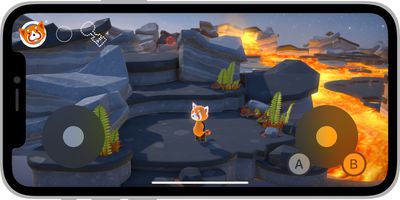
apple virtual game controller ios 15
While many iPhone and iPad games already offer on-screen controls, Apple's new virtual game controller is available to all developers, easy to add, and can be customized on a per-game basis. Apple said the on-screen controller can be adjusted to a variety of layouts, with up to four buttons and a thumbstick, d-pad, or touchpad available per left and right side.

"These new on-screen controls for iPhone and iPad look amazing, and they're carefully tuned for grip locations across hand sizes and for a great responsiveness and feel," said Nat Brown, an Apple engineer working on Game Technologies.

Apple offers a WWDC session and developer documentation with more details.

Related Forum: iOS 15

Popular Stories

iOS 27 Next to iPhone

Here's When iOS 27 Rolls Out Today in Every Time Zone [Update: It's Out]

Sunday September 13, 2026 3:00 am PDT by
Update 10:04 a.m.: iOS 27 is rolling out now, though it may take a bit for all users to see it, so keep checking! Apple is about to release iOS 27, which will finally deliver more advanced Siri AI capabilities as well as a variety of other refinements, improvements, and new features to iPhones. It's Apple's biggest software update of the year, and Apple announced at Wednesday's iPhone event...
iOS 27 Icon iPhone

iOS 27 Available Now With These 8 New Features

Monday September 14, 2026 9:00 am PDT by
Update — 10 a.m. Pacific Time: Apple has released iOS 27. During its iPhone 18 Pro and iPhone Duo event last week, Apple announced that iOS 27 will be released widely on Monday, September 14. iOS 27 should be available around 10 a.m. Pacific Time / 1 p.m. Eastern Time today via the Settings app, under General → Software Update. Below, we have highlighted eight new features and...
Apple iCloud Plus expansion hero

iCloud+ Now Includes Apple TV, Apple Arcade, and Curated Apple Music Stations in Over 100 Countries

Tuesday September 15, 2026 1:43 am PDT by
Apple today announced a new subscription initiative that turns paid iCloud+ subscriptions into a broader services bundle in more than 100 countries. In select countries, Apple says every paid iCloud+ plan, including the cheapest 50GB tier, now includes Apple TV and Apple Arcade "at no additional cost," while family sharing extends the storage, TV and Arcade access to up to five people....


Top Rated Comments

dannyyankou Avatar
69 months ago
On screen game controllers have never worked and will never work. It’s very difficult to keep your eyes on the gameplay and controls at the same time. You need physical buttons.
Score: 25 Votes (Like | Disagree)
TheDailyApple Avatar
69 months ago
I find the best on screen controllers are the ones designed from the ground up for touch screen instead on those trying to replicate standard game controls.
Score: 10 Votes (Like | Disagree)
TheDailyApple Avatar
69 months ago

On screen game controllers have never worked and will never work. It’s very difficult to keep your eyes on the gameplay and controls at the same time. You need physical buttons.
While I tend to agree with you, this could help with that. If multiple games share the same on screen controls then it will be easier to memorize button location and placement. Similar to how I can type on the 12.9” iPad’s software keyboard without looking just like I do on a real one (albeit more slowly) because the key placement is the same.

Obviously a heavy gamer should buy a real controller just as a coder or writer should buy a real keyboard. But as light/infrequent gamers are unlikely to invest in one, it’s worth optimizing the on screen interface.
Score: 9 Votes (Like | Disagree)
69 months ago

On screen game controllers have never worked and will never work. It’s very difficult to keep your eyes on the gameplay and controls at the same time. You need physical buttons.
I don’t know, Caster (http://www.elecorn.com/caster3d/) largely nailed the core aspects of it in 2009 by just using the position of your thumb from the first point it hits the screen. It is entirely possible to use the orientation of your character or vehicle as a visual cue for where you need to go to next. Controlling a camera using the same method is no different to using a mouse.

Meteor Blitz (https://toucharcade.com/2009/09/16/meteor-blitz-dual-stick-space-shooting-goodness/) also showed how you can use orientation and visual cues to make up for a lack of buttons. Geometry Wars 3 on iOS was and still is a fantastic port.

Where touchscreen controls do fall down is when devs tried to port over console titles to a phone and have to shoehorn touchscreen controls into games not designed for them. This does not work.

There are exceptions, for example games with a largely static camera like FFVII but this pales in comparison to proper ports like FFIX which have been redesigned with the host platform in mind. See also titles like Horizon Chase and Oceanhorn 1.
Score: 7 Votes (Like | Disagree)
BulkSlash Avatar
69 months ago
Personally I prefer games that centre the virtual left stick on the place where I place my thumb. It takes a bit of adjustment to not keep your thumb on the screen but I find it’s the best way of avoiding the situation you get in many iOS games where your character doesn’t move as expected because you didn’t put your thumb in the right place.
Score: 5 Votes (Like | Disagree)
ArPe Avatar
69 months ago
Hope this means finally FIFA and racing games with classic joypad controls not the swiping stroking flicking stuff.
Score: 5 Votes (Like | Disagree)