Apple Releases First Public Beta of tvOS 15 - MacRumorsOpen MenuShow RoundupsShow Forums menuVisit ForumsOpen Sidebar
Skip to Content

Apple Releases First Public Beta of tvOS 15

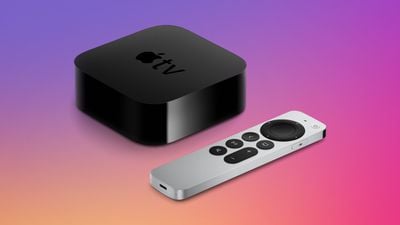
Apple today seeded the first beta of tvOS 15 to public beta testers, allowing members of the public to download and test the new update on modern Apple TV models.
apple tv 4k design triad
Public beta testers can download the tvOS 15 beta update by opening up the Settings app on the ‌Apple TV‌, navigating to the Software Updates section under "System," and then toggling on "Get public Beta Updates" after signing up to beta test on Apple's public beta website.

tvOS updates are often minor in scale, but there are some notable new additions that are coming. SharePlay, a FaceTime feature that lets multiple users watch TV shows or movies together, will integrate with tvOS, and there's a new "For All of You" recommendation engine that suggests shows everyone might enjoy.

A Shared With You section also displays movies and shows that were shared with you through the Messages app so you remember to check them out. When paired with AirPods Pro or AirPods Max, the ‌Apple TV‌ supports Spatial audio for a theater-like surround sound experience, and there's a new feature for automatically connecting your AirPods through Smart AirPods routing.

Two HomePod mini speakers can be paired with the ‌Apple TV‌ 4K for stereo sound, and if you have HomeKit cameras, you can view multiple cameras at the same time on the ‌Apple TV‌.

Apple may add new features or refine existing features throughout the tvOS 15 beta testing process, with the software set to be released in the fall.


Related Roundup: Apple TV
Buyer's Guide: Apple TV (Don't Buy)

Popular Stories

General visionOS watchOS and tvOS Betas Feature Redux

Apple Releases Third watchOS 26.6, tvOS 26.6 and visionOS 26.6 Betas

Monday June 29, 2026 10:08 am PDT by
Apple today provided developers with the third betas of upcoming watchOS 26.6, tvOS 26.6, and visionOS 26.6 betas for testing purposes. The software comes two weeks after Apple seeded the second betas. The software updates are available through the Settings app on each device, and because these are developer betas, a free developer account is required. There's no word on what's in the...
Apple TV 2025 Thumb 2 Sans Text

iOS 27 Lets You Update Your Apple TV Using Your iPhone

Tuesday June 23, 2026 9:09 am PDT by
If the idea of digging out your Siri Remote to install a tvOS update on your Apple TV sounds like too much effort, Apple's upcoming iOS 27 software will have a new feature you'll surely welcome. Based on the latest iOS 27 beta 2, you can push Apple TV software updates straight from your iPhone, and you don't even need to turn the Apple TV on first. Apple's set-top box now appears in the...
Chase Sapphire Reserve Apple Perk Feature

Chase Sapphire Credit Cards Offering New Apple TV and Apple One Perks

Wednesday June 24, 2026 7:00 am PDT by
Chase recently introduced new Apple TV and Apple One perks for its Sapphire Preferred and Sapphire Reserve credit cards in the United States. Sapphire Preferred cardholders ($95 annual fee) are now eligible to receive a complimentary one-year Apple TV streaming subscription, or a $7.50/month discount on an active Apple One subscription for 12 months instead. Sapphire Reserve cardholders...

Top Rated Comments

66 months ago
Should add a warning to this post. There is NO way to downgrade to an official OS release after updating to the beta if you're using an Apple TV 4K.
Score: 3 Votes (Like | Disagree)
66 months ago

Used to work fine on Sony. They released an update and poof, no more functionalit.
Sony just released another firmware update that fixes this. Apple TV can now turn on AND off a sony TV through HDMI-CEC.
Score: 3 Votes (Like | Disagree)
66 months ago

Used to work fine on Sony. They released an update and poof, no more functionalit.
Seems model specific then, because my Sony (65XG9505) works fine
Score: 2 Votes (Like | Disagree)
66 months ago

Did you check this? this was problem for mine:

Make sure that HDMI-CEC is on
If some features don't work, check the following:
[LIST=1]
* Make sure that your TV or receiver offers HDMI-CEC support. For help, ask the TV manufacturer or check the manual.
* Check that HDMI-CEC is turned on in the menu of your TV or receiver. Use the remote that came with your equipment. Since manufacturers often have different names for HDMI-CEC, look for a setting that ends in "Link" or "Sync." Here are some examples:


* LG: SimpLink
* Philips: EasyLink
* Samsung: Anynet+
* Sharp: Aquos Link
* Sony: BRAVIA Sync

Power button has always worked with my LG. I have CEC on.
Score: 2 Votes (Like | Disagree)
Realityck Avatar
66 months ago
Trying this on one ATV to see what's changed. Hey maybe it will fix the library issue finally for BWhaler? ;)
Score: 2 Votes (Like | Disagree)
66 months ago

Hope power button on Siri remote can learn IR now
Did you check this? this was problem for mine:

Make sure that HDMI-CEC is on
If some features don't work, check the following:
[LIST=1]
* Make sure that your TV or receiver offers HDMI-CEC support. For help, ask the TV manufacturer or check the manual.
* Check that HDMI-CEC is turned on in the menu of your TV or receiver. Use the remote that came with your equipment. Since manufacturers often have different names for HDMI-CEC, look for a setting that ends in "Link" or "Sync." Here are some examples:


* LG: SimpLink
* Philips: EasyLink
* Samsung: Anynet+
* Sharp: Aquos Link
* Sony: BRAVIA Sync
Score: 2 Votes (Like | Disagree)