

Apple's MagSafe Battery Pack Unlocks Long Rumored Reverse Charging Feature - MacRumorsOpen MenuShow RoundupsShow Forums menuVisit ForumsOpen Sidebar
Skip to Content

Apple's MagSafe Battery Pack Unlocks Long Rumored Reverse Charging Feature

Apple's MagSafe Battery Pack designed for the iPhone 12 models has a unique feature that's long been rumored but never introduced in an Apple product -- reverse wireless charging.
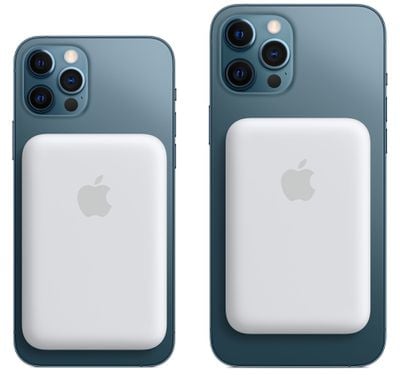
magsafe battery pack 2
When attached to an iPhone that's charging via Lightning, the iPhone can deliver power to the MagSafe Battery Pack, which is the first instance of an iPhone being able to route power to an accessory device.

We've long heard rumors of reverse wireless charging capabilities for the iPhone, a feature that's been talked about as a possibility for both the iPhone 11 and the iPhone 12. Apple hasn't actually implemented reverse wireless charging until now, and the way that it works with the ‌MagSafe Battery Pack‌ is limited in scope.

With the ‌MagSafe Battery Pack‌, the iPhone has to be plugged in for the charging feature to work, but it's certainly a step in the right direction and hints at more expansive reverse wireless charging capabilities in the future. Given the ‌MagSafe Battery Pack‌'s reverse wireless charging feature, it seems technically possible that an iPhone 12 could deliver power to the AirPods or AirPods Pro, but Apple has not yet implemented this feature.

Apple has suggested that ‌MagSafe Battery Pack‌ users might want to use the iPhone passthrough charging feature when the iPhone is connected to a power source like wired CarPlay and is able to charge both accessories.


Popular Stories

iCloud iPhone 17 Pro

iPhone Users Who Pay for iCloud Storage Get Two New Perks on iOS 27

Thursday July 2, 2026 6:10 am PDT by
If you pay for certain iCloud+ storage plans beyond the 5GB that Apple offers for free, you will receive two more perks on iOS 27 at no additional cost. A summary of the two new iCloud+ perks on iOS 27:Increased daily usage limits for some new Apple Intelligence features, including image generation in the revamped Image Playground app. HomeKit Secure Video cameras receive generated video...
iPhone 4 on Black Feature

Apple Facing One of Its Worst Leaks Since the iPhone 4

Thursday July 2, 2026 9:53 am PDT by
Apple supplier Tata Electronics recently suffered a cyberattack that resulted in thousands of confidential files being published on the dark web, and this reportedly included some photos and documents related to the upcoming iPhone 18 Pro. We have elected not to share any of the leaked photos in this story due to the illegal nature in which they were obtained, but they can easily be found...
American Express Gold Apple Pay Feature

American Express Announces New Apple Pay Feature

Tuesday June 30, 2026 10:27 am PDT by
American Express today announced that you can now redeem Membership Rewards points when checking out with Apple Pay on the web and in apps on the iPhone and iPad. When checking out with Apple Pay on iOS 18 or iPadOS 18 or later, tap on your eligible American Express card (Platinum, Gold, Green, and others) and select the Membership Rewards points option. You can use points to cover all or...

Top Rated Comments

szw-mapple fan Avatar
65 months ago
Does this mean I can eventually use the iPhone mini as a MagSafe Battery for a Pro Max? :p
Score: 15 Votes (Like | Disagree)
65 months ago
I’m surprised the rumors were actually true. Hopefully they enable reverse charging for AirPods though I’m not holding my breath.
Score: 11 Votes (Like | Disagree)
arn Avatar
65 months ago

I knew it. This thing has no port.
no, you can plug the battery into the Battery Pack and charge it that way too. And it will also charge the iPhone at the same time. so it goes both ways.

https://support.apple.com/en-us/HT212174

Charge your MagSafe Battery Pack

Before you use your MagSafe Battery Pack for the first time, fully charge it using a Lightning to USB cable with a 20W or higher power adapter.

1. Plug one end of a Lightning to USB cable into the Lightning connector on your MagSafe Battery Pack.
2. Plug the other end of the cable into a 20W or higher USB power adapter, then plug the adapter into a power outlet.
3. You'll see an amber status light while your MagSafe Battery Pack is charging. When the MagSafe Battery Pack is fully charged, you'll briefly see a green status light.
Score: 10 Votes (Like | Disagree)
macsplusmacs Avatar
65 months ago
and the "bulge" is the easiest bulge to put on and take off ever.

if you have plenty of charge in your iphone, don't put it on.

if you are running out of power. put it on.

in this respect much more flexible than the smart case from apple which i loved on my iphone 11.
Score: 9 Votes (Like | Disagree)
65 months ago
$100 for a bulge that has less than half the phone’s capacity.

much less money can buy high quality battery packs with substantially higher capacity, and will charge other things
Score: 9 Votes (Like | Disagree)
Black.Infinity Avatar
65 months ago
As always Apple limits things by its software. Unfortunately I still love iOS.
Score: 7 Votes (Like | Disagree)















