macOS Monterey Beta 3: Apple Redesigns Safari Tab Interface Following Complaints - MacRumorsOpen MenuShow RoundupsShow Forums menuVisit ForumsOpen Sidebar
Skip to Content

macOS Monterey Beta 3: Apple Redesigns Safari Tab Interface Following Complaints

In the third developer beta of macOS Monterey, which came out this morning, Apple has overhauled the design of Safari, making the tab bar more similar to the current tab bar in macOS Big Sur.

macos monterey safari beta 3
The prior Safari design did away with the dedicated URL and search interface, instead allowing any individual tab to be used for navigation input. Tabs were also all arranged at the top of the display to minimize the space taken up at the top of a Safari window.

In macOS Monterey, Apple has walked this back. There's a dedicated URL/search bar at the top of the Safari window, with the tabs arranged below it. Clicking on a tab makes it the active window and it's easier to drag tabs for rearranging or opening in a new window.

It's still quite far off from the current Safari design in macOS Big Sur, but it's certainly an improvement over the initial macOS Monterey design.

The new and separate tab bar is enabled by default when upgrading to macOS Monterey beta three, but Apple has included an option to revert to the original Monterey design. If you to go View and toggle off "Show Separate Tab Bar," you can use the original design.

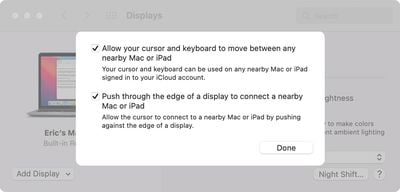
macOS Monterey beta 3 also appears to lay the groundwork for Universal Control. Under System Preferences -> Displays -> Add Display -> Advanced, there are now preferences that can be selected for the ‌Universal Control‌ feature.

universal control settings monterey
Unfortunately, ‌Universal Control‌ is not functional and we'll have to wait for a later beta to experience a working version.

Tag: Safari
Related Forum: macOS Monterey

Popular Stories

MacBook Pro Low Angle Wide Lens

macOS 27: Two More Changes Leaked Ahead of WWDC Next Month

Sunday May 10, 2026 9:45 am PDT by
macOS 27 will have a "slight redesign" compared to macOS Tahoe, according to the latest word from Bloomberg's Mark Gurman. In his Power On newsletter today, Gurman said the design changes will help to improve the readability of macOS Tahoe's Liquid Glass interface:If you've used Tahoe, you're likely familiar with some of the quirks — particularly the transparency effects and shadows that...
Apple Card iPhone 16 Pro Feature

Apple Card Promo to Offer Free AirPods Pro 3

Friday May 15, 2026 8:59 am PDT by
Starting as early as next week, customers who sign up for an Apple Card at Apple's retail stores in the U.S. will receive $249 cash back when they purchase AirPods Pro 3, according to Bloomberg's Mark Gurman. The promotion has yet to be officially announced by Apple, so exact terms and conditions are not available at this time. AirPods Pro 3 are priced at $249 in the U.S., so customers who...
Apple WWDC25 iOS 26 CarPlay Light mode 250609

Six Popular iPhone Apps Now Available on CarPlay

Thursday May 14, 2026 9:10 am PDT by
Apple's CarPlay system for accessing iPhone apps on a vehicle's dashboard screen has received six popular apps in recent weeks: ChatGPT, Perplexity, Grok, Google Meet, WhatsApp, and the indie artist streaming platform Audiomack. Make sure you have the latest version of each app and they will automatically appear on CarPlay. ChatGPT Starting with iOS 26.4, CarPlay supports voice-based...

Top Rated Comments

63 months ago
I feel like I’m the only person that liked the change! Oh well, not a big deal to me at the end of the day as I’m one to never really have more than 5 tabs open and close them as soon as I’m done. I mostly appreciated how the interface stayed thin with more than one tab open. Oh well, can’t please everyone!

edit: as others have pointed out, there’s a choice between the two styles! Happy day :)
Score: 56 Votes (Like | Disagree)
grmlin Avatar
63 months ago
This looks like crap. So much wasted vertical space. 🤢
Score: 24 Votes (Like | Disagree)
sniffies Avatar
63 months ago
Thank god it can be disabled. The new tabs look too much like the search/address bar, which is visually confusing.
Score: 22 Votes (Like | Disagree)
63 months ago
Not sure how this is an improvement...
Score: 21 Votes (Like | Disagree)
MrGimper Avatar
63 months ago
Well done Apple for reversing that total cluster-f
Score: 17 Votes (Like | Disagree)
63 months ago
Geez. What is going on.

Now the tabs and address bar having same general shape in different rows just looks odd and is wasting even more space than Safari in Big Sur.
Score: 13 Votes (Like | Disagree)