Everything New in iOS 15 and iPadOS 15 Beta 5 - MacRumorsOpen MenuShow RoundupsShow Forums menuVisit ForumsOpen Sidebar
Skip to Content

Everything New in iOS 15 and iPadOS 15 Beta 5

Apple today released the fifth betas of iOS and iPadOS 15 to developers, introducing additional tweaks to the new operating system that's launching this fall.


As we get further into the beta testing process, the changes that are introduced are getting smaller as Apple begins to finalize its design plans for the update. Today's beta focuses on small changes and refinements to iOS and iPadOS 15 features.

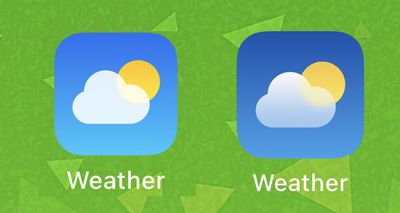
Weather App Icon

The design of the Weather app icon has been tweaked slightly. It's a darker blue than the prior version.
weather app icon ios 15

iOS 15 b4 Weather app icon on left, iOS 15 b5 Weather app icon on right

Safari Reload Icon

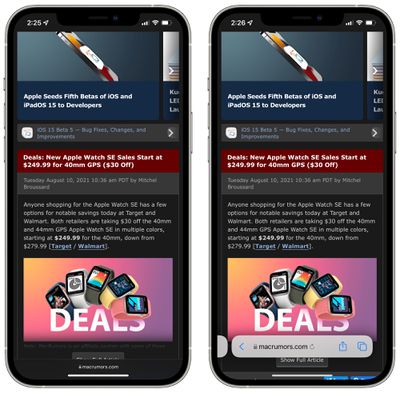
In Safari, when the address bar is collapsed while in the full web page view, the reload icon has been removed from the URL bar. The reload icon still shows in the standard view.
ios 15 reload icon
In the prior beta, the reload icon was shown in both views that are demonstrated in the screenshot above. In the current beta, it only shows in the standard view.

iPadOS 15 Safari

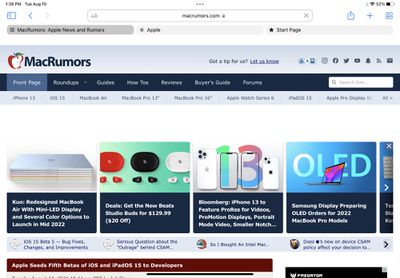
In iPadOS 15, today's beta changes the shading of the tab interface in Safari in an effort to make it more clear which tab is the active tab.
ipados 15 safari design b5

iPadOS 15 Home Screen Settings

In the Settings app under Home Screen & Dock, there's now an option on the iPad to use large icons.
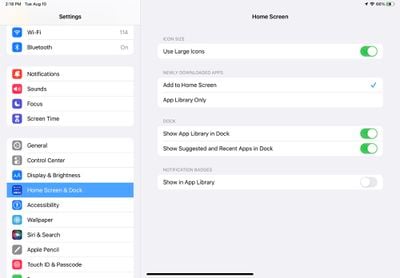
ipados 15 use large icons
With the feature enabled, icons take up more space on the screen so there's less empty area, and it's also easier to tap on the app icon that you need.
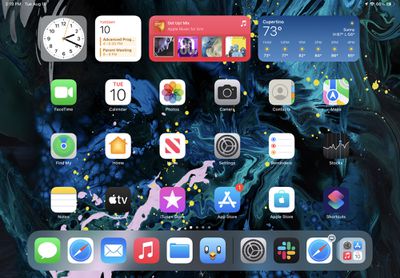
ipados 15 large icons

Control Center Camera Icon

Apple in an earlier beta refined the icon for the Camera app, and in iOS 15 beta 5, the camera icon in the Control Center is using the newly updated icon rather than the old icon.
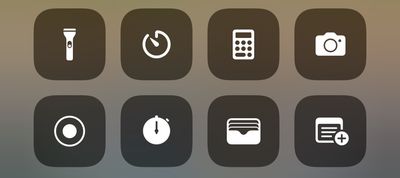
control center camera icon ios 15
Design wise, the new icon does away with the shutter button.

ios 15 lock screen camera icon

Old camera icon on left, new camera icon on right

Control Center Sound Recognition Icon

Apple has also changed the icon for the Sound Recognition feature in the Control Center. It was previously a sound wave in a square, but now it is a sound wave with a little magnifying glass search icon.
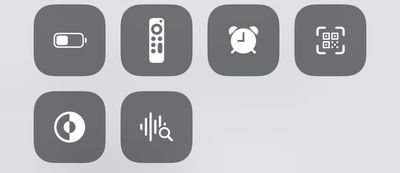
sound recognition icon

iPhone Power Off

When turning off the iPhone, there's now a tappable warning that the iPhone will remain findable after it's turned off. If you tap on it, there's an option to "Temporarily Turn Off Finding."
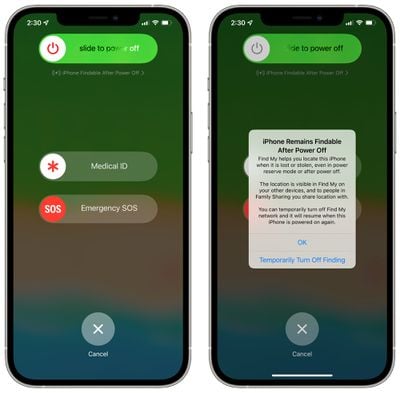
iphone power off find my

Splash Screens

Apple has added new splash screens with feature descriptions for apps like Photos, Reminders, Home, and Maps.
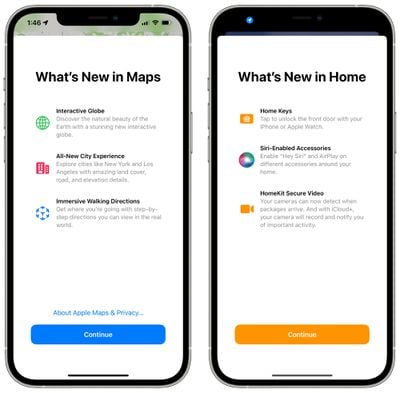
ios 15 splash screens

Background Sounds

There's a new option to turn off Background Sounds when an iPhone is locked, which can be found under Settings > Accessibility > Audio and Visual> Background Sounds.

TestFlight Info in App Store

When you look up an app in the App Store, if you have the TestFlight version installed from a developer, the ‌App Store‌ listing will display the TestFlight version that you have installed and will offer a link to open the TestFlight app.

ios 15 testflight

Legacy Contacts

According to Apple's release notes for the update, Legacy Contacts has been removed in beta 5 and will be re-added in a later update.

Other New Features

Know of something new in the beta that we left out? Let us know in the comments below.

Related Forum: iOS 15

Popular Stories

iOS 27 Next to iPhone

Here's When iOS 27 Rolls Out Today in Every Time Zone [Update: It's Out]

Sunday September 13, 2026 3:00 am PDT by
Update 10:04 a.m.: iOS 27 is rolling out now, though it may take a bit for all users to see it, so keep checking! Apple is about to release iOS 27, which will finally deliver more advanced Siri AI capabilities as well as a variety of other refinements, improvements, and new features to iPhones. It's Apple's biggest software update of the year, and Apple announced at Wednesday's iPhone event...
iOS 27 Icon iPhone

iOS 27 Available Now With These 8 New Features

Monday September 14, 2026 9:00 am PDT by
Update — 10 a.m. Pacific Time: Apple has released iOS 27. During its iPhone 18 Pro and iPhone Duo event last week, Apple announced that iOS 27 will be released widely on Monday, September 14. iOS 27 should be available around 10 a.m. Pacific Time / 1 p.m. Eastern Time today via the Settings app, under General → Software Update. Below, we have highlighted eight new features and...
Apple iCloud Plus expansion hero

iCloud+ Now Includes Apple TV, Apple Arcade, and Curated Apple Music Stations in Over 100 Countries

Tuesday September 15, 2026 1:43 am PDT by
Apple today announced a new subscription initiative that turns paid iCloud+ subscriptions into a broader services bundle in more than 100 countries. In select countries, Apple says every paid iCloud+ plan, including the cheapest 50GB tier, now includes Apple TV and Apple Arcade "at no additional cost," while family sharing extends the storage, TV and Arcade access to up to five people....

Top Rated Comments

Expos of 1969 Avatar
67 months ago
Look everyone. ... the weather app is a bit darker blue.

But what about my photos being scanned? Shut up and look at the darker blue!
Score: 69 Votes (Like | Disagree)
Canubis Avatar
67 months ago
Can we please just go back to the old Safari tab layout. Stop this waste of space and time to reinvent designs just for the sake of it…
Score: 18 Votes (Like | Disagree)
67 months ago

Are we sure it doesn't require you to know your iCloud password like if we turn Find My off in the phone? I would have thought that disabling it (even temporarily) would require you to input some sort of verification that you are the owner of the phone.
In order to temporarily disable it you have to enter your passcode. I just tried it.
Score: 17 Votes (Like | Disagree)
WWPD Avatar
67 months ago
New weather icon is a game changer.
Score: 17 Votes (Like | Disagree)
ghostface147 Avatar
67 months ago
What are legacy contacts?
Score: 17 Votes (Like | Disagree)
67 months ago

Legacy Contact, you can designate one or more people to have access to your data when you die. Your legacy contact will need to provide an access key and a copy of your death certificate to Apple in order to access data from your account
****…we’d better not die before Beta 6, then.
Score: 15 Votes (Like | Disagree)