

Web-Based iCloud Mail Redesign, Hide My Email, and Custom Domain Features Now Live - MacRumorsOpen MenuShow RoundupsShow Forums menuVisit ForumsOpen Sidebar
Skip to Content

Web-Based iCloud Mail Redesign, Hide My Email, and Custom Domain Features Now Live

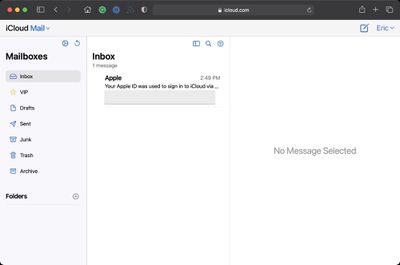
Alongside the launch of iOS 15, iPadOS 15, tvOS 15, and watchOS 8, Apple has also pushed an update for its iCloud.com website, introducing a new look for iCloud Mail that's viewed on the web.
icloud mail redesign
The new web-based ‌iCloud‌ Mail design looks similar to the Mail apps on devices running iOS 15, iPadOS 15, and the beta version of macOS Monterey. It is a cleaner and more streamlined look than the prior ‌iCloud‌ Mail app for the web, but the functionality is largely the same.

Colors are lighter, the font has been updated, and there's a new smaller compose window for writing emails that takes up less space.

Apple introduced the new ‌iCloud‌ Mail design for the web during the iOS 15 beta testing process and it was previously limited to the beta.icloud.com site, but it has now been released for the main iCloud.com website.

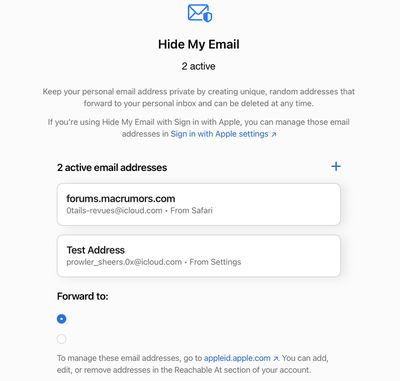
Apple today also made the Hide My Email and Custom Email Domain features live on the main iCloud.com site. Hide My Email is designed to allow users to create throwaway emails that forward to a main email address. With this feature, users can create different email addresses for different websites and then disable them if spam emails ever start arriving.
icloud hide my email
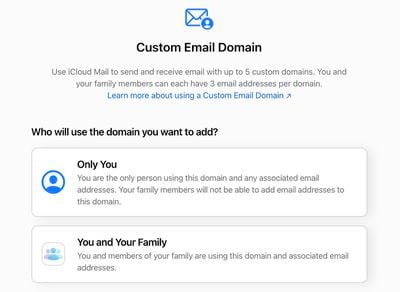
Custom Email Domains are designed to allow customers to use their own custom email addresses with the ‌iCloud‌ Mail feature. Domain records need to be updated with Apple's settings, so access to the domain's registrar is required.
icloud custom email domain
All of these new features can be accessed by logging into the iCloud.com website. The Custom Email Domain and Hide My Email features can be accessed by clicking on your name and choosing "Settings."


Popular Stories

iOS 27 Next to iPhone

Here's When iOS 27 Rolls Out Today in Every Time Zone [Update: It's Out]

Sunday September 13, 2026 3:00 am PDT by
Update 10:04 a.m.: iOS 27 is rolling out now, though it may take a bit for all users to see it, so keep checking! Apple is about to release iOS 27, which will finally deliver more advanced Siri AI capabilities as well as a variety of other refinements, improvements, and new features to iPhones. It's Apple's biggest software update of the year, and Apple announced at Wednesday's iPhone event...
iOS 27 Icon iPhone

iOS 27 Available Now With These 8 New Features

Monday September 14, 2026 9:00 am PDT by
Update — 10 a.m. Pacific Time: Apple has released iOS 27. During its iPhone 18 Pro and iPhone Duo event last week, Apple announced that iOS 27 will be released widely on Monday, September 14. iOS 27 should be available around 10 a.m. Pacific Time / 1 p.m. Eastern Time today via the Settings app, under General → Software Update. Below, we have highlighted eight new features and...
Apple iCloud Plus expansion hero

iCloud+ Now Includes Apple TV, Apple Arcade, and Curated Apple Music Stations in Over 100 Countries

Tuesday September 15, 2026 1:43 am PDT by
Apple today announced a new subscription initiative that turns paid iCloud+ subscriptions into a broader services bundle in more than 100 countries. In select countries, Apple says every paid iCloud+ plan, including the cheapest 50GB tier, now includes Apple TV and Apple Arcade "at no additional cost," while family sharing extends the storage, TV and Arcade access to up to five people....

Top Rated Comments

BigKahunaBurguer Avatar
65 months ago

The custom domain thing really needs to clarify, it has to be a Domain that you own.
Well that's obvious. You can't use someone else's domain for your email...
Score: 9 Votes (Like | Disagree)
iammike1 Avatar
65 months ago
For all these new features, how does iCloud Mail still not push read status to other devices? If I read an email on my desktop it should mark it as read on my iPad or my iPhone without me having to open the Mail app.
Score: 7 Votes (Like | Disagree)
65 months ago
So, for the web interface, the following were all trivial to do last week, but now cannot be done:

* They moved all of the buttons around (new email is on the opposite side of the page)
* No mouseover for the buttons to know what they do now that they have different icons
* One button so it looks like it's half off the page with no clue as to what it's for
* Can no longer drag emails from one folder to another
* Can no longer "pop out" an email to a separate window
* No longer an easy way to add a rule for the current message
* It no longer knows anyone that I correspond with on a daily basis
* When you're in an email, you can't even easily send an email to someone from that email, and can't even get a copy of their full email contact (SMTP address plus friendly name, as is in the properly-formatted To: field)
* Speaking of the To: field, as was mentioned earlier, without the pop-out option, you now have no way to view email headers at all
* Can no longer choose whether to paste a picture into the content of an email or to attach it to the email

Yay for improvements?
Score: 5 Votes (Like | Disagree)
Darajavahus Avatar
65 months ago


Attachment Image
Score: 4 Votes (Like | Disagree)
65 months ago

So, for the web interface, the following were all trivial to do last week, but now cannot be done:

* They moved all of the buttons around (new email is on the opposite side of the page)
* No mouseover for the buttons to know what they do now that they have different icons
* One button so it looks like it's half off the page with no clue as to what it's for
* Can no longer drag emails from one folder to another
* Can no longer "pop out" an email to a separate window
* No longer an easy way to add a rule for the current message
* It no longer knows anyone that I correspond with on a daily basis
* When you're in an email, you can't even easily send an email to someone from that email, and can't even get a copy of their full email contact (SMTP address plus friendly name, as is in the properly-formatted To: field)
* Speaking of the To: field, as was mentioned earlier, without the pop-out option, you now have no way to view email headers at all
* Can no longer choose whether to paste a picture into the content of an email or to attach it to the email

Yay for improvements?
Yes all of the above! This is horrendous - had to do some email admin yesterday and it was painful/impossible. My inbox is a total mess.
I mean it is setting back the functionalities now available in email apps by years.

I suppose the question is: is there anything we can do about it?
Score: 3 Votes (Like | Disagree)
vegovno Avatar
65 months ago

People wanting mail using their personal domain to be delivered to a separate inbox are effectively just wanting a second, independent account which is something that been available all along.
Yes, that is exactly what I wanted to have.
An independent account with my domain - but using Apple servers, not through Google Workspace or Outlook Premium
Score: 3 Votes (Like | Disagree)














