

iMovie and Clips Apps for iOS Gain Support for iPhone 13 Features - MacRumorsOpen MenuShow RoundupsShow Forums menuVisit ForumsOpen Sidebar
Skip to Content

iMovie and Clips Apps for iOS Gain Support for iPhone 13 Features

Apple today updated iMovie and Clips with support for several new features that are set to be introduced alongside the iPhone 13 models.
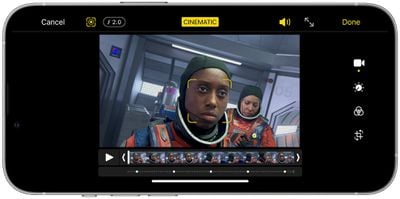
iphone 12 pro cinematic mode

iMovie now supports Cinematic Mode and can be used to add, adjust, and delete focus points and modify the depth of field effect in Cinematic Mode video. Cinematic Mode is a feature that's available on all of the iPhone 13 models, but footage can be edited on the iPhone XS or later, iPad mini 5 or later iPad Air 3 or later, and all iPad Pro models.

The update also includes the option to add ProRAW images to movies and trailers, and options to import and edit ProRes video.

ProRes video is a feature coming to the iPhone 13 Pro models later this year, and it will allow the devices to record in the ProRes format. ProRes video can be captured with an iPhone 13 Pro when the feature launches and it will be able to be edited on the iPhone 13, ‌iPad mini‌ 6, and ‌iPad Pro‌ models.

As for Clips, Cinematic Mode video can now be imported and edited in the app. Filters, stickers, and emoji can be added to video recorded in Cinematic Mode, and ProRAW images can be added to videos. When ProRes video launches, it will also be able to be imported into Clips and edited directly in the app.

Today's update also adds the option to add photos or videos from the Photos library with a single tap, without having to record each one into a project.

iMovie and Clips can both be downloaded from the App Store for free.

Popular Stories

Aston Martin CarPlay Ultra Screen

Apple Says CarPlay Ultra is Coming to These Vehicle Brands

Thursday May 21, 2026 11:53 am PDT by
Last year, Apple launched CarPlay Ultra, the long-awaited next-generation version of its CarPlay software system for vehicles. Nearly a year later, CarPlay Ultra is still limited to Aston Martin's latest luxury vehicles, but that should change fairly soon. In May 2025, Apple said many other vehicle brands planned to offer CarPlay Ultra, including Hyundai, Kia, and Genesis. CarPlay Ultra...
iphone 18 pro blue%402x

iPhone 18 Pro: Dark Cherry, Light Blue, and Dark Gray Chassis Leaked [Update]

Thursday June 4, 2026 5:18 am PDT by
Update: Since publication, new information has come to light suggesting the images have been AI-manipulated and are not in fact iPhone 18 Pro chassis parts. The original article follows. The color options Apple is reportedly planning for the upcoming iPhone 18 Pro and ‌iPhone 18 Pro‌ Max have appeared online today in the form of images of chassis parts of unknown authenticity....
iOS 27 All the New App Features

iOS 27: All the Rumored App Features

Wednesday June 3, 2026 3:48 pm PDT by
Siri is getting a major overhaul in iOS 27, but Apple also has some big updates planned for apps like Camera, Photos, and Wallet. There are multiple new AI features in the works, plus some non-AI upgrades. Camera Apple is moving Visual Intelligence from the Camera Control button to the Camera app in iOS 27, according to Bloomberg. There will be a Siri mode that will be available alongside...

Top Rated Comments

62 months ago
Slow-Mo video shot on iPhone doesn't transfer it seems to Final Cut Pro...it could be user error but I think that's how it is as I've shot slow-mo and all I end up getting is a 1080P video that is at normal speed when honestly my workflow is 4K anyway...not a big deal just something I noticed.

...so with that said, I saw that we can adjust focus points later after shooting a video in Cinematic Mode (GREAT!) but same question applies. Will Final Cut Pro be updated to adjust this later or do I have to adjust on iPhone then export the video from iCloud photos?

As what Apple calls a "pro user" I"m hoping they don't expect me to edit these in iMovie for iPhone to retain the feature. Forcing me to use the feature on a tiny screen when I Have an iMac with 50 inches of screen real estate doesn't feel "oh.so.pro"
Score: 4 Votes (Like | Disagree)
Johnny907 Avatar
62 months ago
Lol “clips.”
Apple continues to delude itself into thinking anyone uses that app.
Score: 2 Votes (Like | Disagree)
FCX Avatar
62 months ago

...so with that said, I saw that we can adjust focus points later after shooting a video in Cinematic Mode (GREAT!) but same question applies. Will Final Cut Pro be updated to adjust this later or do I have to adjust on iPhone then export the video from iCloud photos?
Update coming, not sure when:
https://fcp.co/final-cut-pro/articles/2514-refocus-iphone-13-pro-movies-in-final-cut-pro-and-imovie
Score: 1 Votes (Like | Disagree)
ccraig13 Avatar
62 months ago

Slow-Mo video shot on iPhone doesn't transfer it seems to Final Cut Pro...it could be user error but I think that's how it is as I've shot slow-mo and all I end up getting is a 1080P video that is at normal speed when honestly my workflow is 4K anyway...not a big deal just something I noticed.

...so with that said, I saw that we can adjust focus points later after shooting a video in Cinematic Mode (GREAT!) but same question applies. Will Final Cut Pro be updated to adjust this later or do I have to adjust on iPhone then export the video from iCloud photos?

As what Apple calls a "pro user" I"m hoping they don't expect me to edit these in iMovie for iPhone to retain the feature. Forcing me to use the feature on a tiny screen when I Have an iMac with 50 inches of screen real estate doesn't feel "oh.so.pro"
When I AirDrop a video shot in 240fps from my iPhone 8, it converts it to a 30fps file, but all the frames are there so the video is slowed down when I view it in FCP 10.5.4. Then you can speed it up if desired with the retiming tool and still have all those frames. I also make sure I change the slow-mo in and out points for the file on the iPhone before AirDropping to make sure the whole file is slow. Is that not happening or you?
Score: 1 Votes (Like | Disagree)
19callum93 Avatar
62 months ago
I wish iMovie on iOS would support portrait video 😩
Score: 1 Votes (Like | Disagree)
FSMBP Avatar
62 months ago
Their Clips app is so under rated. Such a hassle free app.
Score: 1 Votes (Like | Disagree)















