Apple Prompts Pre-Order Customers to 'Get Ready' for New iPhone 13 With iCloud Syncing and Trade-Ins - MacRumorsOpen MenuShow RoundupsShow Forums menuVisit ForumsOpen Sidebar
Skip to Content

Apple Prompts Pre-Order Customers to 'Get Ready' for New iPhone 13 With iCloud Syncing and Trade-Ins

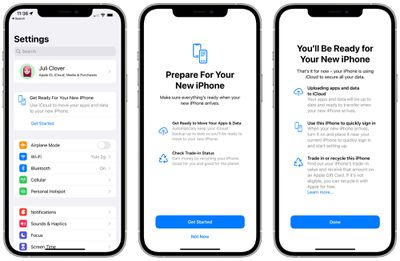
iPhone users who have pre-ordered an iPhone 13 model are seeing a new prompt in the Settings app that walks through the steps of preparing for a new device.
apple prepare for new iphone
Tapping on this prompt encourages users to make sure that iCloud syncing is enabled for all of their apps for a complete ‌iCloud‌ backup, offering up an option to turn on syncing for any app that doesn't have it on.

The feature also explains how to use an existing iPhone to set up a new iPhone for a quick sign in process, and it offers up details on finding out how much an existing iPhone is worth for trade-in purposes.

Apple is likely showing this information based on Apple ID, so many customers who pre-ordered an iPhone may be seeing the new popup. For those who want to get rid of it, just tapping through the prompts should be enough to get it to disappear.

Popular Stories

macOS 27 on MacBook Pro

Apple Says macOS 27 Won't Be Compatible With These Macs

Wednesday June 3, 2026 8:29 am PDT by
During WWDC 2025, Apple revealed that macOS 26 Tahoe would be the final major macOS version for Intel-based Macs. macOS 27 will be compatible with Apple silicon Macs only, meaning that you will need a Mac with an M-series chip or a MacBook Neo with an A18 Pro chip in order to install the software update. Apple will unveil macOS 27 during its WWDC 2026 keynote this Monday, June 8, and the...
MacBook Neo on Yellow Feature

MacBook Neo is So Popular That Apple Reportedly Doubled Production

Wednesday June 3, 2026 9:24 am PDT by
On an earnings call in late April, Apple's CEO Tim Cook said that customer response to the MacBook Neo was "off the charts," and the popularity of the laptop has reportedly led the company to significantly boost production. Apple supply chain analyst Ming-Chi Kuo this week said he believes that MacBook Neo shipments to Apple were doubled from an initial target of 5 million units to 10...
iphone 18 pro blue%402x

iPhone 18 Pro: Dark Cherry, Light Blue, and Dark Gray Chassis Leaked [Update]

Thursday June 4, 2026 5:18 am PDT by
Update: Since publication, new information has come to light suggesting the images have been AI-manipulated and are not in fact iPhone 18 Pro chassis parts. The original article follows. The color options Apple is reportedly planning for the upcoming iPhone 18 Pro and ‌iPhone 18 Pro‌ Max have appeared online today in the form of images of chassis parts of unknown authenticity....

Top Rated Comments

MaximTV Avatar
62 months ago
For some reason I'm not seeing this in my Settings app. Maybe it's only available in a few countries?
Score: 4 Votes (Like | Disagree)
Dormammu Avatar
62 months ago

I guess if you have enough free space and already back up everything in iCloud, this prompt may not necessary and won't show.
The iCloud backup is not limited to the 5GB free we all get. It is a temporary backup good for something like 21 days to allow you to set up your new iPhone.
I do not purchase additional iCloud storage and I was allowed to back up my phone (including photos, 25GB).

https://www.google.com/amp/s/www.macrumors.com/2021/06/07/apple-icloud-storage-temporary-expansion/amp/
Score: 3 Votes (Like | Disagree)
62 months ago
I backed up my iPhone for the first time to iCloud and it took 5 hours for 32 GB of data with a 5/50 internet connection.
I then backed it up to my Mac and it took less than 3 minutes.
Score: 3 Votes (Like | Disagree)
Apple_Robert Avatar
62 months ago
I updated to iOS 15 and I don't see any prompt.
Score: 3 Votes (Like | Disagree)
spcgry Avatar
62 months ago
I've preordered the 13 Pro Max but don't see the prompt on my iPhone X. However if you're running iOS 15 you can easily bring up the wizard by going to Settings > General > Transfer or Reset iPhone > Get Started.

Attachment Image
Score: 2 Votes (Like | Disagree)
Sir_Macs_A_Lot Avatar
62 months ago

Can anyone even backup their 128 GB+ phones to iCloud anymore?
I've been using their $0.99/month 50GB option for my 128GB iPhone and an iPad for a while. (I don't backup every app, though.)
For $2.99/month they'll give you 200GB...which I may need now for a 512GB iPhone.
Score: 1 Votes (Like | Disagree)


















