iOS 15 Doesn't Offer a Way to Disable Apple TV Keyboard Notifications - MacRumorsOpen MenuShow RoundupsShow Forums menuVisit ForumsOpen Sidebar
Skip to Content

iOS 15 Doesn't Offer a Way to Disable Apple TV Keyboard Notifications

iOS 15 was released last week with a long list of new features, but there is one change that is proving to be an annoyance to users.
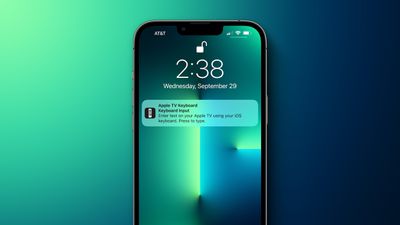
apple tv keyboard notification iphone tight
On the Apple TV, users who prefer not to input text using the Siri Remote can use a nearby iPhone or iPad to type. Whenever a text field appears on the Apple TV, a notification appears on the iPhone or iPad, and after tapping the notification, users can use the on-screen keyboard on the iPhone or iPad to enter text on the Apple TV.

The issue is that iOS 15 and iPadOS 15 no longer offer a way to disable the Apple TV keyboard notifications, despite Apple advertising this option in its tvOS 15 User Guide. On devices running iOS 14 and iPadOS 14, there was a toggle switch for turning off the notifications in Settings > Notifications > Apple TV Keyboard.

The inability to turn off the Apple TV keyboard notifications has prompted complaints from users. We've reached out to Apple to see if the company will consider reintroducing the toggle switch in a future software update, and we'll update this story if we hear back.

Related Roundup: Apple TV
Buyer's Guide: Apple TV (Don't Buy)

Popular Stories

Where is the New Apple TV Feature

Next Apple TV's Chip Revealed in Latest Leak

Tuesday September 8, 2026 10:19 am PDT by
The next Apple TV 4K will be equipped with an A19 or A19 Pro chip, according to evidence in Apple's code uncovered by MacRumors contributor Aaron Perris. In particular, the device's model identifier points towards the A19 generation of chips. Accordingly, the next Apple TV would have 8GB or 12GB of RAM, up from 4GB in the current 2022 model with the A15 Bionic chip. Other rumored upgrades for...
iOS 27 Feature Cool

Apple Releases New iOS 27, iPadOS 27, macOS 27, and tvOS 27 Public Betas

Monday August 31, 2026 2:13 pm PDT by
Apple today released the sixth public betas of iOS 27, iPadOS 27, tvOS 27, and macOS Golden Gate, allowing anyone with a compatible device to download and test the new software. The sixth betas come a week after Apple seeded the fifth betas and a few hours after the eighth developer betas. You can get started by signing up on Apple's beta website and then opting in to the public beta by...
Apple TV Remote Icon

iOS 27 to Upgrade Apple TV Remote App in Two Ways

Thursday September 10, 2026 2:33 am PDT by
Apple has updated the design of the virtual Apple TV Remote for the iOS 27 Release Candidate, which was released yesterday, and there are two new features that have been added to the iPhone app's interface. First up, Apple has added a new button to the top-right corner of the Remote UI with a glyph showing four squares. Pressing the button pops out an app menu similar to the Apple TV home...


Top Rated Comments

macduke Avatar
65 months ago

Why would ppl complain about this? How much of an annoyance could this possibly be?!
RE: above, if you have kids and multiple TVs in the house it gets annoying FAST.

Imagine trying to text someone and a box just keeps popping up over and over again throughout that one interaction multiple times. And then multiply this times every 15-20 minutes when a show is over. Even worse if they're watching shorts or something and jumping around. And I don't even let me kids watch TV much, usually just on the weekends.
Score: 23 Votes (Like | Disagree)
macduke Avatar
65 months ago
The most annoying part isn't even mentioned: It does this not just for nearby iPhones, but for any iPhone on the local network that has ever paired with that TV. So if my kids are downstairs looking for shows, it pops up repeatedly on my iPhone and my wife's iPhone and it's really annoying.
Score: 18 Votes (Like | Disagree)
65 months ago
I sometimes feel that Apple assumes it knows best for its customers. I would say to Apple: if in doubt, always give us options to change settings and notifications. And never take existing options away.
Score: 11 Votes (Like | Disagree)
contacos Avatar
65 months ago
i can already tell you the reply: „it will require a future software update“
Score: 10 Votes (Like | Disagree)
gigapocket1 Avatar
65 months ago
Man…. iOS 15.2 is going to solve so many problems lol
Score: 7 Votes (Like | Disagree)
65 months ago
I've never said this about an update: iSO 15 is their most trash update ever. SO many things like this are half baked and don't actually work.

- Youtube videos now autoplay in Safari on scroll touch events, fked up
- Can't disable these notifications, fked up
- It overwrote a ton of system settings so I've had to re configure a lot of my apps, notifications, etc.
- There are really long pop ups that come up back to back and so you miss them hitting continue
- Still doesn't solve the calendar spam issue
- Taps don't work half the ***** time


I just hate it, I'm so upset with Apple. They really cracked this year and it shows that their culture is breaking. As an engineer who knows a lot of other Apple engineers, they all hate their lives right now and I don't blame them!
Score: 6 Votes (Like | Disagree)