Luna Display 5.0 Turns an iPad Into a Second Screen for a Windows PC - MacRumorsOpen MenuShow RoundupsShow Forums menuVisit ForumsOpen Sidebar
Skip to Content

Luna Display 5.0 Turns an iPad Into a Second Screen for a Windows PC

Astropad today announced the launch of new software for the Luna Display, with the 5.0 update introducing support for Windows PCs.
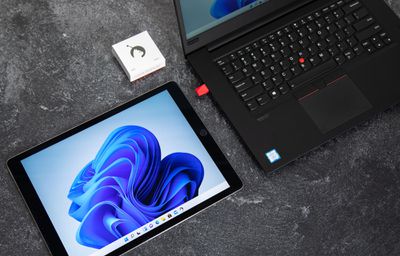
luna display windows support
The Luna Display is a little dongle that's designed to allow an iPad or a Mac to be used as a secondary display for a main Mac machine. It's similar to Sidecar, but works with both Macs and iPads.

Luna Display users who own a USB-C version of the dongle can upgrade to the new software to use the device interchangeably between Macs and PCs. That means Mac users who have a Luna Display can also now use it with PCs, connecting a secondary ‌iPad‌ to a PC to serve as an extra display.

The Luna Display apps have been rearchitected to support both PCs and Macs, and the update also introduces a faster setup flow for M1 Macs. The Luna Display can be purchased from the Astropad website.

Popular Stories

iCloud iPhone 17 Pro

iPhone Users Who Pay for iCloud Storage Get Two New Perks on iOS 27

Thursday July 2, 2026 6:10 am PDT by
If you pay for certain iCloud+ storage plans beyond the 5GB that Apple offers for free, you will receive two more perks on iOS 27 at no additional cost. A summary of the two new iCloud+ perks on iOS 27:Increased daily usage limits for some new Apple Intelligence features, including image generation in the revamped Image Playground app. HomeKit Secure Video cameras receive generated video...
iPhone 4 on Black Feature

Apple Facing One of Its Worst Leaks Since the iPhone 4

Thursday July 2, 2026 9:53 am PDT by
Apple supplier Tata Electronics recently suffered a cyberattack that resulted in thousands of confidential files being published on the dark web, and this reportedly included some photos and documents related to the upcoming iPhone 18 Pro. We have elected not to share any of the leaked photos in this story due to the illegal nature in which they were obtained, but they can easily be found...
American Express Gold Apple Pay Feature

American Express Announces New Apple Pay Feature

Tuesday June 30, 2026 10:27 am PDT by
American Express today announced that you can now redeem Membership Rewards points when checking out with Apple Pay on the web and in apps on the iPhone and iPad. When checking out with Apple Pay on iOS 18 or iPadOS 18 or later, tap on your eligible American Express card (Platinum, Gold, Green, and others) and select the Membership Rewards points option. You can use points to cover all or...

Top Rated Comments

62 months ago
$130? Ouch. I can buy a real 2nd display for that price.
Score: 8 Votes (Like | Disagree)
62 months ago
Works great with my M1 mini to my 27” iMac (not retina) over thunderbolt bridge. Lag is pretty much non-existent and completely adequate for a main monitor.

Ethernet and WiFi are ok for second screen static work- emails, spreadsheets etc. but noticeable lag and compression.
Score: 7 Votes (Like | Disagree)
62 months ago
Ok I set it up. I'm typing this using a AMK and a M1 Ipad Pro 12.9", and Edge as a browser :D Windows 11 and a Galaxy Book Pro 15.6", which has the Intel gen11 and thunderbolt.

It works perfectly. Very easy also. I'm not sure if it's using wifi or USB at this point, but I have a USB cable connection. But it's a USB-A to USB-C hub, as there's only two ports on the Galaxy and that dongle takes up one, so if you want power.....

I'll try some other things. I have a Thunderbolt Hub that will work. Not on me though.

I like it. It just may be my new thing. No lag at all. Freaky. Having touch is awesome. Scrolling with the AMK trackpad doesn't seem to work. Maybe there's a settting. I've been using Superdisplay and a Galaxy Tab which works like this, that is perfectly, but this iPad blows the Tab away pretty much. Also, the AMK keyboard is nice. Will update this post after a while.

Correction, there's a USB-A port on the right side I never noticed. I'll try that, but I don't like those USB A to C cables. I think they have some issues with compatibility, at least with Displayport
Score: 6 Votes (Like | Disagree)
62 months ago
Finally. The iPad “Pro” can actually become one by not using iOS looool
Score: 3 Votes (Like | Disagree)
klasma Avatar
62 months ago

$130? Ouch. I can buy a real 2nd display for that price.
Not with touch input.
Score: 2 Votes (Like | Disagree)
62 months ago

This is a WiFi/Ethernet solution. It never use your thunderbolt port.
The dongle is just a fake EDID dongle to fool the GPU to believe there's a real display on it.
It’s absolutely a Thunderbolt solution. It’s the only way I’ve found it to be acceptable for a main display replacement.

https://astropad.com/luna-4-5/
Score: 1 Votes (Like | Disagree)


















