macOS Monterey: Here Are All the Features Your Intel Mac Won't Support - MacRumorsOpen MenuShow RoundupsShow Forums menuVisit ForumsOpen Sidebar
Skip to Content

macOS Monterey: Here Are All the Features Your Intel Mac Won't Support

Apple's official public release of macOS Monterey arrives on Monday, October 25, and users should be aware that there are several features in macOS 12 that are only available to machines powered by Apple silicon chips. In other words, they won't work on Intel-powered Macs.

macOS Monterey on MBP Feature
Differentiating the user experience like this isn't anything new to iOS users, since each year the latest iPhone models boast features that aren't available on iPhones that Apple released the previous year.

Mac users on the other hand aren't so used to such fast-paced changes, and the latest software-based depreciations could come as a shock to some. With the possible exception of Object Capture, the following macOS Monterey features won't be available to anyone running the new software on an Intel Mac, even if it was purchased from Apple only last year.

Portrait Mode in FaceTime
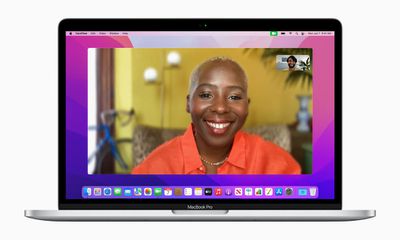
macOS Monterey FaceTime Portrait Mode

With Portrait mode in macOS Monterey, you can blur your background during a FaceTime call, so that the focus is on you rather than what's behind you. The feature is commonly used by other video conferencing apps like Zoom and Teams to obscure untidy domestic scenes and other sources of distraction or embarrassment. If you're using an Intel-powered Mac though, it won't be an option.

Maps Interactive Globe

maps monterey globe view

On Macs powered by M1, M1 Pro, and M1 Max chips, Apple has enhanced the Maps app to include a new globe view that allows you to spin the world around and zoom into different regions on Earth. In previous versions of macOS, zooming out maximally in Maps would present you with a flat world map, but the new globe view gives you a three-dimensional view of Earth from space that's a lot more fun to navigate.

More Detailed Cities in Maps

maps monterey 3d view coit tower
The globe also allows you to drill down into areas, where you'll find more detailed information on vast geological features like mountain ranges, deserts, forests, and oceans, and more comprehensive maps in cities like San Francisco, Los Angeles, New York, and London, which includes details for elevation, roads, trees, buildings, landmarks, and more. If you're using an Intel-based Mac, this extra detail will be lacking.

Object Capture

Object Capture allows users to create a photo-realistic, AR-optimized 3D object by stitching together a series of photographs. The technique is called photogrammetry, which previously required specialized software to work out, but with Monterey, Apple has integrated its Object Capture API into macOS, which makes the process faster and a whole lot easier when using an app that supports it.
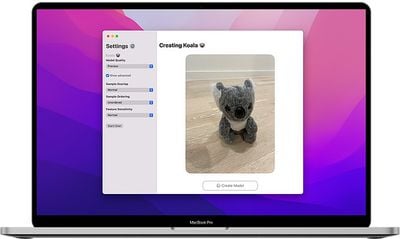
object capture photocatch
For example, using an app like PhotoCatch allows users to import a video, or several photos of an object from several angles, and with no additional effort, turn them into a realistic 3D model of the object, which can then be easily integrated into any AR app. All Apple Silicon Macs support Object Capture, but it is only supported on Intel Macs that have at least 16GB of RAM and 4GB of VRAM.

Siri Text-to-Speech
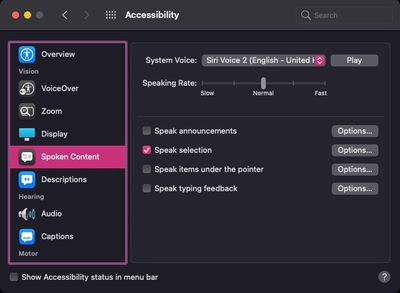
siri text to speech

The Text-to-speech feature in macOS allows users to select portions of text or highlight whole documents to be read out to them. Users of ‌Apple Silicon‌ Macs can use the text-to-speech voice feature in more languages than Intel-based Mac users, including Swedish, Danish, Norwegian, and Finnish.

On-Device Keyboard Dictation

keyboard dictation
With keyboard dictation, you can dictate text anywhere you can type it, and the feature improves the more you use it, personalizing over time. On ‌Apple Silicon‌ Macs, keyboard dictation now protects user privacy by performing all processing on-device, meaning it's completely offline. And thanks to on-device dictation, users can also dictate text of any length without a timeout. On Intel Macs, however, there's a time limit of 60 seconds.

Apple Speeds Up Its Transition Away From Intel

m1 v intel thumb
This is a unique period in the Mac's history, as Apple is currently in the midst of a two-year transition from Intel processors to its custom Apple silicon chips in Macs, with the changeover slated to be completed by WWDC 2022.

The transition began last November, when Apple debuted the ‌M1‌, its first custom-designed chip, in the entry-level 13-inch MacBook Pro, MacBook Air, and Mac mini, followed by the 24-inch iMac in April. Just last week at its "Unleashed" event, Apple unveiled new 14-inch and 16-inch ‌MacBook Pro‌ models powered by even higher performance ‌M1 Pro‌ and ‌M1 Max‌ chips.

Intel chips continue to be available in desktop machines that include the ‌Mac mini‌, ‌iMac‌, and Mac Pro, but upgrades for all of those devices are in the works and expected next year, so expect the next version of macOS to exclude Intel-based Mac users to an even greater extent than Monterey.


Related Forum: macOS Monterey

Popular Stories

skyrim

Skyrim Comes to Apple Silicon Macs With New Unofficial Installer

Tuesday October 20, 2026 7:56 pm PDT by
Bethesda's beloved role-playing game "The Elder Scrolls V: Skyrim" has reached multiple generations of consoles since its 2011 debut, but it never officially came to the Mac. A new unofficial project called SkyrimMT now aims to make playing and modding it on Apple silicon Macs easier than ever. Mac owners have found ways to play Skyrim over the years, including installing Windows through...
apple pro tell logo

Apple Launching Five New Products Today

Thursday November 5, 2026 12:59 am PST by
Apple is launching five new products on Friday, November 6, following pre-orders that opened last week, including its first touchscreen MacBook Pro models. The following new products will be available from today: iPad mini with OLED display and A20 Pro chip iMac with M6 chip 14-inch MacBook Pro with M6 chip 14-inch MacBook Pro with OLED touchscreen 16-inch MacBook Pro with OLED...
duo aquarium

More Fun iPhone Duo Apps: 30 New Picks to Try

Friday November 6, 2026 3:27 pm PST by
When the iPhone Duo launched, we shared a list of some of the fun apps developers created for the new form factor. Two weeks out, developers are continuing to come up with fresh ideas, so we thought we'd share some of our favorites. Games Marbles Unhinged ($2.99) - Marbles Unhinged is a marble maze designed for the Duo. When you fold it, the floor turns into a ramp. If you stand the top...

Top Rated Comments

MJaP Avatar
66 months ago
This is just mean spirited of Apple, there's no reason that Intel Macs couldn't support the majority of these features, this is just Apple's attempt to hobble their Intel lines in order to "encourage" people to upgrade. I'm not a fan of this tactic.
Score: 101 Votes (Like | Disagree)
Sandstorm Avatar
66 months ago

Bruh 99% of people will never need these features that are apple M1 only.
But it is still ridiculous that very recent and very expensive Apple Mac devices will not handle simple things like displaying a globe. It is just so lazy (or possibly just another small example of artificially created obsolescence).
Score: 51 Votes (Like | Disagree)
66 months ago

This is just mean spirited of Apple, there's no reason that Intel Macs couldn't support the majority of these features, this is just Apple's attempt to hobble their Intel lines in order to "encourage" people to upgrade. I'm not a fan of this tactic.
Yeah Apple does this unfortunately. Sometimes they even ‘disallow’ certain older intel models from booting the operating system at all. Making you believe the features of the new OS will put a strain on the older Mac so as to not be a good experience. I say ‘disallow’ in quotes because while by default an unsupported mac model is prevented from booting the newer OS, Apple does allow the use of a boot flag to disable the kernel compatibility check and may possibly allow the OS to boot on the older hardware.

However, this is rubbish. Forced obsolescence in my opinion. With open core legacy patcher, my 9-year old MacBook Pro that got cut off by Apple after Catalina can totally run Big Sur and now Monterey. It lives on! And that Mac was upgradable. So with an SSD and 16 GB of ddr3 ram, it still runs very well despite its age.

Apple is full of it, when it comes to cutting off support of perfectly capable machines. With Apple silicon I don’t know how long they’ll support their m1 macs. But once they start cutting off support for the m1, I don’t know if there will be a way around it like on the intel side, other than needing to upgrade of course. Which in the end creates more e-waste. And incentivizes you to spend more money.

Score: 45 Votes (Like | Disagree)
66 months ago
2021 - new chip required in order to render a globe in 3D graphics 🤔
Score: 41 Votes (Like | Disagree)
MrGimper Avatar
66 months ago
No blurred background on FaceTime when I can do it in Teams on my 2014 iMac. Cash grab for sure.
Score: 40 Votes (Like | Disagree)
DinkThifferent Avatar
66 months ago
Flat Earthers aren't crazy. They just have an Intel Mac!

Score: 35 Votes (Like | Disagree)
Latest Stories
Early Apple Black Friday Deals on Apple Watch, MacBook Air, and More
9 hours ago
'Backglow' Lets You Customize New MacBook Pro's Glowing Apple Logo
9 hours ago
Top Stories: Apple Product Launches, iOS 27.3 Beta, and More
16 hours ago
More Fun iPhone Duo Apps: 30 New Picks to Try
1 day ago
Hands-On With Apple's New OLED Touchscreen MacBook Pro
1 day ago
Apple Store With All-New Design Opening Soon in Southern California
1 day ago
Control the Glowing Apple Logo on Your New MacBook Pro
1 day ago
Apple Shares New 'Apple Card: Apply and Use in Minutes' Ad
2 days ago
Apple Says More Than 100,000 Apps Optimized for iPhone Duo, Here's What's Still Missing
2 days ago
Early Black Friday Deals Kickoff With Steep Discounts on Apple Watch Ultras and More
2 days ago
The MacRumors Show: iOS 27.3 Looks Like a Huge Update
2 days ago
Best Buy's Black Friday Event Begins With Sitewide Savings on Apple, TVs, More
2 days ago
Apple Releasing Yet Another Two New Products Next Week
2 days ago
MacBook Air Drops to Lowest Price in Months With Amazon's $250 Discount
2 days ago
Apple Rumored to Drop the iPhone's Action Button Next Year
2 days ago
Apple's Extended Return Policy Now in Effect for 2026 Holiday Season
2 days ago
Apple Music Classical Updated With New Icon and Refreshed Design
2 days ago
OLED iPad Mini, M6 iMac, and New MacBook Pros Available From Today
2 days ago
Apple Surveys iPhone Duo Buyers About Crease and Camera
2 days ago
Apple's First Touchscreen Mac is Now Arriving to Customers
2 days ago
Claude Gets Personal Finance Feature With Bank Account Linking
2 days ago
Apple Arcade Adds Crossy Road Rush and NBA 2K27
2 days ago
Apple's New HomeView Smart Home Hub: Here's How Much RAM It Has
2 days ago
iPad Mini vs. iPad Air Buyer's Guide: Now Just $50 Apart

2 days ago
First iOS 27.3 and macOS Golden Gate 27.3 Public Betas Now Available
2 days ago
Apple Announces a New Mac Sales Record
3 days ago
Paid $200 for Logic Pro? Apple Says You Won't Get This New Feature
3 days ago
Instagram's Edits Video Editor is Now Available on Mac
3 days ago
Prevent Siri and Search From Accessing Specific iPhone Apps
3 days ago
Best Early Black Friday Deals on iPhone 18 Pro and iPhone Duo
3 days ago






































