Apple Reveals 'Scale to Fit' Setting to Prevent a Mac App's Menu Bar Items From Being Hidden Under Notch - MacRumorsOpen MenuShow RoundupsShow Forums menuVisit ForumsOpen Sidebar
Skip to Content

Apple Reveals 'Scale to Fit' Setting to Prevent a Mac App's Menu Bar Items From Being Hidden Under Notch

Apple today shared a new support document that explains how users can ensure that an app's menu bar items do not appear hidden behind the notch, or the "camera housing" as Apple calls it, on the new 14-inch and 16-inch MacBook Pro models.
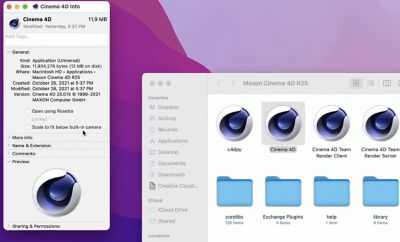
scale to fit notch setting macos
In the support document, Apple says users can turn on "scale to fit below built-in camera" for an app to adjust the active area of the display, ensuring that the app's menu bar items appear below the notch and are always visible.

Menu bar items appearing hidden behind the notch was demonstrated by Quinn Nelson, host of the YouTube channel Snazzy Labs.

To turn on "scale to fit below built-in camera" for an app on the new MacBook Pro models, open the Finder app and click on Applications in the sidebar. Then, right click on the desired app and select "Get Info." In the Info window that opens, check off the "scale to fit below built-in camera" box and the display will automatically adjust when the app is open.

The setting was demonstrated in a tweet by Joseph Angelo Todaro, a design advocate for Sketch.


Apple notes that developers can update their app to work better with the notch, in which case the "scale to fit below built-in camera" setting no longer appears.


Related Roundup: MacBook Pro
Buyer's Guide: MacBook Pro (Buy Now)
Related Forum: MacBook Pro

Popular Stories

MacBook Pro Low Angle Wide Lens 2

MacBook Pro OLED Display Production Clears Key Hurdle

Thursday May 21, 2026 1:41 am PDT by
Apple's first OLED MacBook Pro models have cleared a major manufacturing hurdle, with panel supplier Samsung Display having reportedly achieved yields above 90 percent on its Gen 8.6 OLED production line. According to Korean publication The Elec, some individual process stages are now reaching yields as high as 95 percent, a level that the display industry considers "golden yield" territory ...
MacBook Pro Low Angle Wide Lens

'MacBook Ultra' May Drive Industry Shift to Hybrid OLED Laptop Displays

Thursday June 4, 2026 6:57 am PDT by
Apple's upcoming OLED MacBook Pro – aka "MacBook Ultra" – is expected to be the primary driver of a hybrid OLED laptop display market worth $4 billion this year, according to a new Omdia research report ($). The report corroborates rumors that Apple's first OLED MacBook will use a hybrid OLED architecture combining oxide TFT (thin-film transistor) and tandem OLED layers. The combination is...
Chrome Feature 22

Chrome Sets Browser Speed Records on M5 MacBook Pro

Friday June 5, 2026 10:38 am PDT by
Google's Chrome browser hit new records on browser benchmarking tools Speedometer 3.1 and JetStream 3, Google said today. Chrome earned a score of 61 on Speedometer, a five percent improvement since last year. It earned a 469 on JetStream 3, a 10 percent improvement since the beginning of 2026. Tests were done on an M5 MacBook Pro running macOS 26.0.1. Google says it holds a dual record...

Top Rated Comments

60 months ago

Did you notice that “scale to fit” restores the bezels of the previous generation MBP on the left and right side as well (not just the top of the screen)? This is how it maintains the aspect ratio. It is literally scaling down the whole screen
Yep. This is literally the worst possible solution.
Score: 34 Votes (Like | Disagree)
60 months ago
Lol, a terrible solution to a problem we didn't had before. Nice job.
Score: 22 Votes (Like | Disagree)
60 months ago
The video shows the entire screen shrinking at the same aspect ratio, bizarre. I would have expected the menubar to simply slide down the same number of pixels as the notch is tall, making it the same total aspect ratio as previous MBPs

This is going to be annoying for pixel critical work that designers (and artists, etc) do, as it's no longer a perfect 2x multiple PPI (for the default scale resolution, at least). Scaling the entire screen down a bit means you're no longer integer scaling the display.
Score: 21 Votes (Like | Disagree)
Superhappytree Avatar
60 months ago
When you have to have settings, dark modes and apps to appease the notch and yet you have floods of people on here defending it as “great design, well done Apple”.

It’s a massive design fail that interferes with UX and UI.
Score: 19 Votes (Like | Disagree)
60 months ago
Why not just give an option for the system to ignore the notch area, and simply put the menu bar below the notch…

Essentially maintaining the scale but just making the screen shorter?
Score: 18 Votes (Like | Disagree)
macpot Avatar
60 months ago
Notch gonna lie, that is amazing!

It makes every one happy, bezel lovers will find themself at home now.
Score: 17 Votes (Like | Disagree)