Trio of Friends Create Missing macOS Wallpaper of Monterey Landscape - MacRumorsOpen MenuShow RoundupsShow Forums menuVisit ForumsOpen Sidebar
Skip to Content

Trio of Friends Create Missing macOS Wallpaper of Monterey Landscape

Apple bucked a trend when it unveiled macOS Monterey in June featuring an abstract wallpaper graphic, breaking an eight-year tradition of using a photo of the natural landscape that inspired the latest Calfornia-themed version name.

macos monterey
This change came as a shock to YouTuber and photographer Andrew Levitt and his friends Jacob Phillips and Taylor Gray, whom together have made recreating macOS wallpapers something of a tradition.

Once the trio of friends had come to terms with the new abstract wallpaper, they concluded that it was supposed to represent Monterey Canyon, which is deep underwater and impossible to photograph. So, instead they decided to create their own Monterey landscape, but finding the right shot came with its own problems, as their intrepid video diary explains.


After several false starts, the group eventually found an ideal location – Lone Cypress on Pebble Beach – and, using time-lapse photography, were able to create a not only a still image but also a dynamic wallpaper that changes according to the time of day.
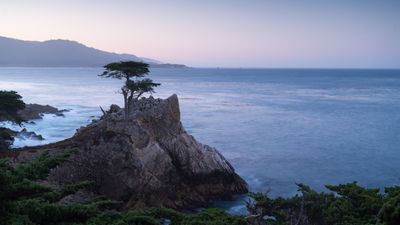
macOS Monterey missing wallpaper

"Missing" Monterey Dynamic Wallpaper

They have since made both the still shot and the dynamic version available to download. The following steps explain how to install the dynamic version of the Monterey wallpaper.

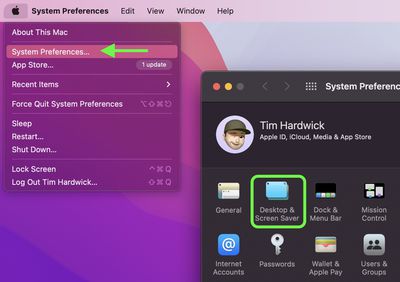
  1. Click the Apple symbol in the menu bar and select System Preferences....
  2. Click Desktop & Screen Saver in the preferences pane.
    sys prefs

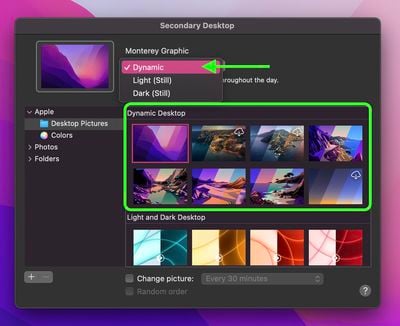
  3. Select one of the official wallpapers that come with macOS, such as "Catalina," "Big Sur," or "Monterey Graphic," and set it to Dynamic.
    2add macos dynamic wallpaper

  4. Open a Finder window and navigate to the "macOS Monterey.heic" wallpaper you downloaded.
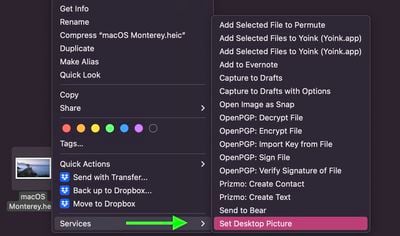
  5. Right-click (or Ctrl-click) on the file and select Services -> Set Desktop Picture from the contextual menu.
    services

Follow the creators on Instagram: Andrew Levitt, Jacob Phillips, and Taylor Gray.

Related Forum: macOS Monterey

Popular Stories

iOS 27 Next to iPhone

Here's When iOS 27 Rolls Out Today in Every Time Zone [Update: It's Out]

Sunday September 13, 2026 3:00 am PDT by
Update 10:04 a.m.: iOS 27 is rolling out now, though it may take a bit for all users to see it, so keep checking! Apple is about to release iOS 27, which will finally deliver more advanced Siri AI capabilities as well as a variety of other refinements, improvements, and new features to iPhones. It's Apple's biggest software update of the year, and Apple announced at Wednesday's iPhone event...
iOS 27 Icon iPhone

iOS 27 Available Now With These 8 New Features

Monday September 14, 2026 9:00 am PDT by
Update — 10 a.m. Pacific Time: Apple has released iOS 27. During its iPhone 18 Pro and iPhone Duo event last week, Apple announced that iOS 27 will be released widely on Monday, September 14. iOS 27 should be available around 10 a.m. Pacific Time / 1 p.m. Eastern Time today via the Settings app, under General → Software Update. Below, we have highlighted eight new features and...
Apple iCloud Plus expansion hero

iCloud+ Now Includes Apple TV, Apple Arcade, and Curated Apple Music Stations in Over 100 Countries

Tuesday September 15, 2026 1:43 am PDT by
Apple today announced a new subscription initiative that turns paid iCloud+ subscriptions into a broader services bundle in more than 100 countries. In select countries, Apple says every paid iCloud+ plan, including the cheapest 50GB tier, now includes Apple TV and Apple Arcade "at no additional cost," while family sharing extends the storage, TV and Arcade access to up to five people....

Top Rated Comments

64 months ago
I'll only use the default desktop picture provided by Apple with each Mac OS release. I'm sure Apple went through millions of desktop pictures before choosing one.

Who am I to decide to go against Apple.
Score: 24 Votes (Like | Disagree)
ScreenSavers Avatar
64 months ago
Looks great on my iMac at my desk. I'm not really a fan of the bright abstract wallpapers.

Attachment Image
Score: 23 Votes (Like | Disagree)
TheYayAreaLiving 🎗️ Avatar
64 months ago
Wow! Nice job. Looks like they went all out. Craig is very big on when it comes to the wallpapers. I’m sure he will be very happy with this.

Apple why don’t you hire them? We need more wallpapers for Mac OS and IOS, please!


Attachment Image
Score: 17 Votes (Like | Disagree)
mikzn Avatar
64 months ago
Cool - looks good - better than the abstract IMHO

I kept expecting it every time I updated - but it never came
Score: 10 Votes (Like | Disagree)
64 months ago
This is what Monterey actually looks like. Fog.


Attachment Image
Score: 9 Votes (Like | Disagree)
rjohnstone Avatar
64 months ago

Looks like the link for the dynamic version is broken. I keep receiving a 404 error.

:confused:
https://www.vyncher.com/macos-monterey

Bottom of the page. ;)
Score: 9 Votes (Like | Disagree)