

Pixelmator Pro 2.3 Adds Smart Subject Selection and Background Removal Features, Plus New Select and Mask Tools - MacRumorsOpen MenuShow RoundupsShow Forums menuVisit ForumsOpen Sidebar
Skip to Content

Pixelmator Pro 2.3 Adds Smart Subject Selection and Background Removal Features, Plus New Select and Mask Tools

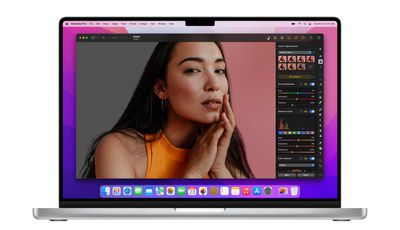
Pixelmator Pro 2.3 went live on the Mac App Store on Tuesday, and the latest major update to the popular image editing app brings a smart new automatic background removal feature, automatic subject selection, new Select and Mask tools, and more.
pixelmator pro 2 31
In a blog post announcing the update, Pixelmator's developers say that it's now possible for users to "magically" remove the background from any image with just a click. The new feature is based on machine learning models that can find a subject in almost any image and automatically strip out the background, and it's also available in Finder as a built-in Quick Action.

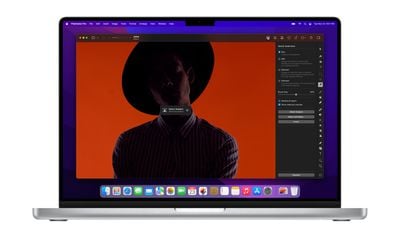
In addition to the background eraser feature, a new AI-powered Decontaminate Colors feature can remove traces of the old background from the edges of objects left behind, allowing them to blend seamlessly with any new background. Decontaminate Colors can be applied manually in any layer, even on ones that have been cut out in other apps.
pixelmator pro 2 34
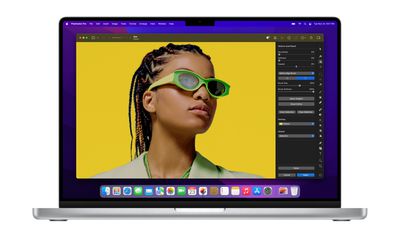
Building on the same set of machine learning algorithms is Automatic Subject Selection, which allows users to make a selection of the subject of any image with just a click. Meanwhile, a new Select and Mask tool makes it easier to select difficult areas of subjects like hair, fur, and other objects with complex edges.

The Smart Refine feature has also been redesigned to enhance selection accuracy, and a new Refine Edge Brush lets users brush over particularly tricky edges to get the selection they want.

These new features are powered by ML algorithms that are integrated into Pixelmator Pro using Core ML, which makes them "absolutely fly" on the latest M1-powered devices thanks to their overall speed and the Apple Neural Engine, according to the developers. For example, background removal takes around 2-5 seconds on M1 devices and up to 30 seconds on Intel devices for an average image.
pixelmator pro 2 33
The update includes some smaller changes, like the ability to specify custom export sizes and scales in the Export dialog. More details are available in the release notes. Version 2.3 is free for existing Pixelmator Pro users, and there's currently a 50% discount off the app price (usually $39.99) in the Mac App Store.


Popular Stories

iCloud iPhone 17 Pro

iPhone Users Who Pay for iCloud Storage Get Two New Perks on iOS 27

Thursday July 2, 2026 6:10 am PDT by
If you pay for certain iCloud+ storage plans beyond the 5GB that Apple offers for free, you will receive two more perks on iOS 27 at no additional cost. A summary of the two new iCloud+ perks on iOS 27:Increased daily usage limits for some new Apple Intelligence features, including image generation in the revamped Image Playground app. HomeKit Secure Video cameras receive generated video...
iPhone 4 on Black Feature

Apple Facing One of Its Worst Leaks Since the iPhone 4

Thursday July 2, 2026 9:53 am PDT by
Apple supplier Tata Electronics recently suffered a cyberattack that resulted in thousands of confidential files being published on the dark web, and this reportedly included some photos and documents related to the upcoming iPhone 18 Pro. We have elected not to share any of the leaked photos in this story due to the illegal nature in which they were obtained, but they can easily be found...
American Express Gold Apple Pay Feature

American Express Announces New Apple Pay Feature

Tuesday June 30, 2026 10:27 am PDT by
American Express today announced that you can now redeem Membership Rewards points when checking out with Apple Pay on the web and in apps on the iPhone and iPad. When checking out with Apple Pay on iOS 18 or iPadOS 18 or later, tap on your eligible American Express card (Platinum, Gold, Green, and others) and select the Membership Rewards points option. You can use points to cover all or...

Top Rated Comments

FSMBP Avatar
60 months ago
Pixelmator Team is killing it...Lot of good updates this year.
Score: 21 Votes (Like | Disagree)
60 months ago
Love this update so far! Thanks Pixelmator for investing time and talent to creating an innovative product that destroys Photoshop.
Score: 11 Votes (Like | Disagree)
joshwenke Avatar
60 months ago
Pixelmator is an incredible app. Not only is it powerful and can handle projects fit for Photoshop, it's intuitive and combines everything I love about Mac and UI and graphic design.
Score: 10 Votes (Like | Disagree)
H3LL5P4WN Avatar
60 months ago
I don't know why anyone would buy into Adobe when Pixelmator exists.

(Provided you don't need the rest of Adobe's ecosystem, of course.)
Score: 9 Votes (Like | Disagree)
attila Avatar
60 months ago

does this 'thing" have layers?
and older 10.14 versions?

the graphic program looks very good and at a great price!
I'd recommend "Affinity Photo" instead if you need anything similar to Photoshop.
Score: 6 Votes (Like | Disagree)
PsykX Avatar
60 months ago

I don't know why anyone would buy into Adobe when Pixelmator exists.

(Provided you don't need the rest of Adobe's ecosystem, of course.)
I'm asking myself the same thing.
It's basically the price of 1-2 months of Photoshop, except that you own it and you have it forever.
Score: 5 Votes (Like | Disagree)














