Microsoft Releases Preview of Native OneDrive Client for Apple Silicon Macs - MacRumorsOpen MenuShow RoundupsShow Forums menuVisit ForumsOpen Sidebar
Skip to Content

Microsoft Releases Preview of Native OneDrive Client for Apple Silicon Macs

Microsoft today offered OneDrive users a pre-release version of its OneDrive syncing client for macOS that is optimized to run natively on Apple silicon.
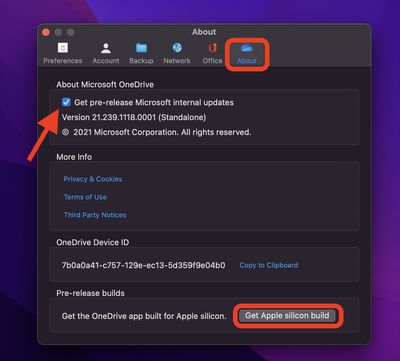
onedrive m1 macs
The official support for M1 Macs should make the OneDrive Arm preview run faster on Apple's latest machines, since the client will no longer need to go through Apple's Rosetta 2 translation layer.

OneDrive users need to be in the Office Insider program or Windows Insider program to use the Apple silicon preview version of OneDrive. Microsoft says it will be rolling out this feature to the Insiders ring over the next few days.

To get the pre-release internal build, click the OneDrive icon in the menu bar and select Help & Settings -> Preferences, then click the About tab. Under "About Microsoft OneDrive," select the checkbox to join the OneDrive Insiders preview, then under Pre-release builds, select Get Apple silicon build.

Microsoft's OneDrive support for Apple silicon comes after Dropbox announced it is working on its own native syncing client for ‌M1‌ Macs that is due for release sometime next year.

Dropbox was forced to reveal its plan to release the optimized client following complaints from users that the company was dragging its feet and being unclear about whether it would eventually offer support for Apple silicon.


Popular Stories

iOS 27 Next to iPhone

Here's When iOS 27 Rolls Out Today in Every Time Zone [Update: It's Out]

Sunday September 13, 2026 3:00 am PDT by
Update 10:04 a.m.: iOS 27 is rolling out now, though it may take a bit for all users to see it, so keep checking! Apple is about to release iOS 27, which will finally deliver more advanced Siri AI capabilities as well as a variety of other refinements, improvements, and new features to iPhones. It's Apple's biggest software update of the year, and Apple announced at Wednesday's iPhone event...
iOS 27 Icon iPhone

iOS 27 Available Now With These 8 New Features

Monday September 14, 2026 9:00 am PDT by
Update — 10 a.m. Pacific Time: Apple has released iOS 27. During its iPhone 18 Pro and iPhone Duo event last week, Apple announced that iOS 27 will be released widely on Monday, September 14. iOS 27 should be available around 10 a.m. Pacific Time / 1 p.m. Eastern Time today via the Settings app, under General → Software Update. Below, we have highlighted eight new features and...
Apple iCloud Plus expansion hero

iCloud+ Now Includes Apple TV, Apple Arcade, and Curated Apple Music Stations in Over 100 Countries

Tuesday September 15, 2026 1:43 am PDT by
Apple today announced a new subscription initiative that turns paid iCloud+ subscriptions into a broader services bundle in more than 100 countries. In select countries, Apple says every paid iCloud+ plan, including the cheapest 50GB tier, now includes Apple TV and Apple Arcade "at no additional cost," while family sharing extends the storage, TV and Arcade access to up to five people....

Top Rated Comments

62 months ago
Here is the link, direct from Microsoft if you dont want to wait for it to be made available to you.
OneDrive Universal Link ('https://oneclient.sfx.ms/Mac/Insiders/21.245.1128.0001/universal/OneDrive.pkg')
Score: 19 Votes (Like | Disagree)
Kylo83 Avatar
62 months ago
What about Teams
Score: 15 Votes (Like | Disagree)
TechRunner Avatar
62 months ago

Great! Now do Teams
Teams is in need of some serious work. If Microsoft plans on keeping it in their Office toolbox, they need to burn that thing down and start over.
Score: 7 Votes (Like | Disagree)
62 months ago
Great! Now do Teams
Score: 6 Votes (Like | Disagree)
throAU Avatar
62 months ago
Overdue... but to be honest not a massive performance win... its mostly waiting on network anyway.

Still, one less Rosetta2 dependency.
Score: 6 Votes (Like | Disagree)
jace88 Avatar
62 months ago
About time. OneDrive sync with 1TB+ of small files/folders/etc is the one thing which brings my M1 Pro to beachball.

I wish they'd introduce the option to choose whether you want full sync, selective folder syncs and everything offline or just links during the login/setup process rather than signing in, letting it sync the filenames/etc, and then changing it... but maybe this'll all be much faster with a native build of OneDrive.
Score: 5 Votes (Like | Disagree)