

iOS 15.4 Beta Adds Option to Hide iCloud Keychain Security Recommendations - MacRumorsOpen MenuShow RoundupsShow Forums menuVisit ForumsOpen Sidebar
Skip to Content

iOS 15.4 Beta Adds Option to Hide iCloud Keychain Security Recommendations

For iCloud Keychain passwords, Apple has long offered security recommendations for weak, compromised, or repeated passwords that need updating for maximum protection, but in some situations, you might have passwords that you can't change and annoying alerts you can't get rid of.
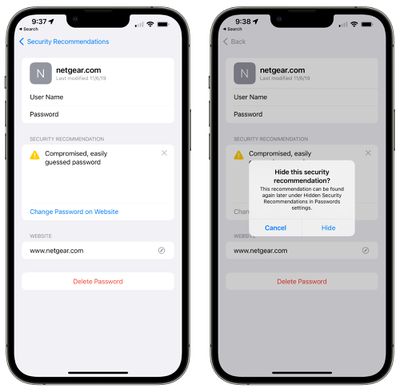
password hide security recommendation ios 15 4
That's changing in iOS 15.4, which is currently in beta testing. In the iOS 15.4 update, any security recommendation listed in the Passwords section of the Settings app can be hidden. Just tap into an alert and then tap the new "x" button next to any security recommendation that you want to hide from view. Prior versions of iOS have no way to dismiss or hide security recommendations other than turning them off entirely.

Security alerts that have been hidden will no longer show up under the main "Security Recommendations" label, but you can still view them if necessary by opening up the Passwords interface and scrolling down to the bottom where there's a new "Hidden Security Recommendations" option.
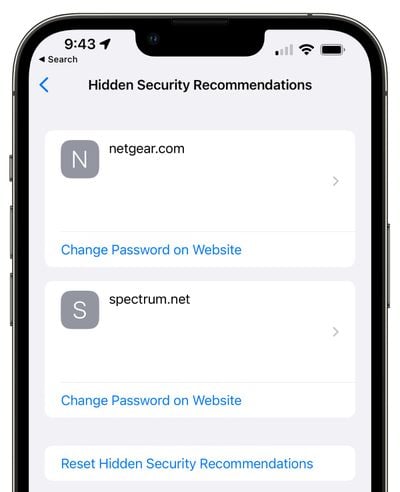
ios 15 4 hidden security recommendations
In this section, you will find any password alerts that have been hidden from your view. The option to hide security recommendations can come in handy for passwords that you cannot change for some reason, such as when the password belongs to someone else. It provides a way to keep the alerts visible in a section but not front and center. If you want to reset security recommendations and make them visible again, there is an option for that, too.


iOS 15.4 also lets you add a note to any ‌iCloud‌ Keychain password, so if you need to provide yourself with more context on a password, such as noting what it's for, you can do so.
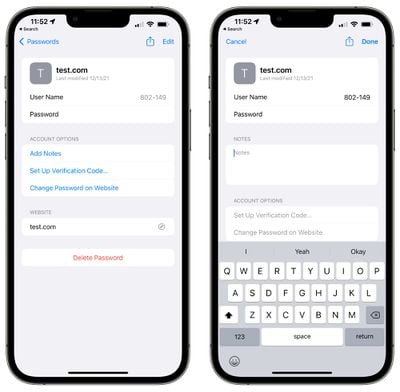
icloud keychain notes
We have a full list of everything that's new with iOS 15.4 available in our iOS 15.4 features guide if you want a rundown on the other new additions in the update.


Related Forum: iOS 15

Popular Stories

iCloud iPhone 17 Pro

iPhone Users Who Pay for iCloud Storage Get Two New Perks on iOS 27

Thursday July 2, 2026 6:10 am PDT by
If you pay for certain iCloud+ storage plans beyond the 5GB that Apple offers for free, you will receive two more perks on iOS 27 at no additional cost. A summary of the two new iCloud+ perks on iOS 27:Increased daily usage limits for some new Apple Intelligence features, including image generation in the revamped Image Playground app. HomeKit Secure Video cameras receive generated video...
iPhone 4 on Black Feature

Apple Facing One of Its Worst Leaks Since the iPhone 4

Thursday July 2, 2026 9:53 am PDT by
Apple supplier Tata Electronics recently suffered a cyberattack that resulted in thousands of confidential files being published on the dark web, and this reportedly included some photos and documents related to the upcoming iPhone 18 Pro. We have elected not to share any of the leaked photos in this story due to the illegal nature in which they were obtained, but they can easily be found...
American Express Gold Apple Pay Feature

American Express Announces New Apple Pay Feature

Tuesday June 30, 2026 10:27 am PDT by
American Express today announced that you can now redeem Membership Rewards points when checking out with Apple Pay on the web and in apps on the iPhone and iPad. When checking out with Apple Pay on iOS 18 or iPadOS 18 or later, tap on your eligible American Express card (Platinum, Gold, Green, and others) and select the Membership Rewards points option. You can use points to cover all or...

Top Rated Comments

fwmireault Avatar
58 months ago
I’d love to have the option to manually add multiple domain names and websites that use the same username/password, like almost any password manager
Score: 12 Votes (Like | Disagree)
Apple Knowledge Navigator Avatar
58 months ago
If they could just turn the iCloud Keychain into a standalone app it would be perfect. For now, I’m using Shortcuts to save going into Sys Pref.
Score: 7 Votes (Like | Disagree)
TheYayAreaLiving 🎗️ Avatar
58 months ago
That’s helpful. Because I get annoyed looking at giving me the suggestion to change my password. The re-use password indicator is annoying.
Score: 5 Votes (Like | Disagree)
joshwenke Avatar
58 months ago
Big improvements to iCloud Keychain recently, but still not even close to 1Password. Seriously, switching to 1P has changed my life (and my family's life too).
Score: 5 Votes (Like | Disagree)
58 months ago
Both of these are excellent additions. I’m already almost finished migrating all my passwords from LastPass to the iCloud Keychain. For my needs this is completely enough and will avoid paying another annual subscription for a 3rd party password management app.
Score: 4 Votes (Like | Disagree)
TheDailyApple Avatar
58 months ago
I’ve been wanting this. I have a couple of accounts that are used to sign into different urls, and I’m tired of them showing up as reused.
Score: 3 Votes (Like | Disagree)















