macOS Monterey 12.3 Beta 3 Makes Accessing Universal Control Settings Easier - MacRumorsOpen MenuShow RoundupsShow Forums menuVisit ForumsOpen Sidebar
Skip to Content

macOS Monterey 12.3 Beta 3 Makes Accessing Universal Control Settings Easier

In the third beta of macOS Monterey that Apple released to developers today, there is a small Universal Control update that is designed to make it easier to access the various ‌Universal Control‌ settings that you might need when using the feature to control multiple Macs and iPads with a single mouse/trackpad and keyboard.
universal control 1
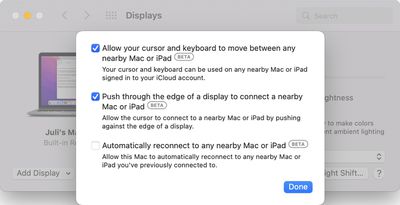
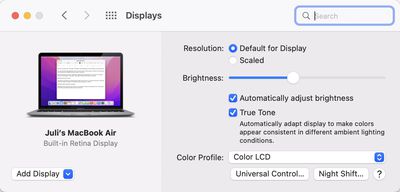
If you open up the Displays section of System Preferences after updating to the new software, there is a new "‌Universal Control‌..." button that was first noticed by 9to5Mac. The ‌Universal Control‌ button goes directly to the three ‌Universal Control‌ settings that are available.

universal control 2
Prior to this beta, the ‌Universal Control‌ options were located under the now-removed "Advanced" tab, and were just a bit harder to get to.

The ‌Universal Control‌ settings have not changed, even though their location has been updated. The first two settings are enabled by default and allow ‌Universal Control‌ to work, while the third is optional and can be toggled on to allow you to automatically reconnect to any nearby Mac or iPad you've previously connected to.

‌Universal Control‌ is live in the macOS Monterey 12.3 and iPadOS 15.4 betas available to developers and public beta testers, and it is working well even in a beta capacity. The feature will be available to everyone when the updates see a public release, which could perhaps come in March following Apple's planned March 8 event.


Related Forum: macOS Monterey

Popular Stories

Apple Card iPhone 16 Pro Feature

Apple Card Promo to Offer Free AirPods Pro 3

Friday May 15, 2026 8:59 am PDT by
Starting as early as next week, customers who sign up for an Apple Card at Apple's retail stores in the U.S. will receive $249 cash back when they purchase AirPods Pro 3, according to Bloomberg's Mark Gurman. The promotion has yet to be officially announced by Apple, so exact terms and conditions are not available at this time. AirPods Pro 3 are priced at $249 in the U.S., so customers who...
Apple WWDC25 iOS 26 CarPlay Light mode 250609

Six Popular iPhone Apps Now Available on CarPlay

Thursday May 14, 2026 9:10 am PDT by
Apple's CarPlay system for accessing iPhone apps on a vehicle's dashboard screen has received six popular apps in recent weeks: ChatGPT, Perplexity, Grok, Google Meet, WhatsApp, and the indie artist streaming platform Audiomack. Make sure you have the latest version of each app and they will automatically appear on CarPlay. ChatGPT Starting with iOS 26.4, CarPlay supports voice-based...
ipad mini 7 blue

OLED iPad Mini: Release Date, Pricing, and What to Expect

Thursday May 14, 2026 5:08 am PDT by
According to the latest rumors, Apple is close to launching its next-generation iPad mini. So what should we expect from the successor to the iPad mini 7 that Apple released over a year ago? Read on to find out. Processor and Performance Apple is working on a next-generation version of the iPad mini (codename J510/J511) that features the A19 Pro chip, according to information found in code...

Top Rated Comments

56 months ago

Handoff is a bit of a different animal, isn't it. Universal Control involves mouse and cursor control across different Apple devices, whereas Handoff involves passing clipboard data (among other things?) to other Apple devices.
Handsoff is part of/required by UC. You can't turn it off while turning UC on.

UC is the ultimate solution that Apple has imagined, combining Handsoff and AirDrop with the soft-KVM, it makes multiple devices feel like one. So far the experience is so great that I couldn't live without when I have multiple Macs around. I sometime forgot that I'm using multiple Macs now and would try to drag an application window from one to another. Hopefully they can make applications work across devices someday.
Score: 3 Votes (Like | Disagree)
TheYayAreaLiving 🎗️ Avatar
56 months ago

I’m really looking forward to this feature. It’s a great innovation by Apple, and I’m glad they’re taking their time to get it right.
I agree. It’s worth the long wait. Highly anticipated. It’s definitely magical. I seriously can’t wait.
Score: 3 Votes (Like | Disagree)
56 months ago
As I recalled right before the update, the “Advanced” button was in the same spot the “Universal Control” button is now.
Score: 3 Votes (Like | Disagree)
56 months ago
Welcome changes. Looking forward to seeing it in the final version.
Score: 2 Votes (Like | Disagree)
symphony Avatar
56 months ago
I set the third option back to off, because you can't change the side of your other device automatically.

And when I took my iPad to another room and tried to use the cursor gesture to show apps in slide over, I didn't realize my cursor went to my Mac, which made me lose the cursor due to how massive my iMac screen is. I was so confused about what happened to my iPad cursor.
Score: 2 Votes (Like | Disagree)
jchap Avatar
56 months ago

Well, those three checkboxes are all that matters, and they are turned on by default iirc. Moving its location hardly matters, and unlike disastrous handoff, this one at least can’t get triggered randomly easily so I’m fine.
Handoff is a bit of a different animal, isn't it. Universal Control involves mouse and cursor control across different Apple devices, whereas Handoff involves passing clipboard data (among other things?) to other Apple devices.
Score: 2 Votes (Like | Disagree)