

PSA: Universal Control and Sidecar Can Be Used At the Same Time in macOS 12.3 - MacRumorsOpen MenuShow RoundupsShow Forums menuVisit ForumsOpen Sidebar
Skip to Content

PSA: Universal Control and Sidecar Can Be Used At the Same Time in macOS 12.3

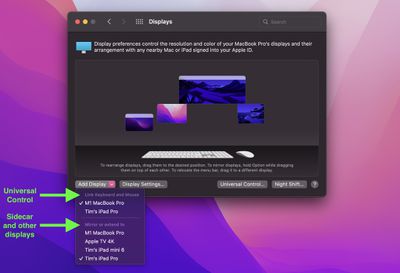
Before macOS 12.3 and iPadOS 15.4 were released to the public, many beta testers who tried Universal Control were unable to get it working if they were already using an iPad in Sidecar mode, but it turns out that in the final release you can actually enable both ‌Universal Control‌ and ‌Sidecar‌ simultaneously on different devices, provided your setup allows for this.
sys-prefs
In the final version of macOS 12.3, the "Add Display" options in the Displays preference pane distinguishes between devices available to connect via ‌Universal Control‌ and devices available to be used as extended displays, including iPads via ‌Sidecar‌.

This means that you can now, for example, connect your Mac to one ‌‌iPad‌‌ via ‌‌Sidecar‌‌ for some extra macOS screen space, and on the other side of your Mac you could control a second ‌‌iPad‌‌ or Mac using your main Mac's keyboard and trackpad.

Differences Between Universal Control and Sidecar

For those unfamiliar with the two modes and the differences between them, here's a quick recap. With ‌‌Universal Control‌‌, if you have a Mac and an ‌‌iPad‌‌ next to each other, or even multiple Macs and iPads, you can use the keyboard and cursor on one device across all of them. So, for example, if you have a MacBook Pro and an ‌‌iPad‌‌ on your desk, the ‌MacBook Pro‌'s trackpad can be used over on the ‌‌‌iPad‌‌‌ just by swiping across, and the Mac's keyboard will become the ‌‌iPad‌‌'s input device. The same is also true of the ‌‌‌iPad‌‌‌ if you have a keyboard attached to it.

‌‌Sidecar‌‌ works differently. Announced in 2019 as part of macOS Catalina, ‌‌Sidecar‌‌ is designed to let you use an ‌‌iPad‌‌ as a secondary display for your Mac. Up to one ‌‌iPad‌‌ can be used to either mirror the content on your Mac's display or turn it into a secondary display for extra screen real estate in macOS.


To be clear, ‌‌Universal Control‌‌ lets you use your Mac's keyboard and trackpad to navigate your ‌‌iPad‌‌, but it functions over two different operating systems – macOS and iPadOS. Unlike ‌Sidecar‌, it does not extend your Mac's display to the ‌‌iPad‌‌, it simply allows the keyboard and mouse/trackpad of one device to be used to control one or more other devices. If you want your Mac's content displayed on a nearby ‌‌iPad‌‌, you'll need to use ‌‌Sidecar‌‌, but you cannot control the same device with ‌‌Universal Control‌‌.

With all that said, however, provided you have enough iPads and Macs, it turns out that you can in fact use ‌‌Sidecar‌‌ and ‌‌Universal Control‌‌ at the same time and enjoy the best of both worlds. Note that ‌Universal Control‌ is still technically in beta, so some setups may throw up lingering bugs.

For more information on how to set up an ‌iPad‌ in ‌Sidecar‌ while also controlling additional Macs and/or iPads using ‌Universal Control‌, be sure to check out our dedicated how-to article.

Popular Stories

macos sidecar

macOS 27 Finally Brings Direct Touch Control to Sidecar

Tuesday June 9, 2026 9:17 am PDT by
Apple has added direct touch input to Sidecar with macOS 27 Golden Gate and iPadOS 27, allowing users to tap and interact with macOS interface elements using a finger on their iPad for the first time. Previously, Sidecar was deliberately limited as a touch interface. While multi-touch gestures like two-finger scrolling, pinch-to-zoom, and three-finger editing gestures for copy, cut, paste,...
iCloud iPhone 17 Pro

iPhone Users Who Pay for iCloud Storage Get Two New Perks on iOS 27

Thursday July 2, 2026 6:10 am PDT by
If you pay for certain iCloud+ storage plans beyond the 5GB that Apple offers for free, you will receive two more perks on iOS 27 at no additional cost. A summary of the two new iCloud+ perks on iOS 27:Increased daily usage limits for some new Apple Intelligence features, including image generation in the revamped Image Playground app. HomeKit Secure Video cameras receive generated video...
American Express Gold Apple Pay Feature

American Express Announces New Apple Pay Feature

Tuesday June 30, 2026 10:27 am PDT by
American Express today announced that you can now redeem Membership Rewards points when checking out with Apple Pay on the web and in apps on the iPhone and iPad. When checking out with Apple Pay on iOS 18 or iPadOS 18 or later, tap on your eligible American Express card (Platinum, Gold, Green, and others) and select the Membership Rewards points option. You can use points to cover all or...

Top Rated Comments

56 months ago
Universal control is not just keyboard/mouse control. It also lets you drag/drop pretty much anything between devices (assuming OS support). I was even able to drag a Safari tab from my iPad to Safari on my Mac. Another very useful thing was to be able to drag a file from the Mac and drop it into a Spark email as an attachment.

Really well done by Apple to allow the config you’ve demonstrated too. Thanks.
Score: 11 Votes (Like | Disagree)
timmyh Avatar
56 months ago
For anyone interested, the above display arrangement maps onto this setup. The iPad on the right is using Sidecar to extend the display of the 14-inch MacBook Pro on the left of the large monitor, while the 13-inch MBP on the far left is linked via Universal Control.


Attachment Image
Score: 10 Votes (Like | Disagree)
56 months ago
Universal Control is PURE GENIUS! I am programming with keyboard on an iMac and MacBook, side by side, and can have testing setup on one computer and programming on the other, without switching keyboards or touchpad!
Score: 6 Votes (Like | Disagree)
Doebldodl Avatar
56 months ago
You can even have one iPad attached via sidecar and universal control simultaneously. In my current setting, I can move the cursor down into the mac sidecar display, and if I move further down, I get the iPad dock (and can then switch to the iPad home screen).


Attachment Image
Score: 4 Votes (Like | Disagree)
GSWForever8 Avatar
56 months ago
Universal control is pure genius. It’s one of my favorite features that apple have ever made!
Score: 3 Votes (Like | Disagree)
56 months ago
Both are very useful and excellent features. Glad that both can be used simultaneously.
Score: 2 Votes (Like | Disagree)















