

Pixelmator Pro 2.4 Adds New Layer Types, Vector Shapes, M1 Ultra Support, More - MacRumorsOpen MenuShow RoundupsShow Forums menuVisit ForumsOpen Sidebar
Skip to Content

Pixelmator Pro 2.4 Adds New Layer Types, Vector Shapes, M1 Ultra Support, More

Pixelmator Pro 2.4 "Odesa" went live on the Mac App Store today, and the latest major update to the popular image editing app brings new layer types, new vector shapes, enhanced support for Apple’s M1 Ultra chip, and other notable additions.
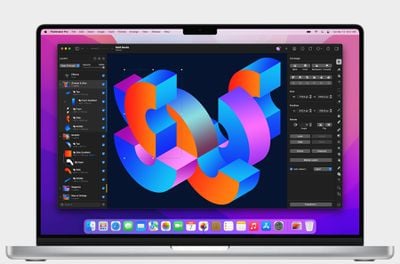
Pixelmator Pro 2

The new color adjustments and effects layers let users nondestructively adjust colors and apply effects to entire layered compositions. With a single color adjustments layer, users can now change the look of a composition no matter how many layers the picture has.

The new layer types work just like other layers, and can be masked, hidden, rearranged, and more. It's also possible to apply selective edits by using colors adjustments and effects layers with masks.

"One of the things that users love most about Pixelmator Pro is how it makes advanced layer-based image editing incredibly easy," said Simonas Bastys, lead developer at the Pixelmator Team. "And with the addition of color adjustments and effects layers, layer-based editing in Pixelmator Pro becomes even more powerful, enabling all-new workflows, such as advanced selective editing of photos."
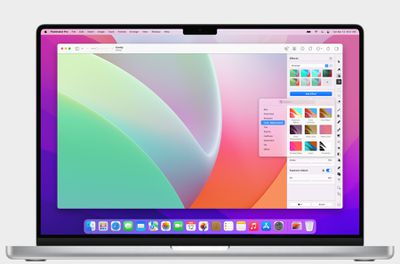
Pixelmator Pro 2

To accommodate the new layer types, the layers sidebar has been redesigned and given a fresh new look. Different layer types, such as images, shapes, text, RAW layers, groups, and other layers, are now more easily recognizable. In addition, layers now also feature informative subtitles that show the most relevant information about a layer at a glance.

Elsewhere, Pixelmator Pro 2.4 also adds over 200 new, artist-designed vector shapes in categories like science, activities, and symbols. The vector shapes are resolution-independent, so they can be used freely in any design or illustration, and their vector points align to pixel boundaries, eliminating any unwanted blurring that can often be found when using vector elements in pixel designs.

This update also includes support for Apple's ‌M1 Ultra‌ processor and machine learning model optimizations, making automatic background removal, super resolution, and photo enhancement up to 1.7 times faster on ‌M1 Ultra‌ compared to M1 Max, according to the developers.
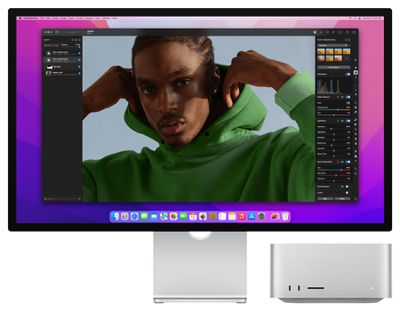
Pixelmator Pro 2

Other new features include a Scrubby Zoom mode, the ability to unlink layer masks, and a wide range of smaller improvements. Pixelmator Pro 2.4 Odesa is available from the Mac App Store as a free update for existing users and $39.99 for everyone else.


Popular Stories

iCloud iPhone 17 Pro

iPhone Users Who Pay for iCloud Storage Get Two New Perks on iOS 27

Thursday July 2, 2026 6:10 am PDT by
If you pay for certain iCloud+ storage plans beyond the 5GB that Apple offers for free, you will receive two more perks on iOS 27 at no additional cost. A summary of the two new iCloud+ perks on iOS 27:Increased daily usage limits for some new Apple Intelligence features, including image generation in the revamped Image Playground app. HomeKit Secure Video cameras receive generated video...
iPhone 4 on Black Feature

Apple Facing One of Its Worst Leaks Since the iPhone 4

Thursday July 2, 2026 9:53 am PDT by
Apple supplier Tata Electronics recently suffered a cyberattack that resulted in thousands of confidential files being published on the dark web, and this reportedly included some photos and documents related to the upcoming iPhone 18 Pro. We have elected not to share any of the leaked photos in this story due to the illegal nature in which they were obtained, but they can easily be found...
American Express Gold Apple Pay Feature

American Express Announces New Apple Pay Feature

Tuesday June 30, 2026 10:27 am PDT by
American Express today announced that you can now redeem Membership Rewards points when checking out with Apple Pay on the web and in apps on the iPhone and iPad. When checking out with Apple Pay on iOS 18 or iPadOS 18 or later, tap on your eligible American Express card (Platinum, Gold, Green, and others) and select the Membership Rewards points option. You can use points to cover all or...

Top Rated Comments

Sandstorm Avatar
55 months ago
Love the version name Odesa 🇺🇦
Score: 7 Votes (Like | Disagree)
nortonandreev Avatar
55 months ago
I'm glad they're making improvements to the Layers (such as the addition of the new Add Empty Layer button, among others). Pixelmator is a great piece of software and I always give it as an example what one could achieve by following the best practices and utilising Apple SDKs and frameworks provided to the developers.
Score: 5 Votes (Like | Disagree)
bchery21 Avatar
55 months ago
Great app, use it frequently.
Score: 3 Votes (Like | Disagree)
quatermass Avatar
55 months ago
Love Pixelmator more and more as they update it - which is pretty frequently. I now only open Photoshop for a couple of filters and plugins, as PMP is now superior for everything else I do. Get this and Affinity Designer, and you're sorted!

Odessa - spot on! 🇺🇦
Score: 2 Votes (Like | Disagree)
53 months ago
FYI - Pixelmator Pro has been discounted down to $19.99.
Score: 1 Votes (Like | Disagree)
HobeSoundDarryl Avatar
55 months ago

So apps have to be recompiled for each variant? What happens if it’s not recompiled?
It runs as it has been running, but not necessarily taking advantage of whatever a new compile might do... and not delivering new features associated with the new version. For example, I just migrated from a aging Intel Mac to a new Mac Studio Ultra. I still had Pixelmator "1" on that Intel Mac and it moved to the Ultra (running in Rosetta 2). It runs as it did on the Intel Mac even without being native.

Yes, I'll upgrade it to this native "pro" version soon- just haven't got there yet.
Score: 1 Votes (Like | Disagree)














