

Apple Releases Swift Playgrounds 4.1 for iPad and Mac - MacRumorsOpen MenuShow RoundupsShow Forums menuVisit ForumsOpen Sidebar
Skip to Content

Apple Releases Swift Playgrounds 4.1 for iPad and Mac

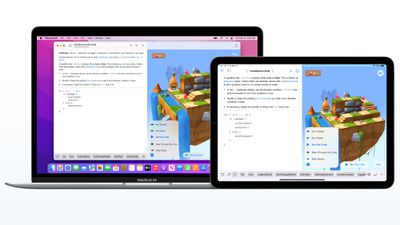
Following the launch of iOS 15.5 and macOS Monterey 12.4, Apple today released Swift Playgrounds 4.1, the latest version of the iPad and Mac app that is designed to teach users how to code and build apps.
swift playgrounds
On the Mac, Swift Playgrounds 4.1 adds a host of new features including support for building Mac apps with SwiftUI with macOS 12.4 or later, guided walkthroughs that teach SwiftUI app building basics, live updates in App Preview as changes are made, and App Store Connect integration for uploading finished apps to the ‌App Store‌.

Apple's full release notes for the Mac version of Swift Playgrounds are below.

Swift Playgrounds 4.1 introduces new features, new content and bug fixes. New features include:
- Build Mac apps with SwiftUI (requires macOS 12.4 or later)
- Guided walkthroughs teach SwiftUI app building basics
- App Preview shows live updates as you make changes to your app
- Apps built with Swift Playgrounds run and install to the Applications folder
- App Store Connect integration lets you upload your finished app to the App Store (requires Apple Developer Program account)
- Smart, inline code suggestions help you write code quickly and accurately
- Project-wide search finds results across multiple files
- Snippets Library provides hundreds of SwiftUI controls, symbols, and colors
- Swift Package support lets you include publicly available code to enhance your apps
- App Projects make it easy to move projects to Xcode and back

The iOS version of Swift Playgrounds 4.1 doesn't add quite as many new features, but it does include a new "Keep Going with Apps" feature to help users better understand how data moves throughout SwiftUI apps. It also adds "Animating Shapes" to teach users how to create, modify, and animate shapes, plus it includes "Capturing Photos," which offers an advanced look at creating a camera.

Swift Playgrounds for Mac can be downloaded from the Mac App Store, and Swift Playgrounds for ‌iPad‌ can be downloaded from the iOS App Store.

Popular Stories

macOS 27 on MacBook Pro

Apple Says macOS 27 Won't Be Compatible With These Macs

Wednesday June 3, 2026 8:29 am PDT by
During WWDC 2025, Apple revealed that macOS 26 Tahoe would be the final major macOS version for Intel-based Macs. macOS 27 will be compatible with Apple silicon Macs only, meaning that you will need a Mac with an M-series chip or a MacBook Neo with an A18 Pro chip in order to install the software update. Apple will unveil macOS 27 during its WWDC 2026 keynote this Monday, June 8, and the...
MacBook Neo on Yellow Feature

MacBook Neo is So Popular That Apple Reportedly Doubled Production

Wednesday June 3, 2026 9:24 am PDT by
On an earnings call in late April, Apple's CEO Tim Cook said that customer response to the MacBook Neo was "off the charts," and the popularity of the laptop has reportedly led the company to significantly boost production. Apple supply chain analyst Ming-Chi Kuo this week said he believes that MacBook Neo shipments to Apple were doubled from an initial target of 5 million units to 10...
iphone 18 pro blue%402x

iPhone 18 Pro: Dark Cherry, Light Blue, and Dark Gray Chassis Leaked [Update]

Thursday June 4, 2026 5:18 am PDT by
Update: Since publication, new information has come to light suggesting the images have been AI-manipulated and are not in fact iPhone 18 Pro chassis parts. The original article follows. The color options Apple is reportedly planning for the upcoming iPhone 18 Pro and ‌iPhone 18 Pro‌ Max have appeared online today in the form of images of chassis parts of unknown authenticity....

Top Rated Comments

Phogro Avatar
53 months ago

I love Playgrounds for kids, but when will XCode be available on iPad Pro?
I really believe that they're using Swift Playgrounds as a way of figuring out how to build an Xcode for the iPad. I'm hoping we see either a Swift Playgrounds 5 or maybe even a sneak peak of Xcode on iPad at WWDC.
Score: 6 Votes (Like | Disagree)
GeoStructural Avatar
53 months ago
I love Playgrounds for kids, but when will XCode be available on iPad Pro?
Score: 6 Votes (Like | Disagree)
53 months ago
This message is for anyone at Apple that worked on Swift Playgrounds.... THANK YOU! Please please keep making more and more tutorials. I'm also happy you didn't wait for iOS 16 to add more. Please continue to add more and more throughout the year! They are great!
Score: 4 Votes (Like | Disagree)
Sir_Macs_A_Lot Avatar
53 months ago
Playgrounds is a great way to get kids and beginners into the Swift Language.

(If the M1 iPad is supposed to be so powerful...why won't Apple release a version of XCode for iPadOS?)
Score: 3 Votes (Like | Disagree)
53 months ago

I love Playgrounds for kids, but when will XCode be available on iPad Pro?
Would really like them to evolve playgrounds into a more full fledged app instead of bringing Xcode. The latter has accumulated a lot of cruft from its long years, and this is their chance to build something fresh and light that's built ground up for SwiftUI (Xcode supports storyboards and UIKit too).
Score: 2 Votes (Like | Disagree)
53 months ago

(If the M1 iPad is supposed to be so powerful...why won't Apple release a version of XCode for iPadOS?)
Xcode was designed with UI that has a bunch of tiny icons, too many for a touch interface. To simulate how Xcode would look with fewer icons, try using Xcode restricted to only a 512x384 corner of your Mac's display, and see how that compares to Playgrounds on an iPad.
Score: 2 Votes (Like | Disagree)















