

Apple today previewed iOS 16, the company's next major update for the iPhone, featuring a redesigned, customizable Lock Screen, improvements to Messages, Maps, and Home, new sharing and personalization capabilities, and more.
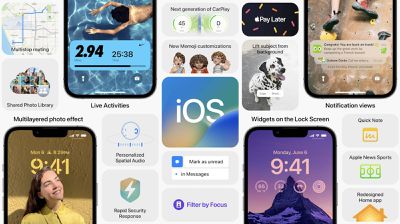
Lock Screen, Notifications, and Focus
An all-new, fully customizable Lock Screen allows users to edit a large number of design elements, including type styles and colors, for a more personalized look. The new Lock Screen includes a row of widgets and Apple says that there are millions of possible design combinations. Users can create multiple Lock Screens and switch between them easily by swiping.
Notifications now roll up from the bottom of the screen and can easily be hidden, ensuring users have a clear view of their personalized Lock Screen. Live Activities make it easier to keep track of events in real-time directly from the Lock Screen, such as when playing music or working out.
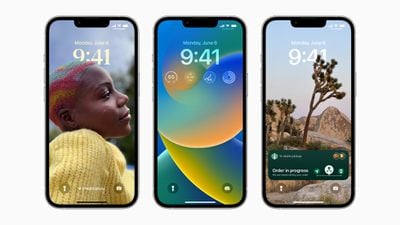
Focus modes have been refined in iOS 16, now allowing users to tie Focus modes to a specific customized Lock Screen. Focuses can also be activated by swiping between different dedicated Lock Screens. Focus filters allow users to filter out distracting content inside apps, such as tab groups in Safari, events in Calendar, or conversations in Messages.
Messages
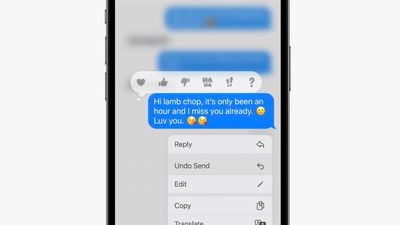
Messages now includes the ability to edit and delete sent messages, and mark messages as unread. SharePlay sessions can be activated directly from the Messages app, while a new Shared With You API enables developers to integrate shared experiences directly into their apps.
Dictation, Siri, and Live Text
A new dictation experience keeps the keyboard open when speaking, allowing users to use a combination of speech and typing in real-time. Dictation also now automatically adds punctuation and emojis to messages, including via Siri. A new App Intents API allows Siri Shortcuts to start working with no setup.
Live Text expands to video in iOS 16, allowing users to select text in playing video. New quick actions in selected Live Text can provide relevant activities such as currency conversion, and users can translate text directly in the camera view. There are improvements to Visual Lookup, and touching and holding on to the subject of an image allows users to pull out subjects and drag them elsewhere.
Apple Pay and Wallet App
The Wallet app now allows users to share keys via a message. Apple Pay Later is a new service that allows users to pay for purchases in four installments over six weeks with zero interest and no fees. Apple Pay Later is available with every Apple Pay purchase.
Apple Pay Order Tracking makes it easier for users to keep track of purchases from retailers like Shopify and receive receipts.
Maps
Enhanced Apple Maps are expanding to many more countries and cities around the world. Multistop routing allows users to plan up to fifteen stops ahead of time. Users can plan a trip on Mac and send it to iPhone, and also add stops to a journey using Siri. Transit allows users to see the cost of a journey, and transit cards can be integrated more closely in Wallet, with the ability to see when balance is low.
Sports
The Apple TV app can now display information about sports games via Live Activities. Apple News allows users to follow their favorite teams and leagues for a dedicated view. The new sports features are available in the U.S., UK, Canada, and Australia.
Family Sharing
Family Sharing includes easier ways to manage accounts for kids, including quicker ways to set age-appropriate restrictions and setup new devices. There is a simpler device setup experience with parental controls with Quick Start, Screen Time requests in Messages, and Family Checklist feature that allows users to be reminded about reviewing parental controls, and more.
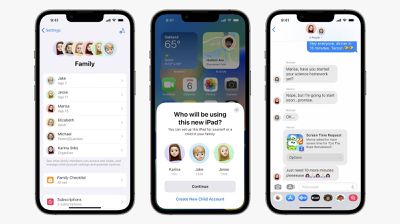
iCloud Shared Photo Library allows up to six family members to contribute to an additional iCloud Photos Library. A switch directly in the Camera app can share new photos directly to the shared family library, and intelligent sharing suggestions make it easy to automatically add new photos based on specific criteria. All members have equal permissions and photos will appear in everyone's memories and widgets.
Safety Check
iOS 16 includes new privacy and safety features. Safety Check is a new section in Settings to review and edit any access granted to other users, providing a way to manage and revoke access quickly, reset privacy permissions, protect access to messages, and stop sharing location data.
Home App
The Home app is completely redesigned in iOS 16, featuring a new main tab view to see the entire home in one place. There are new dedicated categories along the top for climate, security, and more, while large, distinctive tiles ensure that accessories are more recognizable.
iOS 16 also brings underlying improvements to the Home app to make it more reliable, and supports the Matter standard. The new Home app is available across the iPhone, iPad, and Mac.
Other Features
iOS 16 also includes improvements to Spatial Audio with AirPods, allowing users to use the TrueDepth camera on iPhone to create a more precise listening experience, QuickNote on the iPhone for the first time, new Mail features, Rapid Security Response, the Fitness app on the iPhone with no need for an Apple Watch, Spotlight in the dock, additional Memoji customizations, and more.
Availability
The first beta version of iOS 16 is available to developers today, while the public beta will be available in July. iOS 16 is supported on the iPhone 8 and newer.





















