Books App Gets Redesign in iOS 16 and iPadOS 16 - MacRumorsOpen MenuShow RoundupsShow Forums menuVisit ForumsOpen Sidebar
Skip to Content

Books App Gets Redesign in iOS 16 and iPadOS 16

Apple in iOS 16 and iPadOS 16 has overhauled the design of the Books app, simplifying the interface and adding some new customization tools.
ios 16 books app 1
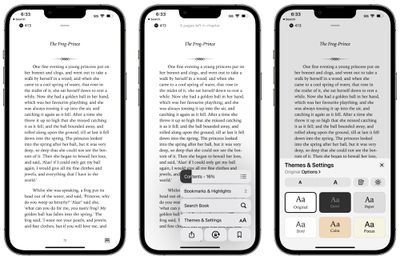
In iOS 15, there's a toolbar at the top of the app that provides access to the chapter index, font adjustments, search tools, and bookmarks, but in iOS 16, everything has been moved to the bottom of the app.

There's a single tappable icon at the bottom of the book interface to access the settings. It provides a distraction-free reading experience, but it's worth noting that it can't be tapped away.

Tapping on the button brings up all of the available settings in the Books app. The top menu bar features the table of contents, while there's also an option to tap in to see all of your bookmarks and highlights.

The search interface is also available, and search does not appear to have been updated. There's a one-tap option for locking orientation, bookmarking a page, and accessing the share sheet.

Tapping on Themes and Settings brings up options to change the font size and the color of the background. There are a few new color options in iOS 16, including a lighter gray, a different shade of white, and a light yellow.
ios 16 books app 2
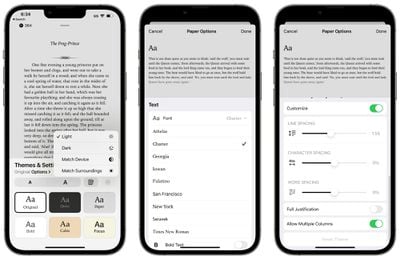
You can turn on vertical scrolling in this interface, and elect to activate Light Mode, Dark Mode, match the device settings, or match the ambient lighting with True Tone.

Tapping on Options brings up different fonts and the option to bold the text. There are easy to access Accessibility settings for adjusting line spacing, word spacing, and character spacing, along with toggling on full justification. Apple has also changed the way that pages turn.


All in all, the changes bring more customization options to the Books app on iPhone and iPad, and access to features like search and bookmarking still takes about the same amount of time despite the fact that they're now in a menu.


Popular Stories

iCloud iPhone 17 Pro

iPhone Users Who Pay for iCloud Storage Get Two New Perks on iOS 27

Thursday July 2, 2026 6:10 am PDT by
If you pay for certain iCloud+ storage plans beyond the 5GB that Apple offers for free, you will receive two more perks on iOS 27 at no additional cost. A summary of the two new iCloud+ perks on iOS 27:Increased daily usage limits for some new Apple Intelligence features, including image generation in the revamped Image Playground app. HomeKit Secure Video cameras receive generated video...
iPhone 4 on Black Feature

Apple Facing One of Its Worst Leaks Since the iPhone 4

Thursday July 2, 2026 9:53 am PDT by
Apple supplier Tata Electronics recently suffered a cyberattack that resulted in thousands of confidential files being published on the dark web, and this reportedly included some photos and documents related to the upcoming iPhone 18 Pro. We have elected not to share any of the leaked photos in this story due to the illegal nature in which they were obtained, but they can easily be found...
American Express Gold Apple Pay Feature

American Express Announces New Apple Pay Feature

Tuesday June 30, 2026 10:27 am PDT by
American Express today announced that you can now redeem Membership Rewards points when checking out with Apple Pay on the web and in apps on the iPhone and iPad. When checking out with Apple Pay on iOS 18 or iPadOS 18 or later, tap on your eligible American Express card (Platinum, Gold, Green, and others) and select the Membership Rewards points option. You can use points to cover all or...

Top Rated Comments

53 months ago
Wish they hadn't gotten rid of the bar at the bottom that indicated progress through the book and especially the number of pages left in the chapter. That gives me a good idea about whether I had enough time to read an entire new chapter (or how long I had left in a chapter).
Score: 31 Votes (Like | Disagree)
53 months ago
Disappointed to see the skeuomorphic page turning get removed. The new animation is so average and clinical. I hope the rest of the changes are nice in practice because Books is my favorite app to read in.
Score: 30 Votes (Like | Disagree)
53 months ago

Disappointed to see the skeuomorphic page turning get removed. The new animation is so average and clinical. I hope the rest of the changes are nice in practice because Books is my favorite app to read in.
It was a beautiful and natural animation. Sad to lose it and just turn books into boring web pages.
Score: 26 Votes (Like | Disagree)
fwmireault Avatar
53 months ago

..and Wow! They really make it worse, don't they?
I am a long time user of apple book. Can’t understand why they removed this animation. It’s a small detail that makes reading ebooks more natural. I don’t want to feel like I’m reading a PDF
Score: 18 Votes (Like | Disagree)
klasma Avatar
53 months ago

It provides a distraction-free reading experience, but it's worth noting that it can't be tapped away.
…so not distraction-free after all. Oh Apple.
Score: 18 Votes (Like | Disagree)
53 months ago
As a librarian, it’s baffling to me that it’s still not possible to sort your ebooks by the authors surname. Sorting them by name sorts them by the first name.
Score: 13 Votes (Like | Disagree)