

You Can Unsend an Email 10 Seconds After It's Sent in iOS 16 Mail App - MacRumorsOpen MenuShow RoundupsShow Forums menuVisit ForumsOpen Sidebar
Skip to Content

You Can Unsend an Email 10 Seconds After It's Sent in iOS 16 Mail App

Apple in iOS 16, iPadOS 16, and macOS Ventura is overhauling the Mail app and introducing a slew of new features that bring it more in line with competing mail services such as Gmail. One of those new features is a long-awaited Undo Send option, designed to let you quickly recall an email if you make a mistake.
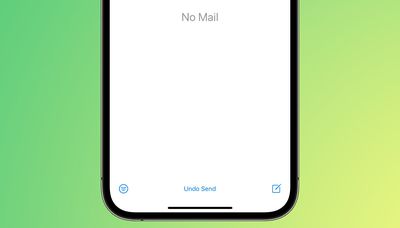
mail undo send
Undo Send works for up to 10 seconds after you send an email, so you don't have a lot of time to change your mind if you do want to unsend an email that you've sent out. Google's Gmail service also has an undo send feature for emails, but you can customize the cancelation period to 5, 10, 20, or 30 seconds.

For now, Apple is limiting undo send to 10 seconds, but it's possible the company could add other time options in the future.

There are several other new features coming to the Mail app. You can schedule your emails for the future, or have Mail give you a reminder about an email you opened but forgot to respond to. It will also let you move sent messages to the top of your inbox so you can get a reminder to send a follow-up, and it can notify you if you forget an important part of an email like an attachment or recipient.
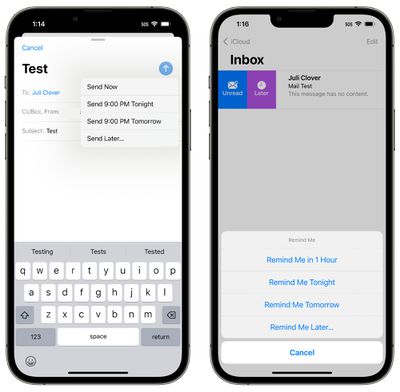
mail send later reminders
Rich links are now supported in email messages so you can see more at a glance, and search is improved. Apple says that you'll see better search suggestions from the moment you begin a search, and it will also correct typos and use synonyms for your search terms to bring up what you're looking for.

These features are available across Apple's platforms for those running the latest software. Apple's updates are limited to developers at this time, but the company plans to release public betas in July.


Related Forum: iOS 16

Popular Stories

General macOS Mail Feature

Apple Hide My Email Vulnerability Exposes Real Email Addresses

Wednesday July 1, 2026 6:20 am PDT by
A flaw in Apple's Hide My Email service can reportedly allow almost anyone to uncover the real email address behind a generated alias, and Apple has failed to address it for more than a year since it was first reported. 404 Media is withholding the technical specifics of the vulnerability because it remains exploitable, but the publication verified the issue this week using one of its own...
iCloud iPhone 17 Pro

iPhone Users Who Pay for iCloud Storage Get Two New Perks on iOS 27

Thursday July 2, 2026 6:10 am PDT by
If you pay for certain iCloud+ storage plans beyond the 5GB that Apple offers for free, you will receive two more perks on iOS 27 at no additional cost. A summary of the two new iCloud+ perks on iOS 27:Increased daily usage limits for some new Apple Intelligence features, including image generation in the revamped Image Playground app. HomeKit Secure Video cameras receive generated video...
iPhone 4 on Black Feature

Apple Facing One of Its Worst Leaks Since the iPhone 4

Thursday July 2, 2026 9:53 am PDT by
Apple supplier Tata Electronics recently suffered a cyberattack that resulted in thousands of confidential files being published on the dark web, and this reportedly included some photos and documents related to the upcoming iPhone 18 Pro. We have elected not to share any of the leaked photos in this story due to the illegal nature in which they were obtained, but they can easily be found...

Top Rated Comments

BradWI Avatar
53 months ago

Instead of undo send they should have delayed send so you can catch it before it ever leaves Apple Mail.
Isn't that what is happening here anyway? Didn't think there is a real way to actually unsend an email.
Score: 32 Votes (Like | Disagree)
4jasontv Avatar
53 months ago
Give the send button options.
Express: Sends it after 10 seconds.
Courier: Sends the message after 10 minutes.
FedEx: Let you schedule when it's sent.
UPS: Let's you schedule when it's sent but it sits in iCloud for a few days before it's delivered.
USPS: Waits until late afternoon to be sent out, but it sits in iCloud for a week before it's delivered.
Surepost: Let's you schedule when it's sent but it sits in iCloud for a week before it's delivered.
Score: 10 Votes (Like | Disagree)
macduke Avatar
53 months ago
I just want machine learning that can tell I referenced adding an attachment in my message text and then pop up when I go to send with a confirmation “It sounds like you meant to attach a file, do you want to send this message without a file or cancel and attach a file?” Because 9 times out of 10 that’s why I would want to undo send.
Score: 9 Votes (Like | Disagree)
53 months ago

Isn't that what is happening here anyway? Didn't think there is a real way to actually unsend an email.
Yeah, pretty sure this is what it is doing.
Score: 7 Votes (Like | Disagree)
TheYayAreaLiving 🎗️ Avatar
53 months ago
I use this feature all the time in Gmail. Reminds me of Gmail "Undo Send". Happy to see, Apple has finally decided to bring it to it's own operating system.
Score: 7 Votes (Like | Disagree)
zorinlynx Avatar
53 months ago
By the way folks, there's a reason this is only ten seconds.

There is no "undo send" with E-mail. Once your E-mail hits the SMTP server, it's sent. There's no taking it back. Doing so would require the cooperation of the recipient's mail server, which cannot be guaranteed and opens a can of worms to allow this ability.

A 10 second "undo send" is just delaying sending the message for ten seconds. Yes, that'll be enough to sometimes catch yourself and not send it, but you can easily just mull over sending it for ten seconds and it would accomplish the same thing.
Score: 6 Votes (Like | Disagree)














