iPadOS 16 Tidbits: Drastically Improved Files App, System-Wide Undo/Redo, and More - MacRumorsOpen MenuShow RoundupsShow Forums menuVisit ForumsOpen Sidebar
Skip to Content

iPadOS 16 Tidbits: Drastically Improved Files App, System-Wide Undo/Redo, and More

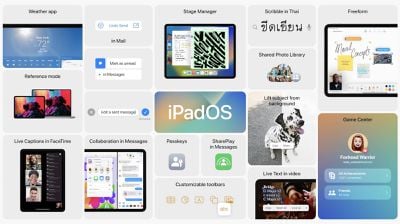
iPadOS 16 is now available to developer beta testers with improvements in Messages and Safari and the all-new Stage Manager, enabling multiple app windows and Mac-like multitasking on M1 iPads.
ipados 16
As has always been the case, many features are shared across iOS and iPadOS, and that's certainly true this year. iPadOS 16 gains several major new features from iOS 16, including the ability to edit and unsend Messages, improvements to Focus, and more.

There are, however, some features and changes exclusive to iPadOS 16 that take even more advantage of the iPad and its performance. We've highlighted a few iPadOS 16 tidbits below:

Files App Gets Quality of Life Improvements
ipados 16 files app changes
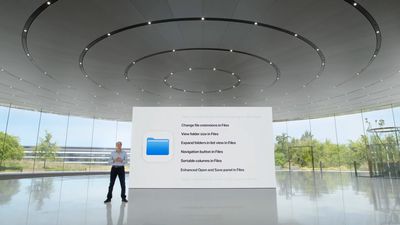
The Files app on iPadOS 16 is gaining some much-requested features from ‌iPad‌ users, including easier navigation buttons, easier access to common controls such as duplicate and rename, the ability to change file extensions, and more. The new changes are part of Apple's efforts to make iPadOS apps more "desktop-class."

System-Wide Undo and Redo and Find and Replace
ipados 19 find and replace
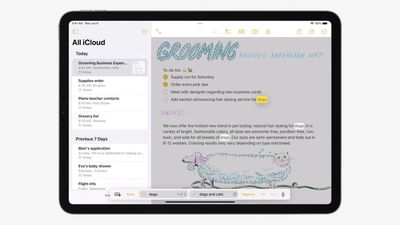
iPadOS is gaining system-wide undo and redo functionality, making it easer and more Mac-like for users to easily revert changes made in apps and across the system. iPadOS 16 also introduces system-wide find and replace that in the Notes app, works in-line.

Reference Mode Support on 12.9-inch iPad Pro
m1 ipad pro video editing
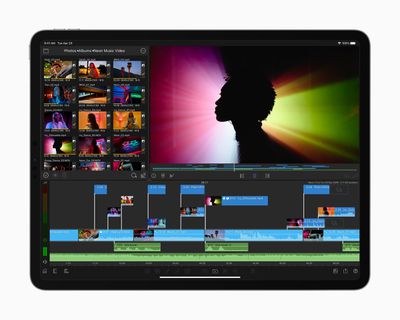
With the high-end 12.9-inch iPad Pro running iPadOS 16, users can take advantage of the Liquid Retina XDR Display and use the ‌iPad‌ as a reference monitor. This is aimed at artists and creators who need accurate colors and vivid detail when working on large projects.

Option to Turn on Lock to End Call

ipados 16 lock to end call
Under Settings, Accessibility, and Touch, users can now choose to toggle on "Lock to End Call," making it easer to end a current call by pressing the top button.


Related Forum: iOS 16

Popular Stories

apple pro tell logo

Apple Launching Five New Products Today

Thursday November 5, 2026 12:59 am PST by
Apple is launching five new products on Friday, November 6, following pre-orders that opened last week, including its first touchscreen MacBook Pro models. The following new products will be available from today: iPad mini with OLED display and A20 Pro chip iMac with M6 chip 14-inch MacBook Pro with M6 chip 14-inch MacBook Pro with OLED touchscreen 16-inch MacBook Pro with OLED...
duo aquarium

More Fun iPhone Duo Apps: 30 New Picks to Try

Friday November 6, 2026 3:27 pm PST by
When the iPhone Duo launched, we shared a list of some of the fun apps developers created for the new form factor. Two weeks out, developers are continuing to come up with fresh ideas, so we thought we'd share some of our favorites. Games Marbles Unhinged ($2.99) - Marbles Unhinged is a marble maze designed for the Duo. When you fold it, the floor turns into a ramp. If you stand the top...
silver iphone 18 pro

Apple Rumored to Drop the iPhone's Action Button Next Year

Friday November 6, 2026 6:07 am PST by
Apple plans to merge the iPhone's Action button with the Camera Control starting next year, according to the leaker known as "Instant Digital." In a new post on Weibo, the leaker claimed that a single press of the combined button would open the camera, while a long press would trigger the function assigned to the Action button. They explicitly clarified that the dedicated Action button would ...

Top Rated Comments

nvmls Avatar
58 months ago
15 years of OS development to mimic how a computer handles files, still limited though, and people clap 🤣

God bless the apple consumer.
Score: 15 Votes (Like | Disagree)
Channan Avatar
58 months ago

There’s really zero reason to get an iPad Pro over a MacBook Air.


Ironically the iPad mini might be the most useful of the iPad family due to its convenience as a consumption device.
*For you.

You forgot to put that in your first sentence. Because for me, there’s really zero reason to get a MacBook Air over an iPad Pro. There’s nothing a Mac can do that my iPad can’t for my own personal use.
Score: 10 Votes (Like | Disagree)
58 months ago

There’s really zero reason to get an iPad Pro over a MacBook Air.


Ironically the iPad mini might be the most useful of the iPad family due to its convenience as a consumption device.
I let go of my MacBook recently because I wanted an iPad Pro. Why? My reasons were because I wanted a device that’s even more lightweight but also powerful. I chose the 11” because it’s the perfect size for reading books and reading study material on the train or plane. I can throw it in my back pack and I do t even know it’s there. I found the 12.9” just too big to do that and after a while became too heavy for reading in your hands for long periods of time.

It’s also perfect for math notation, taking notes, studying and doing research. I also started to get back into art which I haven’t done for years because of the iPad Pro. The value I get out of the iPad Pro has far outweighed the value I get from the MacBook. I don’t think I will ever get a MacBook again but instead will have an iMac or Mac Studio, an iPad Pro 11”, iPhone Pro, and an Apple Watch.

Each device has its perfect use case for me since I have an iMac at home and now an iPad Pro and iPhone. The MacBook has no use any longer for me and my use case. Others will have a different use cases and might need one for different purposes.
Score: 8 Votes (Like | Disagree)
FightTheFuture Avatar
58 months ago

Except true external display support and "State Manager", I don't really see desktop-class improvement here.
- Can I use Disk Utility.app to format/partition an external drive? No.
- Is Files on par with macOS' Finder? No.
- Is there a Terminal.app? No.
- Transferring my own music to iTunes w/o relying on another Mac? No.
- So-called "Pro" apps? No.
- ...

As long as Apple didn't go into that "What's a computer?" BS, it was fine considering an iPad as a bigger iPhone and not having bigger expectations.
This is a list of things most people do not do with their computers.
Score: 7 Votes (Like | Disagree)
58 months ago
Have they come up with a way to delete text messages across all your Apple devices yet? I have to delete them manually from my iPhone, MacBook, MacBook Pro, and iPad.
Score: 6 Votes (Like | Disagree)
58 months ago

I let go of my MacBook recently because I wanted an iPad Pro. Why? My reasons were because I wanted a device that’s even more lightweight but also powerful. I chose the 11” because it’s the perfect size for reading books and reading study material on the train or plane. I can throw it in my back pack and I do t even know it’s there. I found the 12.9” just too big to do that and after a while became too heavy for reading in your hands for long periods of time.

It’s also perfect for math notation, taking notes, studying and doing research. I also started to get back into art which I haven’t done for years because of the iPad Pro. The value I get out of the iPad Pro has far outweighed the value I get from the MacBook. I don’t think I will ever get a MacBook again but instead will have an iMac or Mac Studio, an iPad Pro 11”, iPhone Pro, and an Apple Watch.

Each device has its perfect use case for me since I have an iMac at home and now an iPad Pro and iPhone. The MacBook has no use any longer for me and my use case. Others will have a different use cases and might need one for different purposes.
Reminds me of college, I owned a Mid 2007 MacBook and, after it came out, an OG iPad. I took a chemistry class my Freshman year with that MacBook, and note taking on it was truly a pain, if just because of all the chemical subscripts. The year after I got my iPad, I used it for note taking in a linear algebra class, handwritten notes with one of those touchscreen styluses. It made taking notes in my math class such a breeze. (Why didn’t I just use a paper notebook? Well, I type faster than I write, so it made sense to me as a muddle-headed freshman. As for the math class? Mostly because I didn’t want to carry a large notebook in my backpack, especially if it had only so much space for each subject. Plus, I was on crutches for two months, if I could reduce the weight in my backpack, I gladly would.) There are times and scenarios when I prefer paper and pen, but there are also times and scenarios when I prefer digital handwriting.


Score: 4 Votes (Like | Disagree)
Latest Stories
Siri AI Rumored to Become 'More Like an Agent' as Early as Next Year
28 minutes ago
Apple Taking New Approach to Developing iOS 28 and macOS 28
2 hours ago
Early Apple Black Friday Deals on Apple Watch, MacBook Air, and More
21 hours ago
'Backglow' Lets You Customize New MacBook Pro's Glowing Apple Logo
21 hours ago
Top Stories: Apple Product Launches, iOS 27.3 Beta, and More
1 day ago
More Fun iPhone Duo Apps: 30 New Picks to Try
2 days ago
Hands-On With Apple's New OLED Touchscreen MacBook Pro
2 days ago
Apple Store With All-New Design Opening Soon in Southern California
2 days ago
Control the Glowing Apple Logo on Your New MacBook Pro
2 days ago
Apple Shares New 'Apple Card: Apply and Use in Minutes' Ad
2 days ago
Apple Says More Than 100,000 Apps Optimized for iPhone Duo, Here's What's Still Missing
2 days ago
Early Black Friday Deals Kickoff With Steep Discounts on Apple Watch Ultras and More
2 days ago
The MacRumors Show: iOS 27.3 Looks Like a Huge Update
2 days ago
Best Buy's Black Friday Event Begins With Sitewide Savings on Apple, TVs, More
2 days ago
Apple Releasing Yet Another Two New Products Next Week
2 days ago
MacBook Air Drops to Lowest Price in Months With Amazon's $250 Discount
2 days ago
Apple Rumored to Drop the iPhone's Action Button Next Year
2 days ago
Apple's Extended Return Policy Now in Effect for 2026 Holiday Season
2 days ago
Apple Music Classical Updated With New Icon and Refreshed Design
2 days ago
OLED iPad Mini, M6 iMac, and New MacBook Pros Available From Today
2 days ago
Apple Surveys iPhone Duo Buyers About Crease and Camera
3 days ago
Apple's First Touchscreen Mac is Now Arriving to Customers
3 days ago
Claude Gets Personal Finance Feature With Bank Account Linking
3 days ago
Apple Arcade Adds Crossy Road Rush and NBA 2K27
3 days ago
Apple's New HomeView Smart Home Hub: Here's How Much RAM It Has
3 days ago
iPad Mini vs. iPad Air Buyer's Guide: Now Just $50 Apart
3 days ago
First iOS 27.3 and macOS Golden Gate 27.3 Public Betas Now Available
3 days ago
Apple Announces a New Mac Sales Record
3 days ago
Paid $200 for Logic Pro? Apple Says You Won't Get This New Feature
3 days ago
Instagram's Edits Video Editor is Now Available on Mac
3 days ago







































