Here Are All the Widgets You Can Add to Your iPhone's Lock Screen in iOS 16 - MacRumorsOpen MenuShow RoundupsShow Forums menuVisit ForumsOpen Sidebar
Skip to Content

Here Are All the Widgets You Can Add to Your iPhone's Lock Screen in iOS 16

In iOS 16, Apple has overhauled the iPhone Lock Screen to make it a lot more customizable, and one of the most welcome changes is the ability to add information-rich widgets to the Lock Screen for the first time.
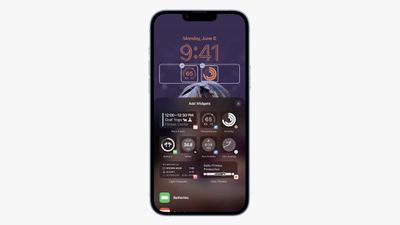
lock screen widgets ios 16
Lock Screen Widgets have been the sole preserve of Android phones for a few years now, so it's good to see that they will finally come to iPhones later this year when iOS 16 is released in the fall.

As it stands, widgets provide updates from your apps that you can conveniently check at a glance, without having to unlock your iPhone to access the Home Screen, but they're minimally interactive insofar as tapping on a widget will likely only open its associated app.

Below is a list of all the available stock ‌Widgets‌ that Apple has included in the first iOS 16 beta, divided into those which can be added above or below the digital clock.

Widgets You Can Add Above the Time
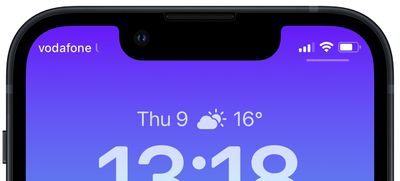
lock screen top widget
You can insert a widget alongside the date above the digital clock on the Lock Screen. The list below includes the stock app widget options available to you. Many of these widgets display a single data point, using alphanumeric text and symbols.

  • Calendar - day of the week, date, month / next event
  • Clock - city time zone / next alarm
  • Fitness - activity stats (move calories, exercise minutes, stand hours)
  • Reminders - due today
  • Stocks - single stock with up/down symbol
  • Weather - moon events, sun events, conditions, location, rain, air quality, UV index, wind

Widgets You Can Add Below the Time
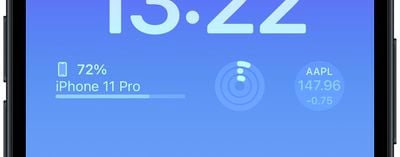
lock screen widgets bottom
Directly below the digital clock there is a larger oblong space where you can place widgets horizontally next to each other. You can insert up to four square symbol-based widgets, or up to two rectangular widgets with more information, or alternatively a combination of two square widgets and one rectangular widget.

Batteries
lock screen widgets
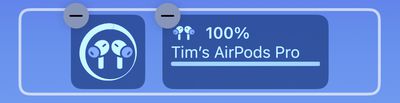
The Batteries widget comes in both square and rectangular versions showing the iPhone's battery status. Connect AirPods and their battery is shown instead.

Oddly, if you use two battery widgets they will display the battery level for the same device, rather than showing AirPods in one and iPhone in the other. Hopefully this is a kink that will be worked out in the beta testing phase.

Calendar
2lock screen widgets
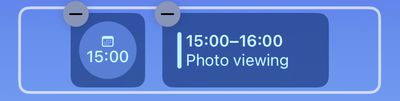
The Calendar widget comes in three formats. You can track the current date as a square widget (although why you'd want to is unclear since the date is always displayed above the time). You can also track the next upcoming event's time or use a larger widget to show both the event name and its time.

Clock
3lock screen widgets
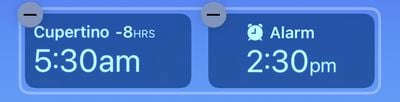
Three clock widgets let you view a clock for a city to check the time at that location, and these come in one rectangular and two square varieties. There's also a world clock to view the time in up to three cities around the world, and two versions that display the next alarm.

Fitness
4lock screen widgets
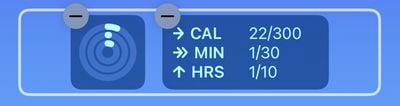
One Fitness widget displays the Activity rings graphic, while a larger readout shows your Activity ring stats (move, exercise, stand).

Home
5lock screen widgets
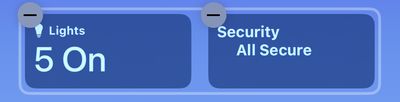
For the Home app, two widgets display any indoor climate sensors, one displays any lights and switches, and another informs you of any security issues. You can also monitor a specific security accessory, or view a home summary (security, climate, and lights).

News
6lock screen widgets
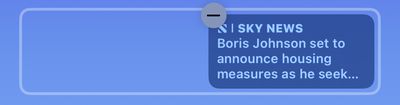
A single larger widget provides today's top news story.

Reminders
7lock screen widgets
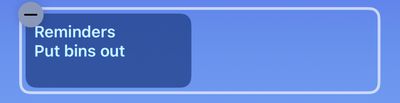
A single larger widget offers quick access to one of your reminders lists, and displays the next due reminder.

Stocks
8lock screen widgets
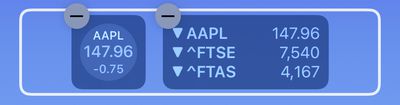
One smaller and one larger widget let you view price quotes and track performance a symbol throughout the day. There's also a larger widget that displays three stocks.

Weather
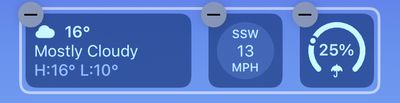
9lock screen widgets
Eight optional weather widgets to see moon events, sun events, conditions, location, rain, air quality, UV index, and wind. Only the current weather conditions and moon events come in the larger widget format.

More Widgets to Come

This widgets list shouldn't be treated as comprehensive, as Apple may add more or tweak existing ones before the public release of iOS 16 in the fall. Also, developers will be able to create widgets for third-party apps using Apple's new WidgetKit API, so expect plenty more Lock Screen widgets to come.


Related Forum: iOS 16

Popular Stories

iCloud iPhone 17 Pro

iPhone Users Who Pay for iCloud Storage Get Two New Perks on iOS 27

Thursday July 2, 2026 6:10 am PDT by
If you pay for certain iCloud+ storage plans beyond the 5GB that Apple offers for free, you will receive two more perks on iOS 27 at no additional cost. A summary of the two new iCloud+ perks on iOS 27:Increased daily usage limits for some new Apple Intelligence features, including image generation in the revamped Image Playground app. HomeKit Secure Video cameras receive generated video...
American Express Gold Apple Pay Feature

American Express Announces New Apple Pay Feature

Tuesday June 30, 2026 10:27 am PDT by
American Express today announced that you can now redeem Membership Rewards points when checking out with Apple Pay on the web and in apps on the iPhone and iPad. When checking out with Apple Pay on iOS 18 or iPadOS 18 or later, tap on your eligible American Express card (Platinum, Gold, Green, and others) and select the Membership Rewards points option. You can use points to cover all or...
series 10 apple watch titanium digital crown

Report: Apple Watch Redesign Coming Next Year With New Band System

Tuesday June 30, 2026 8:45 am PDT by
A "major overhaul" of the Apple Watch's design is due to arrive next year with a new system for connecting bands, according to a known Weibo leaker. In a set of recent posts, the leaker known as "Instant Digital" linked the new claim to older rumors about an "Apple Watch X" model, which was said to introduce a fresh design and break compatibility with the existing watch band system. Citing...

Top Rated Comments

Justin Cymbal Avatar
53 months ago
Apple can and needs to do a better job with the design of the battery widgets for both this new lock screen and the existing home screen

This widget (screenshot attached) should not take up (literally) one third of my available screen real estate

Myself, and many other Apple users would really like to see the battery percentages for AirPods, the Apple Watch and their iPhone on at all times and take up as little screen real estate as possible

I can’t speak for others, but the default battery widget with just a circle and no percentage, is useless, as well as displaying the name of the AirPods as pictured in the above article

A simple picture of an Apple Watch and a picture of AirPods next to their percentage is all that I need - in AS LITTLE screen real estate as possible

Attachment Image
Score: 29 Votes (Like | Disagree)
rhett7660 Avatar
53 months ago

Already enough..we dont want infinite widgets to create too much confusion
Why limit? Why not let the end user pick what they want...
Score: 15 Votes (Like | Disagree)
Leon Ze Professional Avatar
53 months ago
Adding widgets to the lock screen was a master stroke by Apple. Well played Apple and an awesome move!
Score: 11 Votes (Like | Disagree)
Populus Avatar
53 months ago
This widgets are screaming “always-on display”. Actually the whole lock screen redesign points to a future always-on display. Such a pity that this feature will be exclusive to the 14 Pro models… And no iPhone mini will have it.
Score: 10 Votes (Like | Disagree)
xraydoc Avatar
53 months ago

Already enough..we dont want infinite widgets to create too much confusion
Really? I can think of a many more.
- Battery level for my car (EV)
- Battery level for my hearing aids (currently reported by their app)
- Timer widget / Countdown timer
- # unread mail / text messages
...many others
Score: 10 Votes (Like | Disagree)
53 months ago

If you tap a widget will it take you to the respective app?
Yes, i.e if you click on a weather widget icon on the lockscreen it will open up weather app.
Score: 9 Votes (Like | Disagree)