

Apple Removes Network Locations Feature in macOS Ventura - MacRumorsOpen MenuShow RoundupsShow Forums menuVisit ForumsOpen Sidebar
Skip to Content

Apple Removes Network Locations Feature in macOS Ventura

In addition to redesigning the System Settings app on macOS Ventura, Apple has removed the app's longstanding Network Locations feature, as noted by Jason Snell at Six Colors. The feature allowed users to quickly switch between different sets of Wi-Fi, Ethernet, and other network settings depending on their location, such as home or work.
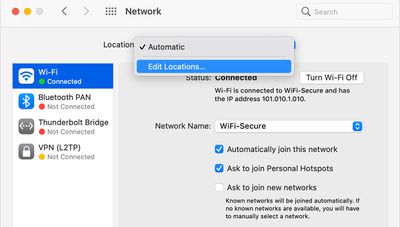
macos ventura network locations
Given that macOS Ventura is still in beta, there is always a chance that Network Locations could return at some point, but this seems unlikely given that Apple marked Tyler Loch's bug report about the feature's absence as "works as currently designed."

In a support document, Apple says the Network Locations feature could be useful in circumstances such as those listed below:

- You use the same type of network (such as Ethernet) at work and at home, but the settings you use at work don't allow your Mac to automatically connect to the same type of network at home.

- Your Mac connects to more than one type of network service (such as both Wi-Fi and Ethernet) at work and at home, but at work you want your Mac to try connecting to the Ethernet network first, and at home you want your Mac to try connecting to the Wi-Fi network first. In other words, you want to set a different service order for each location.

- Your Mac isn't connecting to your network and you want to quickly reset your network settings for testing purposes, without losing your current network settings.

Snell says Apple's command-line tool "networksetup" is still present in the latest macOS Ventura beta, so a third-party developer could step in and release an app to replace the Network Locations functionality removed in the System Settings app.


Related Forum: macOS Ventura

Popular Stories

Aston Martin CarPlay Ultra Screen

Apple Says CarPlay Ultra is Coming to These Vehicle Brands

Thursday May 21, 2026 11:53 am PDT by
Last year, Apple launched CarPlay Ultra, the long-awaited next-generation version of its CarPlay software system for vehicles. Nearly a year later, CarPlay Ultra is still limited to Aston Martin's latest luxury vehicles, but that should change fairly soon. In May 2025, Apple said many other vehicle brands planned to offer CarPlay Ultra, including Hyundai, Kia, and Genesis. CarPlay Ultra...
iphone 18 pro blue%402x

iPhone 18 Pro: Dark Cherry, Light Blue, and Dark Gray Chassis Leaked [Update]

Thursday June 4, 2026 5:18 am PDT by
Update: Since publication, new information has come to light suggesting the images have been AI-manipulated and are not in fact iPhone 18 Pro chassis parts. The original article follows. The color options Apple is reportedly planning for the upcoming iPhone 18 Pro and ‌iPhone 18 Pro‌ Max have appeared online today in the form of images of chassis parts of unknown authenticity....
iOS 27 All the New App Features

iOS 27: All the Rumored App Features

Wednesday June 3, 2026 3:48 pm PDT by
Siri is getting a major overhaul in iOS 27, but Apple also has some big updates planned for apps like Camera, Photos, and Wallet. There are multiple new AI features in the works, plus some non-AI upgrades. Camera Apple is moving Visual Intelligence from the Camera Control button to the Camera app in iOS 27, according to Bloomberg. There will be a Siri mode that will be available alongside...

Top Rated Comments

50 months ago

Pardon my ignorance on this matter, but how was this used? I mean you would connect to a different network depending on where you were, wouldn't you?
You could basically have your Mac adjust your network configuration for you based on your WiFi network, e.g. automatically use a different DNS server at home vs work.

It was a niche feature for sure but I also don't see why it needs to be removed. Part of what made macOS special was a lot of these little "nice touches" that came built in to the OS.
Score: 55 Votes (Like | Disagree)
50 months ago

My guess is they will bring it back in a few years as a "new feature" like they are doing with the battery percentage.
Battery Percentage. Network Location. And Mobile Home Folders.
Battery Percentage! Network Location!! And Mobile Home Folders!!

BATTERY PERCENTAGE! NETWORK LOCATION!! ... Are you getting it yet???

These are not 3 separate updates!!!

Introducing.... iosOSmacOS

:D
Score: 36 Votes (Like | Disagree)
50 months ago
Well, no one comes into work at Apple, so they don't need it and we are expected to just follow suit.
Score: 33 Votes (Like | Disagree)
macduke Avatar
50 months ago
Everyone: We want iPadOS to be more like macOS.

Apple: We made macOS more like iPadOS.


Attachment Image
Score: 24 Votes (Like | Disagree)
50 months ago

Pardon my ignorance on this matter, but how was this used? I mean you would connect to a different network depending on where you were, wouldn't you?
I haven't used it recently, but in the past I'd use it to switch Network settings as I moved to different locations. This really was a more advanced feature that the average user would never use, and I suspect that they are removing it because it was lightly-used. Dumbing down the system. Not happy about that, if true.
Score: 23 Votes (Like | Disagree)
50 months ago
My guess is they will bring it back in a few years as a "new feature" like they are doing with the battery percentage.
Score: 23 Votes (Like | Disagree)














