Apple Criticized for 'Fundamentally Misguided' Approach to Stage Manager in iPadOS 16 - MacRumorsOpen MenuShow RoundupsShow Forums menuVisit ForumsOpen Sidebar
Skip to Content

Apple Criticized for 'Fundamentally Misguided' Approach to Stage Manager in iPadOS 16

Stage Manager in the iPadOS 16 beta is receiving heavy criticism for being "fundamentally misguided" in its approach to bringing a new level of multitasking to the iPad experience, with some even calling on Apple to delay the feature entirely due to its shortcomings.
ipados 16 stage manager
Federico Viticci, the founder and editor in chief of MacStories and a prominent member of the Apple community, outlined his frustration with ‌Stage Manager‌ in a Twitter thread earlier this week. Viticci says that design decisions built into ‌Stage Manager‌ are "fundamentally misguided," arguing that the feature is unstable, hard to use, and has user interface glitches across the experience.

"If ‌Stage Manager‌ is the future of iPadOS for pro users, I hope Apple understands that it can't be rushed. We waited years for this; might as well get it in Spring 2023," Viticci says, suggesting Apple delay ‌Stage Manager‌'s release entirely and rethink its approach.

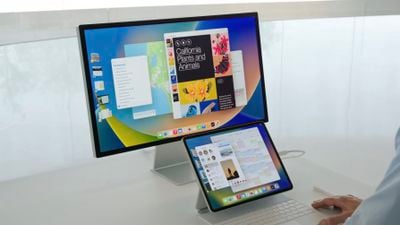
‌Stage Manager‌, for the first time, lets users overlap windows and use external display support with their ‌iPad‌. Apple's implementation of the feature, however, is not as clear-cut as some may have hoped.

‌iPad‌ enthusiasts have yearned for the company to take better advantage of the ‌iPad‌'s power and multitasking potential, and ‌Stage Manager‌ is Apple's answer to those calls. The narrative around iPadOS and its inability to take full advantage of the ‌iPad‌'s hardware took a momentous leap when Apple brought the M1 Apple silicon chip to the iPad Pro in April 2021 and then to the iPad Air last fall.

‌Stage Manager‌ is designed to only work with iPads powered by the ‌M1‌ chip, another point of contention surrounding the increasingly controversial feature. Apple argues that only the unified memory architecture of the ‌M1‌ chip, designed initially for the Mac, can power the heavy workload that ‌Stage Manager‌ requires.

craig wwdc stage manager
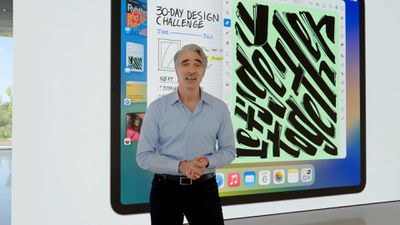
Announcing ‌Stage Manager‌ at WWDC in June, Apple's senior vice president of software engineering, Craig Federighi, said, "With technologies like display scaling and virtual memory swap, we have the foundation for a big leap forward in user experience, one that can change how our Pro users get work done on ‌iPad‌."

‌Stage Manager‌ is one of just a few new features of iPadOS 16, but it's also present in macOS Ventura. While they share a name and the same fundamental idea, ‌Stage Manager‌'s implementation on iPadOS 16 and macOS Ventura could not be more different.

For instance, as Viticci noted in his early overview of iPadOS 16, Apple is looking to alleviate the heavy lifting often faced by Mac users of having to perfectly position their overlapping Mac windows to create an ideal workspace. With ‌Stage Manager‌ on iPadOS 16, the system automatically moves apps around to keep the main app in use in the center of the "stage" while other apps open "gracefully move to the side." As Viticci wrote at the time:

The idea behind Stage Manager is that you'll get a system that wants to help you keep the benefits of overlapping windows while offering tools that should alleviate some of the pains behind window management for people like me, who have historically disliked the Mac's overlapping windows.

Stage Manager also takes care of automatically focusing on the 'center app', and you can choose to hide or show the dock and recent apps on the left side. If you keep the dock, you'll have a fast way to drag in new windows into a workspace.

Viticci shared on Twitter two feedback reports he filed back to Apple about ‌Stage Manager‌, still in testing. First, he suggests an easy way to move windows from the ‌iPad‌ to an external display, as it's currently not possible to do so. The other feedback report outlines how the system "destroys" workspaces for apps when connected to an external display.

For the latter report, Apple responded by saying it "behaves as intended," which Viticci calls "baffling." For the other suggestion to make it easier to move windows and spaces to an external display, Apple said after having "carefully considered" the idea, it won't be moving forward with its implementation.

Stepping away from the precedent in years past, Apple is planning to release iPadOS 16 later in the fall and not alongside iOS 16, expected in September. The delay in iPadOS 16's launch should give Apple ample time to address concerns around ‌Stage Manager‌ before it launches to customers sometime in October.

Apple is unlikely to pull ‌Stage Manager‌ from iPadOS 16 when it's released, although it could always opt to label it as a beta feature until it works through the kinks, as it did for Universal Control in macOS Monterey.


Related Forum: iOS 16

Popular Stories

apple pro tell logo

Apple Launching Five New Products Today

Thursday November 5, 2026 12:59 am PST by
Apple is launching five new products on Friday, November 6, following pre-orders that opened last week, including its first touchscreen MacBook Pro models. The following new products will be available from today: iPad mini with OLED display and A20 Pro chip iMac with M6 chip 14-inch MacBook Pro with M6 chip 14-inch MacBook Pro with OLED touchscreen 16-inch MacBook Pro with OLED...
duo aquarium

More Fun iPhone Duo Apps: 30 New Picks to Try

Friday November 6, 2026 3:27 pm PST by
When the iPhone Duo launched, we shared a list of some of the fun apps developers created for the new form factor. Two weeks out, developers are continuing to come up with fresh ideas, so we thought we'd share some of our favorites. Games Marbles Unhinged ($2.99) - Marbles Unhinged is a marble maze designed for the Duo. When you fold it, the floor turns into a ramp. If you stand the top...
silver iphone 18 pro

Apple Rumored to Drop the iPhone's Action Button Next Year

Friday November 6, 2026 6:07 am PST by
Apple plans to merge the iPhone's Action button with the Camera Control starting next year, according to the leaker known as "Instant Digital." In a new post on Weibo, the leaker claimed that a single press of the combined button would open the camera, while a long press would trigger the function assigned to the Action button. They explicitly clarified that the dedicated Action button would ...

Top Rated Comments

Reason077 Avatar
55 months ago

"unstable, hard to use, and has user interface glitches across the experience."
Unfortunately this is the direction Apple seems to be going with a lot of its software updates lately. Another case in point: System Preferences in macOS Ventura beta!

Is Apple trying to do too much, too fast with its annual OS release schedule? Perhaps it's time they moved to a "tick/tock" model with major new features every 2nd year, followed by a release that focuses mainly on bug fixes, performance, new hardware support, etc? Would this give teams more time to ensure that significant new features like Stage Manager are really polished and well-thought out?
Score: 47 Votes (Like | Disagree)
contacos Avatar
55 months ago
It’s overengineered in my opinion. It could be so easy, just give me an active corner like on a Mac to select a „desktop“ with different open app windows on them and let me drag and drop a window from the iPad Home Screen to the extended monitor.

I’ll stick to one full screen app (eg safari) and a swipe from the right to quickly glance at twitter, messages or emails. I have not even used the „3 dots“ thing they added on iPadOS15. The only time I use it is when I activated it by mistake with a swipe down.

Apple doesn’t just work anymore. You need YouTube tutorials to use anything new that they try to squeeze into their pre-existing functionalities / features. Start to rebuilt from scratch
Score: 45 Votes (Like | Disagree)
DHagan4755 Avatar
55 months ago
Perhaps Apple would be better served by ditching the annual OS updates.
Score: 35 Votes (Like | Disagree)
sunapple Avatar
55 months ago
It’s so strange to me how they decided to waste so much screen real estate.

For work on Windows I always have my two monitors filled with app windows. I drag them to one of the sides of the screen to fill the monitor either fully or to have two or more windows in some kind of split view.

Yet on a small iPad screen they think it’s best to work with small windows and have more apps stored to the left and a dock on the bottom?

Then they even hide this functionality by default and still offer the old split view. Why not improve on existing UI?

It looks good in pictures, that’s about all the upsides I can see. Too negative?
Score: 34 Votes (Like | Disagree)
Wildkraut Avatar
55 months ago
Good to see critical voices also from die hard Apple evangelists.
Score: 23 Votes (Like | Disagree)
55 months ago
For some reason, multitasking is hard in 2022 when you want to reinvent the wheel for some reason, just for being different. This makes Windows 3.11 for Workgroups look like a miracle.
Score: 19 Votes (Like | Disagree)
Latest Stories
Siri AI Rumored to Become 'More Like an Agent' as Early as Next Year
20 minutes ago
Apple Taking New Approach to Developing iOS 28 and macOS 28
2 hours ago
Early Apple Black Friday Deals on Apple Watch, MacBook Air, and More
21 hours ago
'Backglow' Lets You Customize New MacBook Pro's Glowing Apple Logo
21 hours ago
Top Stories: Apple Product Launches, iOS 27.3 Beta, and More
1 day ago
More Fun iPhone Duo Apps: 30 New Picks to Try
2 days ago
Hands-On With Apple's New OLED Touchscreen MacBook Pro
2 days ago
Apple Store With All-New Design Opening Soon in Southern California
2 days ago
Control the Glowing Apple Logo on Your New MacBook Pro
2 days ago
Apple Shares New 'Apple Card: Apply and Use in Minutes' Ad
2 days ago
Apple Says More Than 100,000 Apps Optimized for iPhone Duo, Here's What's Still Missing
2 days ago
Early Black Friday Deals Kickoff With Steep Discounts on Apple Watch Ultras and More
2 days ago
The MacRumors Show: iOS 27.3 Looks Like a Huge Update
2 days ago
Best Buy's Black Friday Event Begins With Sitewide Savings on Apple, TVs, More
2 days ago
Apple Releasing Yet Another Two New Products Next Week
2 days ago
MacBook Air Drops to Lowest Price in Months With Amazon's $250 Discount
2 days ago
Apple Rumored to Drop the iPhone's Action Button Next Year
2 days ago
Apple's Extended Return Policy Now in Effect for 2026 Holiday Season
2 days ago
Apple Music Classical Updated With New Icon and Refreshed Design
2 days ago
OLED iPad Mini, M6 iMac, and New MacBook Pros Available From Today
2 days ago
Apple Surveys iPhone Duo Buyers About Crease and Camera
3 days ago
Apple's First Touchscreen Mac is Now Arriving to Customers
3 days ago
Claude Gets Personal Finance Feature With Bank Account Linking
3 days ago
Apple Arcade Adds Crossy Road Rush and NBA 2K27
3 days ago
Apple's New HomeView Smart Home Hub: Here's How Much RAM It Has
3 days ago
iPad Mini vs. iPad Air Buyer's Guide: Now Just $50 Apart
3 days ago
First iOS 27.3 and macOS Golden Gate 27.3 Public Betas Now Available
3 days ago
Apple Announces a New Mac Sales Record
3 days ago
Paid $200 for Logic Pro? Apple Says You Won't Get This New Feature
3 days ago
Instagram's Edits Video Editor is Now Available on Mac
3 days ago