With the launch of the iPhone 14 Pro and iPhone 14 Pro Max, Apple introduced an updated design that does away with the notch at the front for the TrueDepth camera. Instead, Apple has slimmed down the hardware and put the proximity sensor under the display, allowing for a smaller pill-shaped cutout.
As we learned during the rumor cycle, the new cutout consists of a circle for the camera and a second pill-shaped cutout for the TrueDepth hardware, but Apple has combined these into a single cutout that it is calling the Dynamic Island. We thought we'd take a closer look at the Dynamic Island, which is one of the most clever user interface changes Apple has implemented in recent years.
Dynamic Island Shape
The Dynamic Island is not a static cutout, and can shift in size and shape to blend itself into the UI and provide new visual tools front and center on the iPhone's display. In standard usage, it is a small pill-shaped cutout, but Apple uses pixels to expand it to match different tasks.
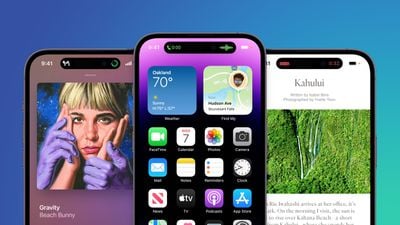
When making an Apple Pay payment, for example, the Dynamic Island expands into a square shape to match the Face ID confirmation interface, and while on a phone call, it expands to be larger so you can have the phone controls front and center.
Basically, the Dynamic Island is able to house ongoing background tasks that you might need to come back to while doing other things on your phone
Ways the Dynamic Island Can Be Used
So far, we only have Apple's demonstrations to go on, but it looks like the Dynamic Island can show all kinds of different information. We're rounded up the ways it's been used so far.
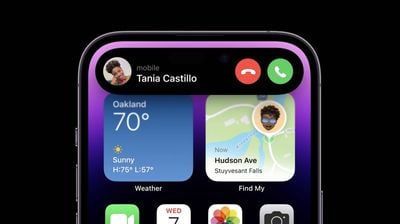
- Expanded into a large rectangle to show upcoming Maps directions without having to open the Maps app.
- Displaying Maps directions in a smaller pill-shaped interface for when you just need a quick glance at the next turn.
- Square shaped for an Apple Pay payment confirmation.
- Showing a music waveform and time remaining on a song that's playing.
- Tracking the time of arrival of a Lyft.
- Displaying privacy indicators when the microphone or camera is in use.
- Displaying a small bar with the phone icon and the length of the phone call.
- Showing a timer.
- Keeping track of sports scores.
- Accessing music controls and a music player.
- Showing AirPods connection status and battery life.
- Displaying iPhone charging status and battery life.
The Dynamic Island can show notifications or information that you're actively keeping up with. It's going to work with the Live Activities feature coming in iOS 16, so you can track sports scores, Uber rides, and more right from the top of the iPhone's display.
It's worth noting that any time the Dynamic Island is in use like this, it is doing its task without interrupting what you're doing in the app you're in. So if you're reading Twitter, you can also be controlling your music through the Dynamic Island with just a tap.
Split Island
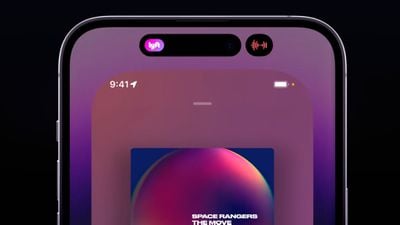
Because the TrueDepth camera system is actually housed in two separate cutouts that are merged through software, the Dynamic Island can do a neat trick where it separates into a small pill on the left and a circle on the right, both of which are able to display different information at the same time, such as music controls and a timer.
Dynamic Island Interaction
When tapped, the Dynamic Island expands to become larger so you can interact with the content that it's offering at the current time, and when you're in an app, you can swipe up to send the app's content to the Dynamic Island so you can get back to the Home screen.
Dynamic Island on iPhone Pro. Really interesting stuff here. pic.twitter.com/5XT3j6x700 — Neil Cybart (@neilcybart) September 7, 2022
Third-Party App Support
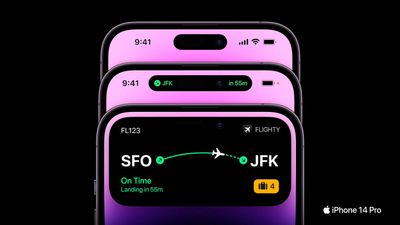
Apple is allowing third-party app developers to integrate their apps into the Dynamic Island so you can access third-party app content as well as Apple's own app content. Third-party app Flighty, for example, is able to put your flight information in the Dynamic Island so you can see it with a tap.
Dynamic Island Reactions
So far, reactions to the Dynamic Island have been largely positive, as can be seen in our roundup of commentary on the feature. It has been called "one of Apple's best designs."
The Dynamic Island has to be one my favorite software-related surprises in a while. In hindsight, it explains so much of Apple's recent design decisions on iOS: pill-shaped alerts, Live Activities, compact UI. They've been playing the long game. I love this. #AppleEvent pic.twitter.com/IGErzZBKq1 — Federico Viticci (@viticci) September 7, 2022
Availability
The Dynamic Island is limited to the iPhone 14 Pro and the iPhone 14 Pro Max. The standard iPhone 14 models continue to offer the same notch as the iPhone 13 models.
Additional Coverage
We'll be picking up an iPhone 14 Pro when preorders go live tomorrow, and when it's delivered on the 16th, we'll do an in-depth look at all of the new features, providing a much more detailed overview of the Dynamic Island and its functionality.




/https://forums.macrumors.com/attachments/2053899/)
/https://forums.macrumors.com/attachments/2053900/)