Apple Will Let You Remove Rapid Security Response Updates in iOS 16 - MacRumorsOpen MenuShow RoundupsShow Forums menuVisit ForumsOpen Sidebar
Skip to Content

Apple Will Let You Remove Rapid Security Response Updates in iOS 16

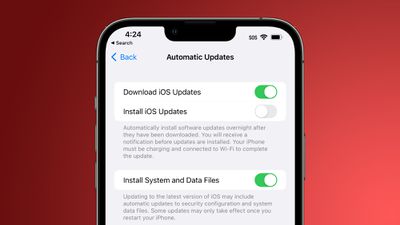
Apple in iOS 16 added a new Rapid Security Response feature that's meant to make it quicker and easier for the company to deploy security improvements to iPhone users without a full iOS update. By default, Rapid Security Responses are installed automatically, but Apple has implemented a way to remove them.
automatic security updates ios 16
In an updated support document shared today, Apple says that you can remove a Rapid Security Response from your device by going to Settings > General > About, tapping the iOS version, and then tapping Remove Security Update.

Apple says you can then reinstall the Rapid Security Response at a later date, or wait for it to be installed permanently as part of a standard software update. It is not clear why a Rapid Security Response would need to be removed, but it's nice that users will have the option.


There is also a toggle for turning off automatic installation of Rapid Security Responses, which then allows them to be downloaded manually.


Related Forum: iOS 16

Popular Stories

Apple Card iPhone 16 Pro Feature

Apple Card Promo to Offer Free AirPods Pro 3

Friday May 15, 2026 8:59 am PDT by
Starting as early as next week, customers who sign up for an Apple Card at Apple's retail stores in the U.S. will receive $249 cash back when they purchase AirPods Pro 3, according to Bloomberg's Mark Gurman. The promotion has yet to be officially announced by Apple, so exact terms and conditions are not available at this time. AirPods Pro 3 are priced at $249 in the U.S., so customers who...
Apple WWDC25 iOS 26 CarPlay Light mode 250609

Six Popular iPhone Apps Now Available on CarPlay

Thursday May 14, 2026 9:10 am PDT by
Apple's CarPlay system for accessing iPhone apps on a vehicle's dashboard screen has received six popular apps in recent weeks: ChatGPT, Perplexity, Grok, Google Meet, WhatsApp, and the indie artist streaming platform Audiomack. Make sure you have the latest version of each app and they will automatically appear on CarPlay. ChatGPT Starting with iOS 26.4, CarPlay supports voice-based...
ipad mini 7 blue

OLED iPad Mini: Release Date, Pricing, and What to Expect

Thursday May 14, 2026 5:08 am PDT by
According to the latest rumors, Apple is close to launching its next-generation iPad mini. So what should we expect from the successor to the iPad mini 7 that Apple released over a year ago? Read on to find out. Processor and Performance Apple is working on a next-generation version of the iPad mini (codename J510/J511) that features the A19 Pro chip, according to information found in code...

Top Rated Comments

48 months ago
One step closer to Windows? The only reason to remove updates there is when they cause terrible unforeseen issues. Which has happened a LOT the last couple years.

Hopefully that doesn’t start becoming the case here.

Of course Microsoft a few years ago went in the opposite direction, removing the ability to remove individual updates and bundling everything into one giant blob instead.
Score: 7 Votes (Like | Disagree)
Apple_Robert Avatar
48 months ago

Why does it say that some files will be installed automatically even when the option is turned off? You can’t really turn it off then can you?

Because some updated system files are necessary core parts of the OS.

This is another good move by Apple.
Score: 5 Votes (Like | Disagree)
eicca Avatar
48 months ago
I'm glad I have that option. Now bring back the option to change my home screen wallpaper without wanting to rip my hair out.
Score: 4 Votes (Like | Disagree)
Naraxus Avatar
48 months ago
So this is it. This is how they're going install their CSAM spyware.
Score: 3 Votes (Like | Disagree)
ChronicLynx Avatar
48 months ago


Attachment Image
Score: 3 Votes (Like | Disagree)
MrRom92 Avatar
48 months ago
Do these rapid security response updates require a respring or reboot?
Score: 3 Votes (Like | Disagree)