

If you updated to iOS 16 this week, you might notice your iPhone's battery draining faster than you remember before you got Apple's latest update.
While you may be quick to point a finger at the update itself as the culprit, there are several reasons why you may notice your battery draining a bit faster in the days after the update. We've listed some reasons below and how you can address them.
iOS 16 Photos App

The Photos app on your iPhone applies advanced machine learning and image-recognition algorithms to your photos and videos. The Photos app uses the A-series chips in the iPhone to run these complex operations and consumes battery life.
On iOS 16, specifically, a new feature automatically surfaces duplicate photos in your photo library. This new feature uses on-device processing to go through the thousands of pictures on your device and identify possible duplicates, and this process can be time and battery-consuming.
The more photos and videos you have, the longer it will take for the categorization process to complete. As Apple suggests, the best course of action is to leave your iPhone plugged in overnight while connected to Wi-Fi. This will allow the Photos app to curate your photos and videos while on connected power, which should alleviate some strain on the battery. The process can take several days, if not weeks, depending on how big your library is.
Spotlight Search Indexing
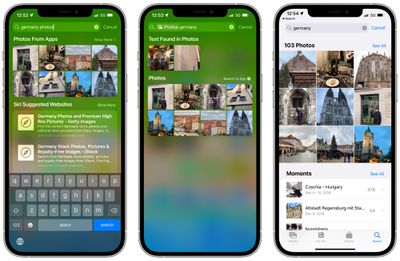
Spotlight search on your iPhone is a powerful way not only to search for apps and contacts, but it's also a place where you can search for content within apps, such as emails, messages, maps, Photos, and more.
To provide search results for content within your apps, your iPhone needs to index all of the content within all your apps using on-device processing, which consumes battery life. This can be a long and non-trackable process that happens in the background as you use and charge your iPhone.
While there is no way to track the process, you may be able to make it easier. Within Settings -> Siri & Search, you can disable the ability for Spotlight to search within individual apps. If there's an app that perhaps you don't want to be indexed, you can disable "Show Content in Search" to stop your iPhone from indexing that app, which could help save some battery life.
Your Apps Need to Be Updated
Apps are essential to the iPhone, but automatic updates to apps you have installed can have an impact on battery life. Especially after a major update like iOS 16, apps still need to get updated to support new technologies and the latest operating system.
In the coming days and weeks, developers will slowly update their apps to support iOS 16 and its new features. Apps that are outdated and that have not been updated for new technologies in iOS 16 may cause some battery drain since they're possibly using older tools and code.
A Good Old Restart and Checking on Battery Health
It's always worth simply restarting your iPhone. Sometimes after a major update, your iPhone could be glitched and bugged out, and a simple restart could resolve it and bring your battery life back to normal.
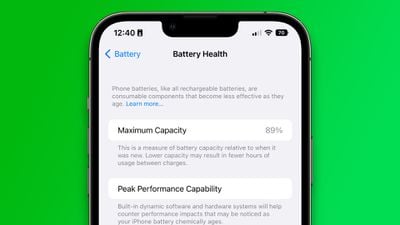
Another thing to remember is that the iPhone's battery, like all lithium-ion batteries, loses capacity over time. On Your iPhone, open Settings and tap through to Battery -> Battery Health, where you'll see how much of your original iPhone's battery capacity you have left. iOS will warn you if your battery needs to be replaced, so it's another point to keep in mind when thinking about your iPhone's battery life.



















