

iPhone 14 Pro's Always-On Display Works With Apple Maps, Phone, Voice Memos, and Apple TV Remote - MacRumorsOpen MenuShow RoundupsShow Forums menuVisit ForumsOpen Sidebar
Skip to Content

iPhone 14 Pro's Always-On Display Works With Apple Maps, Phone, Voice Memos, and Apple TV Remote

iPhone 14 Pro reviews published earlier today have revealed some additional information about the device's optional always-on display mode.
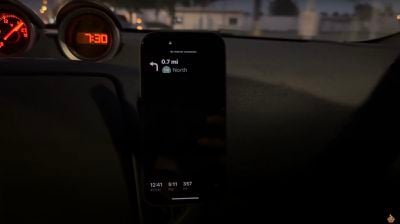
iPhone 14 Pro Always On Display Apple Maps

Always-on Apple Maps via Brian Tong

In addition to the Lock Screen, the always-on display works with the Apple Maps, Phone, and Voice Memos apps, according to Brian Tong's review. In the Maps app, the map is hidden and only the directions, arrival time, and distance remaining are shown. In the Phone and Voice Memos apps, various parts of the interface are dimmed.

Tong demonstrated this functionality in his video below, starting at the 4:40 mark.


As noted by CNBC's Sofia Pitt, the always-on display also works with the virtual Apple TV Remote feature in Control Center, allowing it to be used in dimmed fashion without unlocking the iPhone. The remote feature works with all Apple TV 4K and Apple TV HD models, the third-generation Apple TV, and AirPlay 2-enabled smart TVs.
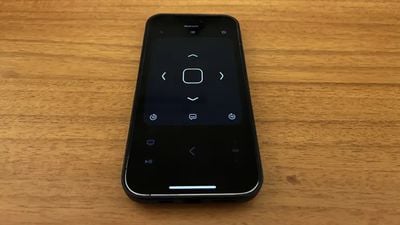
iPhone Always On Display Apple TV Remote

Always-on Apple TV Remote in Control Center via CNBC's Sofia Pitt

Some early reviews of the iPhone 14 Pro noted the always-on display has an impact on battery life, but it's not likely to be excessive given that the display ramps down to a low-power state with a 1Hz refresh rate when in always-on display mode. Nevertheless, the feature can be toggled off in the Settings app under Display & Brightness.

iPhone 14 Pro and iPhone 14 Pro Max launch this Friday, with other new features including the Dynamic Island replacement for the notch, an upgraded rear camera system with a 48-megapixel primary lens, new Deep Purple and Space Black color options, and more.

(Thanks, Ian Zelbo!)

Related Forum: iPhone

Popular Stories

iphone 18 pro blue%402x

iPhone 18 Pro: Dark Cherry, Light Blue, and Dark Gray Chassis Leaked [Update]

Thursday June 4, 2026 5:18 am PDT by
Update: Since publication, new information has come to light suggesting the images have been AI-manipulated and are not in fact iPhone 18 Pro chassis parts. The original article follows. The color options Apple is reportedly planning for the upcoming iPhone 18 Pro and ‌iPhone 18 Pro‌ Max have appeared online today in the form of images of chassis parts of unknown authenticity....
Aston Martin CarPlay Ultra Screen

Apple Says CarPlay Ultra is Coming to These Vehicle Brands

Thursday May 21, 2026 11:53 am PDT by
Last year, Apple launched CarPlay Ultra, the long-awaited next-generation version of its CarPlay software system for vehicles. Nearly a year later, CarPlay Ultra is still limited to Aston Martin's latest luxury vehicles, but that should change fairly soon. In May 2025, Apple said many other vehicle brands planned to offer CarPlay Ultra, including Hyundai, Kia, and Genesis. CarPlay Ultra...
iOS 27 All the New App Features

iOS 27: All the Rumored App Features

Wednesday June 3, 2026 3:48 pm PDT by
Siri is getting a major overhaul in iOS 27, but Apple also has some big updates planned for apps like Camera, Photos, and Wallet. There are multiple new AI features in the works, plus some non-AI upgrades. Camera Apple is moving Visual Intelligence from the Camera Control button to the Camera app in iOS 27, according to Bloomberg. There will be a Siri mode that will be available alongside...

Top Rated Comments

macsplusmacs Avatar
49 months ago
Inject the "Always-on Apple TV Remote in Control Center" into my veins....
Score: 14 Votes (Like | Disagree)
Chrjy Avatar
49 months ago
Personally, it's worth it alone just for the Always-on Apple TV remote. I cannot count the amount of times I wish this had been a thing previously. Pretty much use the TV Remote option every night with my 12 Pro so this will be awesome..
Score: 10 Votes (Like | Disagree)
GMShadow Avatar
49 months ago

What I am waiting to hear is what happens at night? Is it disabled by the Sleep Focus? It can't be tied to ambient lighting or that TV remote wouldn't work much of the time when the user is in "Theater Mode"
Yes, Focuses can turn off the display, as does placing it face down on a table, in a pocket, etc.
Score: 9 Votes (Like | Disagree)
Rob198612 Avatar
49 months ago
Apple TV remote AOD is pretty cool!! Love that
Score: 8 Votes (Like | Disagree)
synergize Avatar
49 months ago
"Always on" was available two years ago via the iPhone 12 Pro. Just run Spotify via CarPlay, and the iPhone screen stays on when you select a song from Spotify on the iPhone rather than CarPlay.
Score: 7 Votes (Like | Disagree)
Darth Tulhu Avatar
49 months ago
It's about time. One less thing I'll miss from Android.
Score: 7 Votes (Like | Disagree)















