Apple Watch Series 8 Takes Five Nights to Establish Baseline Wrist Temperature - MacRumorsOpen MenuShow RoundupsShow Forums menuVisit ForumsOpen Sidebar
Skip to Content

Apple Watch Series 8 Takes Five Nights to Establish Baseline Wrist Temperature

Apple today published a new support document with additional details about the new wrist temperature sensing feature available on Apple Watch Series 8 and Apple Watch Ultra models, and it turns out the feature requires users to wear their watch for five nights before it can detect a baseline temperature.
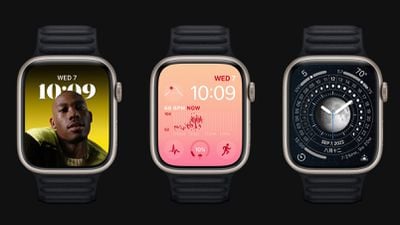
apple watch series 8 trio
Apple Watch Series 8 and Apple Watch Ultra have two temperature sensors — one on the back crystal, near your skin, and another just under the display. While the wearer sleeps, Apple Watch samples wrist temperature every five seconds. This design improves accuracy by reducing bias from the outside environment, according to Apple.

Your body temperature naturally fluctuates and can vary each night due to your diet and exercise, alcohol consumption, sleep environment, or physiological factors such as menstrual cycles and illness. After about 5 nights, your Apple Watch will determine your baseline wrist temperature and look for nightly changes to it.

Apple says that Sleep must be set up with "Track Sleep with Apple Watch" enabled, and Sleep Focus must be enabled for at least four hours a night for about five nights. After that, users can check Body Measurements -> Wrist Temperature in the Health app for recorded measurements.

Apple cautions that the feature isn't a medical-grade device and shouldn't be used for any medical purpose, nor is it a thermometer, and it cannot provide measurements on demand. A loose-fitting Apple Watch can also impact wrist temperature data.

Apple is marketing the feature in promotional materials for the new Apple Watch models as a way to improve period predictions and retrospective ovulation estimates, but the support document suggests that tracking nightly temperature changes while sleeping can give anyone insight into their "overall well-being."

For those who have no use for the feature, Wrist Temperature can be turned off in the Watch app on iPhone, under Privacy -> Turn off Wrist Temperature.

Related Forum: Apple Watch

Popular Stories

Surprise and Shine Live Coverage Article

Apple Event Live Blog: iPhone Duo, iPhone 18 Pro, and More

Wednesday September 9, 2026 9:10 am PDT by
Apple's "Surprise and Shine" event kicks off today at 10:00 a.m. Pacific Time, where we're expecting to see the foldable iPhone Duo, the iPhone 18 Pro and Pro Max, Apple Watch Series 12 and Ultra 4 models, new AirPods 5 earphones, and perhaps some other announcements. Apple is providing a live video stream on its website, on YouTube, and in the company's TV app across various platforms. We...
Apple Watch Ultra 2 Black Titanium

New Apple Watch Series 12 and Apple Watch Ultra 4 Features Revealed

Sunday August 30, 2026 7:54 am PDT by
Bloomberg's Mark Gurman today further outlined what to expect from the Apple Watch Series 12 and Apple Watch Ultra 4 set to be unveiled on September 9. While it was initially rumored that Touch ID may be coming to the Apple Watch this year, Gurman reiterated that he does not expect the Series 12 or Ultra 4 to have any major design changes compared to the current Series 11 and Ultra 3 models. ...
apple surprise and shine event

Apple Event Today: iPhone 18 Pro and iPhone Duo Cheat Sheet

Tuesday September 8, 2026 10:24 am PDT by
Apple's biggest event of the year is almost here, and all eyes are on Cupertino. With the first foldable iPhone expected to headline Apple's "Surprise and Shine" event on Wednesday, September 9, at 10:00 a.m. Pacific Time, the rumor mill has been running full throttle, fuelled by the biggest single design change in the life of the iPhone. To get you up to speed, here's a quick reference...

Top Rated Comments

Le0M Avatar
52 months ago
Honest question:
If I wear the watch all day, and put it into charge before going to sleep, how can I possibly be wearing it at night?
Score: 10 Votes (Like | Disagree)
52 months ago

Honest question:
If I wear the watch all day, and put it into charge before going to sleep, how can I possibly be wearing it at night?
Because there's quick charging on the newer ones which means that 15-30 minutes of charging in the evening will get you through the night and 15-30 minutes of charging in the morning (while showering for example) will get you through a day (because it will still be pretty charged from that evening 15-30 minute charge).

Added bonus of that is that's very good for your battery health.
Score: 9 Votes (Like | Disagree)
52 months ago
I just wish it could last 5 nights on a single charge… 🤔
Score: 9 Votes (Like | Disagree)
whoknows2597 Avatar
52 months ago

Came here to ask this as well. I dont sleep with mine on because obviously it has to get charged at some point and a watch doesnt do me much good on a charger during the day?!
What I do, take off my watch an hour or so before my bedtime then do my evening routine. After that time, it should be 80% to 100% charged then I wear my watch when sleeping. In the morning, I place it on the charger and leave it there before I head out to work.
Score: 7 Votes (Like | Disagree)
52 months ago
So it won’t alert me if I have a fever?
Score: 7 Votes (Like | Disagree)
performa_6400 Avatar
52 months ago
For those that wear your watch overnight, when do you charge it?
Score: 5 Votes (Like | Disagree)