Everything New in the Latest iOS 16.1 and iPadOS 16.1 Betas: Stage Manager Expansion, Wallpaper Tweaks and More - MacRumorsOpen MenuShow RoundupsShow Forums menuVisit ForumsOpen Sidebar
Skip to Content

Everything New in the Latest iOS 16.1 and iPadOS 16.1 Betas: Stage Manager Expansion, Wallpaper Tweaks and More

Apple today released new betas of iOS 16.1 and iPadOS 16.1 to developers, tweaking some of the functionality that's been introduced in prior betas and in the case of iPadOS 16.1, adding a major new feature to Stage Manager.
iOS 16
We've rounded up everything new in both betas below.

Wallpaper Updates

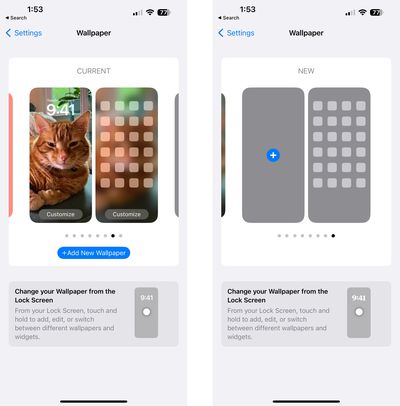
Apple has updated the Wallpaper section of the Settings app to allow users to swap between wallpapers from this interface. The design has also been tweaked, making the options to add new wallpaper more obvious.
ios 16 1 wallpaper

Stage Manager

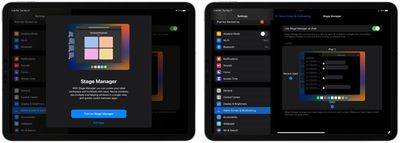
In the latest beta of iPadOS 16.1, Apple has expanded ‌Stage Manager‌ availability to the 2018 and 2020 iPad Pro models equipped with A12Z and A12X chips. Previously, ‌Stage Manager‌ was limited to the M1 ‌iPad Pro‌ and ‌M1‌ iPad Air models.

stage manager ipados 16 1 ipad pro
Apple has also removed external display support from ‌Stage Manager‌ in this beta, with the feature to return in a future update to iPadOS 16. When reintroduced, external display support will be limited to ‌M1‌ iPad models.

Matter Accessories

The Matter Accessories section added to the Settings app in prior betas has been removed.

Emergency SOS via Satellite

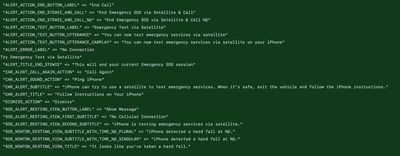
Apple is beginning to lay the groundwork for Emergency SOS via Satellite and Find My satellite integration, functionality that is coming to iPhone 14 models starting in November. Code in the update reveals some of the text we can expect to see.

ios 16 1 emergency satellite 2

ios 16 1 emergency satellite 1

  • Send your location using a supported iPhone from places where there are no cellular or Wi-Fi networks.
  • Send your Location via Satellite.
  • This friend sent you their location via satellite because they have no other network available.
  • Can send location again after X amount of time.
  • X hours ago - Last time your location was sent.
  • You can now text emergency services via satellite on your iPhone.
  • iPhone can try to use a satellite to text emergency services. When it's safe, exit the vehicle and follow the iPhone instructions.
  • iPhone is texting emergency services via satellite.

Other New Features

Know of a new feature in iOS 16.1 that we left out? Let us know in the comments below.

Related Forum: iOS 16

Popular Stories

iPhone 18 Pro and Pro Max Feature

'Apple Upgrade' Program Reportedly Launching Next Week

Tuesday July 21, 2026 8:30 am PDT by
Apple and Klarna are partnering on a new "Apple Upgrade" leasing program set to launch in the U.S. on Tuesday, July 28, according to Bloomberg's Mark Gurman. The program will allow you to finance most iPhone, iPad, Mac, and Apple Watch models, with a 24-month term for iPhones and Apple Watches and a 36-month term for iPads and Macs. Customers will be able to pay off the device early during...
iPhone 18 Pro Deep Red Feature

iPhone 18 Pro Launching in Two Months With These 12 New Features

Tuesday July 21, 2026 6:22 am PDT by
It is now mid-July, and that means the iPhone 18 Pro and iPhone 18 Pro Max are now just two months away. The devices are expected to look similar to the iPhone 17 Pro and iPhone 17 Pro Max, but there will still be many year-over-year changes, with rumored features including a smaller Dynamic Island, 5G via satellite, and more. Apple is expected to unveil the iPhone 18 Pro, iPhone 18 Pro Max, ...
iPhone 18 Pro Deep Red Feature

iPhone 18 Pro Launching in Two Months With These 12 New Features

Friday July 17, 2026 10:39 am PDT by
It is now mid-July, and that means the iPhone 18 Pro and iPhone 18 Pro Max are now just two months away. The devices are expected to look similar to the iPhone 17 Pro and iPhone 17 Pro Max, but there will still be many year-over-year changes, with rumored features including a smaller Dynamic Island, 5G via satellite, and more. Apple is expected to unveil the iPhone 18 Pro, iPhone 18 Pro Max, ...

Top Rated Comments

50 months ago
You can customize your Lock Screen. But don’t you DARE think you will be allowed to use the same font style as iOS 15!! Hellllllll no

—Apple designers


We were stupid enough to introduce Lock Screen customization in iOS 16, and simultaneously, categorically change Notifications by moving them to the bottom of the screen, but HELL no you cannot move them back to the top, where they intelligently belong!!!!

—Apple designers


We thought it would be a great idea to change notifications by moving them to a completely-hidden submenu that a user must perform an upward-gesture on the lower-portion of the Lock Screen to invoke.

—Apple designers
Score: 20 Votes (Like | Disagree)
50 months ago
I wish we could disable changing the wallpaper from the lock screen. After every time I use my flashlight now, I look at my phone wondering what in the world I hit to get into that edit screen. I never noticed that helpful tip until looking at this screenshot.
Score: 19 Votes (Like | Disagree)
50 months ago

I wish someone would take five minutes to fix jiggle mode so I can just put an icon where I want it.

Trying to replace a Home Screen icon is like a puzzle. How do I get this icon where I want it without all my other icons moving themselves around?

Good god there is so much low hanging fruit they just ignore.
Yes, it’s actually highly comical because in early versions of iOS you could move the icons around with much, much less inaccuracy. Now icons just fly around all over the place and it’s difficult to even place an app in a folder.

The best way to describe iOS app placement is like trying to place magnets where you want them when their poles are repulsing
Score: 18 Votes (Like | Disagree)
50 months ago

So much time and resources spent on the wallpaper customisation which people do once and forget about...
I wish someone would take five minutes to fix jiggle mode so I can just put an icon where I want it.

Trying to replace a Home Screen icon is like a puzzle. How do I get this icon where I want it without all my other icons moving themselves around?

Good god there is so much low hanging fruit they just ignore.
Score: 11 Votes (Like | Disagree)
antiprotest Avatar
50 months ago

Can’t everybody get riled up about the lack of Stage Manager on the A15 iPad mini too for my sake?
Apple: No you don't get it everybody you really need M1 to use this other chips just can't handle this and you need a lot of RAM we care about user experience blah blah blah

Also Apple: BAM! A12.

Pathetic. Now make it available for all the chips between A12 and M1.
Score: 8 Votes (Like | Disagree)
headlessmike Avatar
50 months ago
Can’t everybody get riled up about the lack of Stage Manager on the A15 iPad mini too for my sake?
Score: 8 Votes (Like | Disagree)