Apple Explains Why Duplicates Album in Photos Not Showing for Some Users - MacRumorsOpen MenuShow RoundupsShow Forums menuVisit ForumsOpen Sidebar
Skip to Content

Apple Explains Why Duplicates Album in Photos Not Showing for Some Users

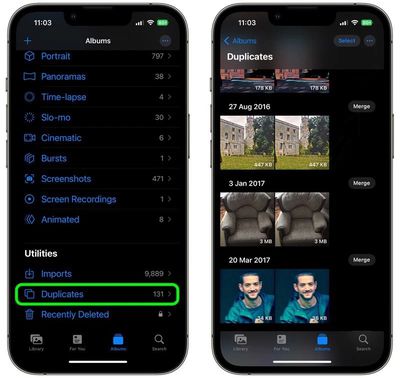
Apple today explained why iPhone users who recently updated to iOS 16 may not see the new Duplicates album in its stock Photos app, and what they can do about it.
photos duplicates
New to iOS 16, the Photos app will automatically detect any duplicate photos and videos in users' libraries and collate them together in a Duplicates album for inspection, giving users the option to merge duplicate sets and delete redundant media.

However, many users have been in touch to say the Duplicates album has not been showing up for them after updating their iPhone software, leading them to wonder if they are doing something wrong.

In a new support document, Apple has clarified that for the Duplicates album to appear, your iPhone has to first index the photo library and find duplicates, but that this detection process requires your iPhone to be locked and connected to power.

"Depending on what tasks are running in the background and the size of your photo library, the process could happen quickly or take up to a few days to complete," adds Apple.

Bear in mind that if you don't have any duplicates in your library, then the Duplicates album won't show up under the "Utilities" section of the Photos app until such a time when you do.

Related Forum: iOS 16

Popular Stories

meta instants

Meta Launches 'Instants' App for Sharing Disappearing Photos on Instagram

Wednesday May 13, 2026 11:32 am PDT by
Meta today announced the launch of Instants, a new image sharing option on the Instagram social network. Instants are ephemeral photos that disappear from Instagram after they're viewed by a user's friends or after a 24-hour period. Reactions and replies to Instants images show up in DMs instead of on the post. Instants photos are only displayed for a short period, but they are saved to a...
sweeping AI driven upgrades feature

First Look at AI Camera and Photos Features in iOS 27 Revealed

Thursday May 28, 2026 6:32 am PDT by
Apple is planning sweeping AI-driven upgrades to its Camera and Photos apps in iOS 27, Bloomberg's Mark Gurman reports. Image via Bloomberg. The report offers a first look at the appearance of several major iOS 27 features that Apple plans to announce at its Worldwide Developers Conference on June 8. The images are based on information viewed by Bloomberg and people said to be familiar with ...
macOS 27 on MacBook Pro

Apple Says macOS 27 Won't Be Compatible With These Macs

Wednesday June 3, 2026 8:29 am PDT by
During WWDC 2025, Apple revealed that macOS 26 Tahoe would be the final major macOS version for Intel-based Macs. macOS 27 will be compatible with Apple silicon Macs only, meaning that you will need a Mac with an M-series chip or a MacBook Neo with an A18 Pro chip in order to install the software update. Apple will unveil macOS 27 during its WWDC 2026 keynote this Monday, June 8, and the...

Top Rated Comments

48 months ago
Why not show the duplicates folder with a message indicating it won't be indexed until plugged in? Would've saved a lot of Apple support inquires.
Score: 13 Votes (Like | Disagree)
48 months ago
Had to wait for this myself back when I updated.

Worked well, though I do wish they had an option or folder for photos that are very similar but aren't 1:1 duplicates -- like the times I take a back-to-school pic of my kids and snap off 15 hoping to get one good shot and then I forget to delete 14 others!
Score: 8 Votes (Like | Disagree)
vtuberalpha Avatar
48 months ago
The stupid indexing and background processes myth bogging down the battery is no more, thanks Apple for disspelling that nonsense.

Included a screenshot of my own to prove it even more.


Attachment Image
Score: 5 Votes (Like | Disagree)
JosephAW Avatar
48 months ago
It should still show the word "duplicates" with a zero or pending grayed out. o_O
Score: 4 Votes (Like | Disagree)
orbital~debris Avatar
48 months ago

It picked up a RAW and JPEG as being duplicates. It doesn’t give you any clue as to which it prefers to save on a ‘merge’.
From Apple's iPhone User Guide:

"Merging combines the highest quality version and all of the relevant data across the duplicates, and keeps that one in your library. The remaining duplicates are moved to the Recently Deleted album."

https://support.apple.com/en-gb/guide/iphone/iph1978d9c23/ios
Score: 4 Votes (Like | Disagree)
lynxwildcat Avatar
48 months ago
I am really intrigued whether this new 'duplicates' feature is a remnant or precursor of CSAM scanning. The fact this capability picks up images that are not 100% perfect duplicates (minor differences) and needs to catalogue your entire library.

I dunno, this seems related to CSAM, it's created some sort of hash that it's comparing between images. Turning on CSAM later based on the work done for duplicates would seem easier.

I haven't seen any news or analysis digging into why duplicates came this year (after CSAM was shelved) and why we haven't had duplicates as a feature well before now. This seems like a precursor or remnant.
Score: 3 Votes (Like | Disagree)

















