

iOS 16.1 to Feature iCloud Shared Photo Library, Key Sharing in Wallet App, and Apple Card Savings Account - MacRumorsOpen MenuShow RoundupsShow Forums menuVisit ForumsOpen Sidebar
Skip to Content

iOS 16.1 to Feature iCloud Shared Photo Library, Key Sharing in Wallet App, and Apple Card Savings Account

Apple today seeded the iOS 16.1 Release Candidate to developers ahead of the update's expected release next week. The release notes for the update confirm that iOS 16.1 enables iCloud Shared Photo Library, the ability to share keys in the Wallet app via apps like Messages and WhatsApp, and the Apple Card's new savings account option.
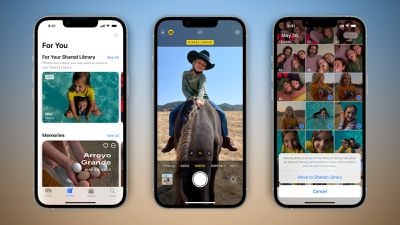
ios 16 icloud shared photo library feature
iCloud‌ Shared Photo Library will make it easier for you to share photos with your family members or friends in the Photos app. The feature will let you and up to five other people add, edit, or remove photos in a shared library accessible via iCloud.

Last week, Apple announced that Apple Card users will be able to open a new "high-yield" savings account from Goldman Sachs and have their Daily Cash cashback rewards automatically deposited into it, with no fees, no minimum deposits, and no minimum balance requirements. Users will be able to manage the savings account in the Wallet app.

iOS 16.1 also features Live Activities support in third-party apps, a Clean Energy Charging option in the United States, support for Matter accessories in the Home app, Apple Fitness+ workouts without an Apple Watch, Reachability support for the Dynamic Island, bug fixes for the Messages app and using a VPN with CarPlay, and more.

Apple's full release notes for iOS 16.1:

This update introduces iCloud Shared Photo Library making it easy to keep your family photos up to date. This release also adds support for third party apps in Live Activities, support for Apple Fitness+ on iPhone even if you don’t have an Apple Watch, and includes other features and bug fixes for your iPhone.

iCloud Shared Photo Library
- Separate library for seamlessly sharing photos and videos with up to five other people
- Setup rules allow you to easily contribute past photos based on start date or people in the photos when you set up or join a library
- Library filters for quickly switching between viewing the Shared Library, your Personal Library, or both libraries together
- Shared edits and permissions let everyone add, edit, favorite, caption, and delete photos
- Sharing toggle in Camera lets you choose to send photos you take straight to the Shared Library, or enable a setting to share automatically when other participants are detected nearby using Bluetooth

Live Activities
- Live Activities from third party apps are available in the Dynamic Island and on the Lock Screen for iPhone 14 Pro models

Fitness+
- Apple Fitness+ is supported on iPhone even if you don’t have an Apple Watch

Wallet
- Key sharing enables you to securely share car, hotel room, and other keys in Wallet using messaging apps such as Messages and WhatsApp
- Savings account enables Apple Card customers to grow their Daily Cash by depositing it in a high yield savings account

Home
- Matter, the new smart home connectivity standard, is supported enabling a wide variety of smart home accessories to work together across ecosystems

Clean Energy Charging
- New setting that can try to reduce your carbon footprint by selectively charging when lower carbon emission electricity is available

Books
- Reader controls are automatically hidden as you start reading

This update also includes bug fixes for your iPhone:
- Deleted conversations may appear in the conversations list in Messages
- Dynamic Island content is not available when using Reachability
- CarPlay may fail to connect when using a VPN app

iOS 16.1 is expected to be released on Monday, October 24 alongside iPadOS 16.1 and macOS Ventura.


Related Forum: iOS 16

Popular Stories

iOS 27 Next to iPhone

Here's When iOS 27 Rolls Out Today in Every Time Zone [Update: It's Out]

Sunday September 13, 2026 3:00 am PDT by
Update 10:04 a.m.: iOS 27 is rolling out now, though it may take a bit for all users to see it, so keep checking! Apple is about to release iOS 27, which will finally deliver more advanced Siri AI capabilities as well as a variety of other refinements, improvements, and new features to iPhones. It's Apple's biggest software update of the year, and Apple announced at Wednesday's iPhone event...
iOS 27 Icon iPhone

iOS 27 Available Now With These 8 New Features

Monday September 14, 2026 9:00 am PDT by
Update — 10 a.m. Pacific Time: Apple has released iOS 27. During its iPhone 18 Pro and iPhone Duo event last week, Apple announced that iOS 27 will be released widely on Monday, September 14. iOS 27 should be available around 10 a.m. Pacific Time / 1 p.m. Eastern Time today via the Settings app, under General → Software Update. Below, we have highlighted eight new features and...
Apple iCloud Plus expansion hero

iCloud+ Now Includes Apple TV, Apple Arcade, and Curated Apple Music Stations in Over 100 Countries

Tuesday September 15, 2026 1:43 am PDT by
Apple today announced a new subscription initiative that turns paid iCloud+ subscriptions into a broader services bundle in more than 100 countries. In select countries, Apple says every paid iCloud+ plan, including the cheapest 50GB tier, now includes Apple TV and Apple Arcade "at no additional cost," while family sharing extends the storage, TV and Arcade access to up to five people....

Top Rated Comments

TheYayAreaLiving 🎗️ Avatar
51 months ago
Can't wait for the Apple Card Savings Account option. This will come in very handy!
Score: 16 Votes (Like | Disagree)
macsplusmacs Avatar
51 months ago
I'm looking forward to this:

iOS 16.1 enables iCloud Shared Photo Library

Because when I take a photo of our cat.
And my girlfriend takes a photo of our cat.

We will have all our cat photos in one place.

🐈🐈🐈🐈
Score: 16 Votes (Like | Disagree)
thatJohann Avatar
51 months ago
They removed the dynamic island outline when on dark backgrounds, amen!
Score: 7 Votes (Like | Disagree)
51 months ago

I'm looking forward to this:

iOS 16.1 enables iCloud Shared Photo Library

Because when I take a photo of our cat.
And my girlfriend takes a photo of our cat.

We will have all our cat photos in one place.

🐈🐈🐈🐈
I'm actually excited for the shared photo library. Currently the only reason I use Google photos on my phone is because it has "Partner Share" where every photo I take it automagically shared with my wife. Once this launches I can drop google photos... a program which is annoying because it gets killed in the background often then I end up with out of sync photo libraries till I launch it again.
Score: 3 Votes (Like | Disagree)
51 months ago
For those of you on macs that cannot update don’t be surprised if all of your photos disappear because they were all moved to the shared folder, which your older photos app will not see. Only your newer iPhone or on the web could you see them. Unless they fixed that bug.
Score: 3 Votes (Like | Disagree)
silver25u Avatar
51 months ago

I hope they add albums to the iCloud Shared Photo Library soon. As it is right now, it is more of a stream than a library. (and Shared Albums don't give you the original resolution photos)
Or just stop reducing resolution on shared albums. I mean you're selling phones that can record in 4K and you're going to reduce it to 720p? Come on
Score: 3 Votes (Like | Disagree)














