

References to New 'Custom Accessibility Mode' Found in iOS 16.2 Beta 2 - MacRumorsOpen MenuShow RoundupsShow Forums menuVisit ForumsOpen Sidebar
Skip to Content

References to New 'Custom Accessibility Mode' Found in iOS 16.2 Beta 2

Apple is working on a new "Custom Accessibility Mode" for iPhone and iPad, according to evidence uncovered by 9to5Mac in the second iOS 16.2 developer beta.
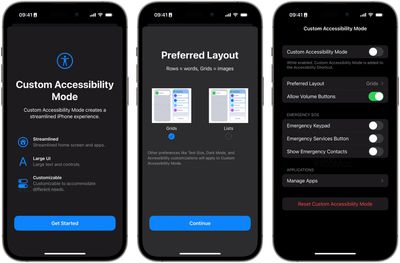
Custom Accessibility Mode iOS 16

Image credit: 9to5Mac

Apple released the second betas of iOS 16.2 and iPadOS 16.2 to developers on Tuesday, including camera bug fixes, support for 5G in India, a Medication widget, and references to the new Custom Accessibility Mode, which 9to5Mac found "under the hood."

Within those references, Apple describes the new mode as offering "a customizable, streamlined way to use your iPhone and ‌iPad‌," although how the feature works isn't completely clear, as it is not yet enabled for developers to test.

That said, screenshots suggest the new mode will allow users to replace the typical Lock Screen and "Springboard" Home Screen with more accessible UI elements, as well as remove the Dock, set much larger app icons, larger hardware interface elements, allowed contacts, and a simpler interface for Messages.
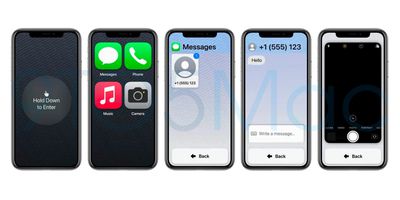
Custom Accessibility Mode iOS 16

Image credit: 9to5Mac

Given the dearth of references, it's not certain that the Custom Accessibility Mode will go live with the release of iOS 16.2. Apple could be just laying the groundwork, with the feature still in the early stages of development. For everything else in the second beta of iOS 16.2, be sure to check out our roundup of changes.

Popular Stories

iCloud iPhone 17 Pro

iPhone Users Who Pay for iCloud Storage Get Two New Perks on iOS 27

Thursday July 2, 2026 6:10 am PDT by
If you pay for certain iCloud+ storage plans beyond the 5GB that Apple offers for free, you will receive two more perks on iOS 27 at no additional cost. A summary of the two new iCloud+ perks on iOS 27:Increased daily usage limits for some new Apple Intelligence features, including image generation in the revamped Image Playground app. HomeKit Secure Video cameras receive generated video...
Apple Event Logo

Apple Just Released a New Product

Thursday July 2, 2026 8:04 am PDT by
Apple's first product release of summer 2026 occurred this week, but do not get too excited, as it is merely the Beats Solo Buds in a new color. Beats Solo Buds are now offered in orange through Best Buy in the U.S., with availability set to expand to 7-Eleven stores in Japan on July 4. Apple already offered orange Solo Buds in India for free with the purchase of an iPhone 15 or iPhone 15 ...
iPhone 4 on Black Feature

Apple Facing One of Its Worst Leaks Since the iPhone 4

Thursday July 2, 2026 9:53 am PDT by
Apple supplier Tata Electronics recently suffered a cyberattack that resulted in thousands of confidential files being published on the dark web, and this reportedly included some photos and documents related to the upcoming iPhone 18 Pro. We have elected not to share any of the leaked photos in this story due to the illegal nature in which they were obtained, but they can easily be found...

Top Rated Comments

riverfreak Avatar
48 months ago
If this comes to fruition, it will be immensely helpful for The Olds.

iOS has become so dainty and precious it takes a lot of time and manual dexterity to do many simple and common things.
Score: 22 Votes (Like | Disagree)
48 months ago

Steve is turning in his grave right now
This is an accessibility option to help people to use the iPhone who otherwise might be unable to.
I’d say it’s something Jobs would welcome.
Score: 15 Votes (Like | Disagree)
IllinoisCorn Avatar
48 months ago
Apple doesn’t get the credit it clearly deserves for its accessibility efforts. My father had a terrible tremor, so gestures were difficult for him. Thank God Apple made an assistive touch function, or else he wouldn’t have been able to use a phone.
Score: 13 Votes (Like | Disagree)
48 months ago
This is amazing - it looks exactly like what I was mocking up in my head all weekend for my father, and feeling frustrated that it’s something I didn’t think Apple would ever build. iPhones have gotten much harder to use for older people over the last few years. Neither of my parents ever fully adapted after iOS 7 made UI controls much less obvious and clear. And as my Dad’s tremors have gotten worse, the gestures, edge swipes, and long presses essentially make his phone a minefield. Existing accessibility options help a bit, but don’t do enough to fundamentally fix the big-picture UI paradigms that are an issue for older users.

We need options for huge home screen icons and/or a list view with large labels for the homescreen, a way to prevent accidental rearranging, a way to disable control center and the other edge swipe gestures, and a much simpler way for a family member to control your screen from FaceTime (he doesn’t under stand how to share screen from FaceTime, and the button icons are absolutely inscrutable). And frankly, this mode should offer dramatically fewer features. For Photos.app, just let it be a big picture frame with a way to scroll backwards in time through the grid view; hide all the UI about albums, organization, and editing. It’s so overwhelming to people who don’t or can’t keep up with so many new changes every year.

I tried to talk to him about a Jitterbug Smart, which I think is solving a lot of these issues, but we’ve been an Apple family since 1984, and he doesn’t want to give it up (and when I showed it to him he said “but those are for old people”…he’s 82). And I have a sneaking suspicion that once you’re past the Jitterbug’s launcher, the apps themselves will be the typical Android hard-to-use UI, so it’s not complete win.

Apple built its reputation on ease of use, and people used to marvel at how babies could pick up and use an iPad. You don’t hear that anymore. For myself, I want all the gestures, shortcuts, automations, and power user tweaks I can get my hands on. But I don’t want that to come at the expense of a worse experience for others. iPhone needs a way to accommodate our parents. Really hope this pans out.
Score: 10 Votes (Like | Disagree)
48 months ago
Immediately reminded me of the Jitterbug phones for old people.

MacRumors content image
Score: 10 Votes (Like | Disagree)
WiiDSmoker Avatar
48 months ago
Really cool, but would also be nice to replace the camera/flashlight and also add other icons at the bottom as well.
Score: 10 Votes (Like | Disagree)
















