macOS Ventura Bug Spits Out Perpetual 'Background Items Added' Notifications at Login, Here's a Potential Fix - MacRumorsOpen MenuShow RoundupsShow Forums menuVisit ForumsOpen Sidebar
Skip to Content

macOS Ventura Bug Spits Out Perpetual 'Background Items Added' Notifications at Login, Here's a Potential Fix

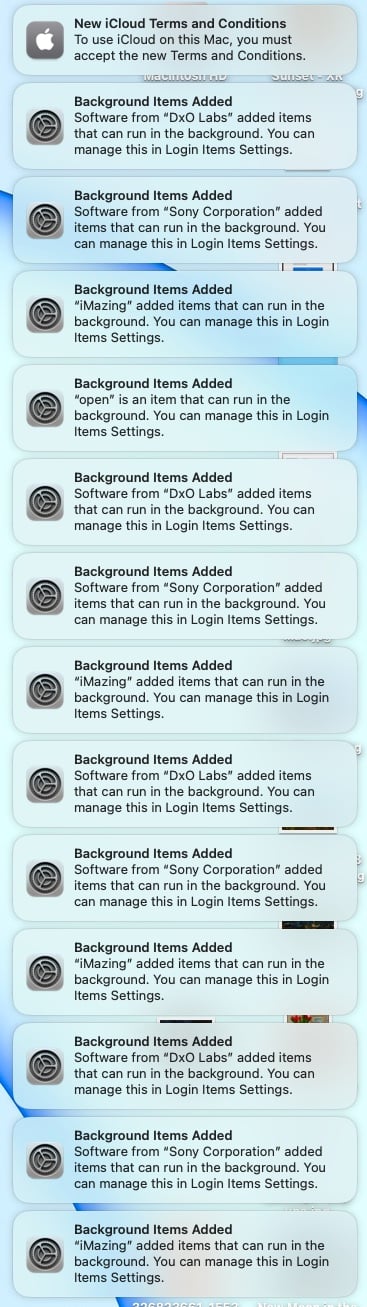
Numerous Mac users are repeatedly encountering a bug in macOS Ventura that throws up Login Items notifications for various background app processes every time they start up their machine, even when the processes in question have been disabled.
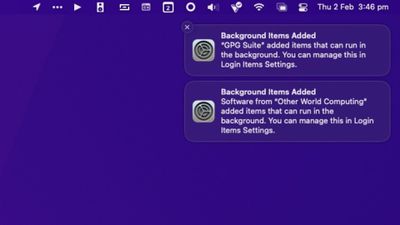
background items notifications
If notification previews are disabled (via System Settings -> Notifications -> Show Previews) the annoying notifications appear as "Login Items." If previews are enabled, the notifications are labelled "Background Items Added" and contain the message "[app/process name] added items that can run in the background. You can manage this in Login Items Settings."

Curiously, there is no option in System Settings -> General -> Login Items to remove background items added to macOS by installed apps. Users can only disable listed items by toggling switches. Doing this however seems to have no impact on the notifications, and in some cases can cause more to appear.

Complaints across Reddit, Twitter, Apple Support Community discussions, and various other app-specific forums repeatedly cite app processes such as Google Updater, Adobe CC Helper, and Dropbox as culprits, but these only appear to be referenced more often because they are popular apps with background processes. Almost any third-party background process can seemingly be referenced in the persistent Login Items notifications.


In all but a minority of cases, trashing or uninstalling the related apps does not fix the problem, and if the notifications do subsequently disappear, reinstalling the app usually brings them back. Some users have even erased their Mac and reinstalled macOS Ventura to defeat the bug, but are then hesitant to install the associated apps.

Only a few users have been successful at ridding their Mac of the notifications by carrying out the following actions, although caution should be applied and users do so at their own risk.

  1. Open Finder, then select Go -> Go to Folder... in the menu bar.
  2. Copy and paste the following address into the input field and press Enter: ~/Library/LaunchAgents
  3. A Finder window will open at the LaunchAgents folder. Show the items as a list organized by name, then search for the app or developer name associated with the process that's causing the Login Items notifications.
  4. Delete the .plist file, then empty the Trash.
  5. Restart your Mac.
  6. If the above steps don't work, look in the ~/Library/LaunchDaemons folder. If there are launch daemons in there associated with the app/developer, delete those too, empty Trash, and restart.

Based on reports, the bug has been around since early beta versions of macOS Ventura, but there have been more frequent incidences reported on Macs running macOS 13.1 and later. Apple is seemingly aware of the problem, but has not commented.


Have you been affected by the Login Items notifications bug? If so, have you found a solution that worked for you? Let us know in the comments.


Related Forum: macOS Ventura

Popular Stories

macOS 27 on MacBook Pro

Apple Says macOS 27 Won't Be Compatible With These Macs

Wednesday June 3, 2026 8:29 am PDT by
During WWDC 2025, Apple revealed that macOS 26 Tahoe would be the final major macOS version for Intel-based Macs. macOS 27 will be compatible with Apple silicon Macs only, meaning that you will need a Mac with an M-series chip or a MacBook Neo with an A18 Pro chip in order to install the software update. Apple will unveil macOS 27 during its WWDC 2026 keynote this Monday, June 8, and the...
MacBook Neo on Yellow Feature

MacBook Neo is So Popular That Apple Reportedly Doubled Production

Wednesday June 3, 2026 9:24 am PDT by
On an earnings call in late April, Apple's CEO Tim Cook said that customer response to the MacBook Neo was "off the charts," and the popularity of the laptop has reportedly led the company to significantly boost production. Apple supply chain analyst Ming-Chi Kuo this week said he believes that MacBook Neo shipments to Apple were doubled from an initial target of 5 million units to 10...
iphone 18 pro blue%402x

iPhone 18 Pro: Dark Cherry, Light Blue, and Dark Gray Chassis Leaked [Update]

Thursday June 4, 2026 5:18 am PDT by
Update: Since publication, new information has come to light suggesting the images have been AI-manipulated and are not in fact iPhone 18 Pro chassis parts. The original article follows. The color options Apple is reportedly planning for the upcoming iPhone 18 Pro and ‌iPhone 18 Pro‌ Max have appeared online today in the form of images of chassis parts of unknown authenticity....

Top Rated Comments

sw1tcher Avatar
44 months ago

Numerous Mac users are repeatedly encountering a bug in macOS Ventura that throws up Login Items notifications for various background app processes every time they start up their machine, even when the processes in question have been disabled.

Apple is seemingly aware of the problem, but has not commented.
An Apple spokesperson just acknowledged the issues and apologized


We are aware that a small number of users are having issues with their third-generation butterfly keyboard macOS 13 Ventura and for that we are sorry. The vast majority of Mac notebook macOS 13 Ventura customers are having a positive experience with the new keyboard macOS.
:p
Score: 16 Votes (Like | Disagree)
44 months ago
Remember when Apple used to run commercials against Microsoft for excessive prompts on Windows? My how the times have changed.
Score: 14 Votes (Like | Disagree)
ivan86 Avatar
44 months ago
Have this bug since day one on Ventura.

I am surprised that this pig slipped into 13.2.

For sure it will be gone in 13.3, since MacRumors made the whole post about it…)
Score: 13 Votes (Like | Disagree)
ratspg Avatar
44 months ago
This bug is probably the most annoying one I have dealt with. It's the gift that keeps on giving lol. Does. Not. Stop. Quality control for macOS sucks lately.
Score: 12 Votes (Like | Disagree)
44 months ago
edge is a nasty piece of crap. I just opened it to test this issue, and it kept trying to change my login settings and add stuff. That is it for me, Edge is going in the trash bin along with any other MS product.
Score: 12 Votes (Like | Disagree)
arkitect Avatar
44 months ago
👍
Thank you! Thank you!

Its been driving me nuts.

MacRumors content image
Score: 10 Votes (Like | Disagree)