PSA: Apple Has Made Its New Home Architecture Update Available Again - MacRumorsOpen MenuShow RoundupsShow Forums menuVisit ForumsOpen Sidebar
Skip to Content

PSA: Apple Has Made Its New Home Architecture Update Available Again

Apple has made the option to upgrade to new Home architecture available again with the release of iOS 16.4, iPadOS 16.4, and macOS Ventura 13.3, after it temporarily pulled the update in December.
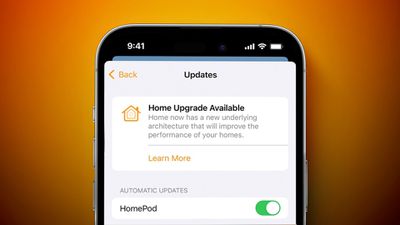
home upgrade available feature
After updating Apple devices to the latest software, users can once again opt to upgrade any homes set up in the Home app to the new Home architecture, which Apple says brings faster, more reliable performance, especially for smart homes with a lot of smart accessories installed.

To perform the upgrade, open the Home app on your iPhone, iPad, or Mac, tap or click the ellipsis button (three encircled dots), then select Home Settings. Select Software Update, tap or click Learn More under "Home Upgrade Available," then follow the prompts. Users who upgraded previously will not see this option and don't need to do anything, since their Home architecture is already up-to-date.

Ahead of the launch of iOS 16 last year, Apple promised a new architecture for the Home app, and briefly offered it following the release of iOS 16.2. But the option was temporarily pulled after users reported issues such as HomeKit devices becoming stuck in an "updating" or "configuring" status, devices going missing entirely, invitations to share the Home with other users failing, HomeKit Secure Video recording not working, and more.

Popular Stories

nanoleaf ceiling light

Nanoleaf's New $80 Smart Ceiling Light Works With Matter and HomeKit

Tuesday June 30, 2026 4:16 pm PDT by
Nanoleaf today launched the Smart Multicolor Ceiling Light, an affordable Matter-compatible lighting product. With a dual-sided design, there's a main downlight and an upward backlight for a layered lighting glow. Each side can be controlled individually for bright light or an ambient lighting option. The light has 196 LEDs inside, with up to 2600 lumens. White light ranges from 2200K to...
home app ios 27

Apple to Add AI Video Descriptions and Smarter Notifications to Home App

Monday June 8, 2026 12:32 pm PDT by
Apple today announced new Apple Intelligence features for the Home app, including AI-generated descriptions of HomeKit Secure Video camera clips and smarter grouping of accessory notifications. The Home app will use Apple Intelligence to analyze recorded clips from compatible cameras and generate text descriptions summarizing what happened in them. Users can search through footage to find...
iCloud iPhone 17 Pro

iPhone Users Who Pay for iCloud Storage Get Two New Perks on iOS 27

Thursday July 2, 2026 6:10 am PDT by
If you pay for certain iCloud+ storage plans beyond the 5GB that Apple offers for free, you will receive two more perks on iOS 27 at no additional cost. A summary of the two new iCloud+ perks on iOS 27:Increased daily usage limits for some new Apple Intelligence features, including image generation in the revamped Image Playground app. HomeKit Secure Video cameras receive generated video...

Top Rated Comments

Sydnxt Avatar
43 months ago
Don’t know if I trust it yet..
Score: 18 Votes (Like | Disagree)
43 months ago
Patiently waiting on other people’s experience about what will happen if I hit that update button…
Score: 15 Votes (Like | Disagree)
pacmania1982 Avatar
43 months ago
Well I pressed it and everything still works. We have Eve plugs and Hue bulbs, plus HomePods and Apple TVs.
Score: 8 Votes (Like | Disagree)
wenepyru Avatar
43 months ago

So I need a HomePod or Apple TV? iPad won't cut it apparently. 😐
They removed iPad HomeHub support since iOS 16.1
Score: 8 Votes (Like | Disagree)
adrianlondon Avatar
43 months ago
Note that every device has to be on iOS 16 or MacOS Ventura if you want them to be able to control your home accessories after performing this update.

I'll be skipping it, same as I've had to skip the "unlock Notes with your phone's pin" option as that blocks devices not on iOS 16 from reading them. I was burnt years ago when upgrading Reminders. Learnt my lesson!

(I have a 6S as a backup phone, "stuck" on iOS 15.)
Score: 8 Votes (Like | Disagree)
GaryMumford Avatar
43 months ago

Not available again, if already performed when it was first available
Of course it’s not available if you’ve already updated
Score: 7 Votes (Like | Disagree)