

Vivaldi 6.0 Web Browser Introduces Tab Workspaces and Custom Icons - MacRumorsOpen MenuShow RoundupsShow Forums menuVisit ForumsOpen Sidebar
Skip to Content

Vivaldi 6.0 Web Browser Introduces Tab Workspaces and Custom Icons

Vivaldi web browser this week pushed out its sixth major release, bringing a new Workspaces feature and custom icons and themes to the highly configurable Mac app.

vivaldi workspaces
Similar in functionality to virtual desktops, the new Workspaces feature is designed to further enhance the browser's powerful tab management by letting users organize tabs by category into separate workspaces and switch easily between them.

For example, users can create Workspaces for productivity, social media, news, and shopping, and then open related tabs within those Workspaces, making it possible to flip between different sets of tabs and keep workflows organized.
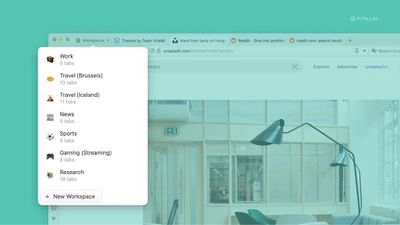
vivaldi 6
Workspaces can also be used in conjunction with Tab Stacks (similar to Safari's Tab Groups). Vivaldi offers the example of maintaining a Sports workspace and having stacks for "Football," "Cricket," "Racing," and "Tennis" to sub-organize your tabs.

In addition, Workspaces support Vivaldi's Tab Tiling feature, allowing users to view multiple tabs in a split-screen or grid within workspace groups.


Elsewhere in Vivaldi 6.0, the browser's built-in theming tools have been upgraded to include new Custom Icons, which can be found in the Themes Gallery. With different icon packs now supported, users can create anything from a Windows 95-inspired look, complete with the familiar buttons and colors, to something more artistic with the Hand Drawn style.

Users can head to Settings -> Themes -> Create more Themes to get started, or use the new filter on the Themes page to see only themes with new custom icons.

Vivaldi browser 6 is a free download for Mac available directly from the Vivaldi website. The browser includes built-in tracking protection, innumerable tab tools, a translation feature, Chrome extensions support, and much more.


Tag: Vivaldi

Popular Stories

iCloud iPhone 17 Pro

iPhone Users Who Pay for iCloud Storage Get Two New Perks on iOS 27

Thursday July 2, 2026 6:10 am PDT by
If you pay for certain iCloud+ storage plans beyond the 5GB that Apple offers for free, you will receive two more perks on iOS 27 at no additional cost. A summary of the two new iCloud+ perks on iOS 27:Increased daily usage limits for some new Apple Intelligence features, including image generation in the revamped Image Playground app. HomeKit Secure Video cameras receive generated video...
iPhone 4 on Black Feature

Apple Facing One of Its Worst Leaks Since the iPhone 4

Thursday July 2, 2026 9:53 am PDT by
Apple supplier Tata Electronics recently suffered a cyberattack that resulted in thousands of confidential files being published on the dark web, and this reportedly included some photos and documents related to the upcoming iPhone 18 Pro. We have elected not to share any of the leaked photos in this story due to the illegal nature in which they were obtained, but they can easily be found...
American Express Gold Apple Pay Feature

American Express Announces New Apple Pay Feature

Tuesday June 30, 2026 10:27 am PDT by
American Express today announced that you can now redeem Membership Rewards points when checking out with Apple Pay on the web and in apps on the iPhone and iPad. When checking out with Apple Pay on iOS 18 or iPadOS 18 or later, tap on your eligible American Express card (Platinum, Gold, Green, and others) and select the Membership Rewards points option. You can use points to cover all or...

Top Rated Comments

42 months ago
Been using Vivaldi as my work browser for a couple of years now. The tab stacking and tiling is perfect for working across many web pages at once (I need to have easy access to about 30-50 tabs split out into stacks according to projects and functions).

The degree to which you can customise the UI and it’s functionality is incredible. Nothing else comes close.

I don’t use it for my personal browser, but if it ever gets an iOS app release I’d definitely try it out to see if it could replace Safari.
Score: 2 Votes (Like | Disagree)
florida man Avatar
42 months ago
It’s already a great chrome replacement on Mac, but can’t quit chrome completely until it finally comes out for iOS. Wonder if they’re waiting for the WebKit requirement to go away.
Score: 2 Votes (Like | Disagree)
42 months ago
I prefer Arc's implementation of spaces and profiles, but this is a good alternative.


I report annoying CleanmyMac ads as spam.
Now all you need is a good adblocker!
Score: 1 Votes (Like | Disagree)
Verified Whiskey Avatar
42 months ago
Hmm. Maybe I need to try this out. My work requires me to have about 20+ tabs open at once, it would be nice to try out different tab management.
Score: 1 Votes (Like | Disagree)
42 months ago

Too janky for me.

I want to open browser, go to website, maybe 4 tabs at a time, close tabs when I am done, don’t want to waste CPU cycles.

I like clean UI but even more I like to use my systems cleanly.

That’s why my systems don’t slow down and I report annoying CleanmyMac ads as spam.
Congrats on your computing discipline.
Score: 1 Votes (Like | Disagree)















