These Gestures Are How You Control Apple Vision Pro - MacRumorsOpen MenuShow RoundupsShow Forums menuVisit ForumsOpen Sidebar
Skip to Content

These Gestures Are How You Control Apple Vision Pro

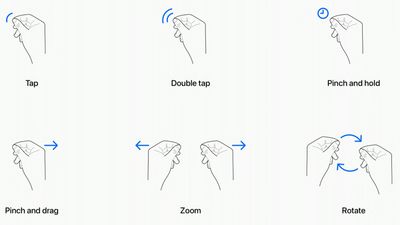
Apple Vision Pro, Apple's new "spatial computing" device, does not have a hardware-based control mechanism. It relies on eye tracking and hand gestures to allow users to manipulate objects in the virtual space in front of them. In a recent developer session, Apple designers outlined the specific gestures that can be used with Vision Pro, and how some of the interactions will work.
apple vision pro gestures

  • Tap - Tapping the thumb and the index finger together signals to the headset that you want to tap on a virtual element on the display that you're looking at. Users have also described this as a pinch, and it is the equivalent to tapping on the screen of an iPhone.
  • Double Tap - Tapping twice initiates a double tap gesture.
  • Pinch and Hold - A pinch and a hold is similar to a tap and hold gesture, and it does things like highlighting text.
  • Pinch and Drag - Pinching and dragging can be used to scroll and to move windows around. You can scroll horizontally or vertically, and if you move your hand faster, you'll be able to scroll faster.
  • Zoom - Zoom is one of two main two-handed gestures. You can pinch your fingers together and pull your hands apart to zoom in, and presumably zooming out will have a pushing sort of motion. Window sizes can also be adjusted by dragging at the corners.
  • Rotate - Rotate is the other two-handed gesture and based on Apple's chart, it will involve pinching the fingers together and rotating the hands to manipulate virtual objects.

Gestures will work in tandem with eye movements, and the many cameras in the Vision Pro will track where you are looking with great accuracy. Eye position will be a key factor in targeting what you want to interact with using hand gestures. As an example, looking at an app icon or on-screen element targets it and highlights it, and then you can follow up with a gesture.

Hand gestures do not need to be grand, and you can keep your hands in your lap. Apple is encouraging that, in fact, because it will keep your hands and arms from getting tired from being held in the air. You only need a tiny pinch gesture for the equivalent of a tap, because the cameras can track precise movements.

@macrumors Eye tracking and pinching is the interface on the new #AppleVisionPro and we could to try jt out! #Apple #VR #AR ♬ original sound - MacRumors

What you're looking at will let you select and manipulate objects that are both close to you and far from you, and Apple does anticipate scenarios where you might want to use larger gestures to control objects that are right in front of you. You can reach out and use your fingertips to interact with an object. For example, if you have a Safari window right in front of you, you can reach your hand out and scroll from there rather than using your fingers in your lap.

In addition to gestures, the headset will support hand movements such as air typing, though it doesn't seem like those who have received a demo have been able to try this feature as of yet. Gestures will work together, of course, and to do something like create a drawing, you'll look at a spot on the canvas, select a brush with your hand, and use a gesture in the air to draw. If you look elsewhere, you'll be able to move the cursor immediately to where you're looking.

While these are the six main system gestures that Apple has described, developers can create custom gestures for their apps that will perform other actions. Developers will need to make sure custom gestures are distinct from the system gestures or common hand movements that people might use, and that the gestures can be repeated frequently without hand strain.

To supplement hand and eye gestures, Bluetooth keyboards, trackpads, mice, and game controllers can be connected to the headset, and there are also voice-based search and dictation tools.

Multiple people who have been able to try the Vision Pro have had the same word to describe the control system - intuitive. Apple's designers seem to have created it to work similarly to multitouch gestures on the iPhone and the iPad, and so far, reactions have been positive.

MacRumors videographer Dan Barbera was able to try out the headset and he was impressed with the controls. You can see his full overview of his experience on our YouTube channel.

Related Roundup: Apple Vision Pro
Buyer's Guide: Vision Pro (Neutral)
Related Forum: Apple Vision Pro

Popular Stories

Apple Remnants Vision Pro

Apple Unveils Immersive Horror Film Coming Exclusively to Vision Pro

Tuesday October 13, 2026 5:26 am PDT by
Apple on Monday announced Remnants, an immersive horror film that will be released exclusively on the Vision Pro on Friday, October 16. The film will be in the Apple Immersive Video format, meaning it will be a 3D video recorded in 8K resolution with a 180-degree field of view and Spatial Audio. Apple shared a short video of people reacting to the film while wearing the Vision Pro....

apple vision pro orange

Apple Releases visionOS 27.2

Monday October 26, 2026 10:46 am PDT by
Apple today released visionOS 27.2, the first big update for the visionOS 27 operating system that runs on the Apple Vision Pro. visionOS 27.2 can be downloaded by opening the Settings app, selecting the General section, and choosing Software Update. Installing the update requires the headset to be removed, and a progress bar appears on the EyeSight display. The visionOS 27.2 update...
General visionOS watchOS and tvOS Betas Feature Redux

Apple Seeds watchOS 27.2, tvOS 27.2 and visionOS 27.2 Release Candidates

Monday October 19, 2026 10:25 am PDT by
Alongside new betas of iOS 27.2, iPadOS 27.2, and macOS Golden Gate 27.2, Apple has seeded the release candidate versions of watchOS 27.2, tvOS 27.2 and visionOS 27.2. The RCs come a week after Apple released the fourth betas. Registered developers can download the betas through the Settings app on each device. There's no word on what's being added in visionOS 27.2 and tvOS 27.2, but...

Top Rated Comments

MacWiz_007 Avatar
45 months ago
They forgot the "flipping the bird" gesture when your battery dies in less than two hours. 😁
Score: 21 Votes (Like | Disagree)
Piggie Avatar
45 months ago
This will be the hand gesture after you ask Siri to do something simple for the 8th time and you are hoping THIS TIME is actually gets it right ;)

MacRumors content image
Score: 15 Votes (Like | Disagree)
vegetassj4 Avatar
45 months ago
They forgot Force Quit and responding to Siri when she asks for clarification:


Attachment Image

Attachment Image
Score: 11 Votes (Like | Disagree)
TheYayAreaLiving 🎗️ Avatar
45 months ago
We need a hand clap 👏🏻 gesture.
Score: 9 Votes (Like | Disagree)
MacWiz_007 Avatar
45 months ago

What about pinch to zoom?
Did you not see the one where it looks like you are pinching someone's nipples to zoom?
Score: 7 Votes (Like | Disagree)
45 months ago
that's seriously amazing. Im wayyyy to broke to afford it, and in all fairness it's not something meant for everyone i feel , but in spite of what reports claimed (that it wasnt ready) , the software appears to work really well and super intuintively (gosh i cannot write )
Score: 7 Votes (Like | Disagree)
Latest Stories
Apple Taking New Approach to Developing iOS 28 and macOS 28
1 hour ago
Early Apple Black Friday Deals on Apple Watch, MacBook Air, and More
20 hours ago
'Backglow' Lets You Customize New MacBook Pro's Glowing Apple Logo
20 hours ago
Top Stories: Apple Product Launches, iOS 27.3 Beta, and More
1 day ago
More Fun iPhone Duo Apps: 30 New Picks to Try
2 days ago
Hands-On With Apple's New OLED Touchscreen MacBook Pro
2 days ago
Apple Store With All-New Design Opening Soon in Southern California
2 days ago
Control the Glowing Apple Logo on Your New MacBook Pro
2 days ago
Apple Shares New 'Apple Card: Apply and Use in Minutes' Ad
2 days ago
Apple Says More Than 100,000 Apps Optimized for iPhone Duo, Here's What's Still Missing
2 days ago
Early Black Friday Deals Kickoff With Steep Discounts on Apple Watch Ultras and More
2 days ago
The MacRumors Show: iOS 27.3 Looks Like a Huge Update
2 days ago
Best Buy's Black Friday Event Begins With Sitewide Savings on Apple, TVs, More
2 days ago
Apple Releasing Yet Another Two New Products Next Week
2 days ago
MacBook Air Drops to Lowest Price in Months With Amazon's $250 Discount
2 days ago
Apple Rumored to Drop the iPhone's Action Button Next Year
2 days ago
Apple's Extended Return Policy Now in Effect for 2026 Holiday Season
2 days ago
Apple Music Classical Updated With New Icon and Refreshed Design
2 days ago
OLED iPad Mini, M6 iMac, and New MacBook Pros Available From Today
2 days ago
Apple Surveys iPhone Duo Buyers About Crease and Camera
3 days ago
Apple's First Touchscreen Mac is Now Arriving to Customers
3 days ago
Claude Gets Personal Finance Feature With Bank Account Linking
3 days ago
Apple Arcade Adds Crossy Road Rush and NBA 2K27
3 days ago
Apple's New HomeView Smart Home Hub: Here's How Much RAM It Has
3 days ago
iPad Mini vs. iPad Air Buyer's Guide: Now Just $50 Apart
3 days ago
First iOS 27.3 and macOS Golden Gate 27.3 Public Betas Now Available
3 days ago
Apple Announces a New Mac Sales Record
3 days ago
Paid $200 for Logic Pro? Apple Says You Won't Get This New Feature
3 days ago
Instagram's Edits Video Editor is Now Available on Mac
3 days ago
Prevent Siri and Search From Accessing Specific iPhone Apps
3 days ago