Here's How Web Apps Work in macOS Sonoma - MacRumorsOpen MenuShow RoundupsShow Forums menuVisit ForumsOpen Sidebar
Skip to Content

Here's How Web Apps Work in macOS Sonoma

In macOS Sonoma, currently in beta, you can create individual web apps for any website that you frequent in Safari, and have them sit beside other apps in your Dock. Let's take a closer look at how it all works by turning MacRumors.com into a virtual Mac app as an example.
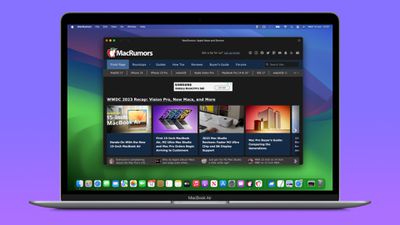
macos sonoma web app MacRumors
In macOS Sonoma, any website viewed in Safari can be turned into a web app, thanks to a new "Add to Dock" option in the File menu. In other words, no work is required on the part of web developers to make a site web app compatible, although there are some elements of web apps that developers can have control over (see below).

How to Turn MacRumors into a Web App

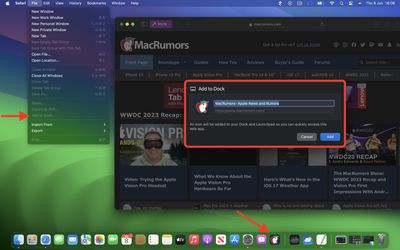
  1. In macOS Sonoma developer beta, navigate to MacRumors.com in Safari.
  2. Choose File -> Add to Dock in the menu bar.
  3. If you want, you can change the MacRumors icon by clicking it in the Add to Dock window. You can also edit the web app's name using the title field – "MacRumors" is more succinct, for example.
  4. Click the blue Add button.

macos sonoma tidbits6

You will now see the MacRumors web app sitting in your Dock, ready for use independently of Safari. The web app works with Mission Control and Stage Manager just like any app, and can also be opened via Launchpad or Spotlight Search.

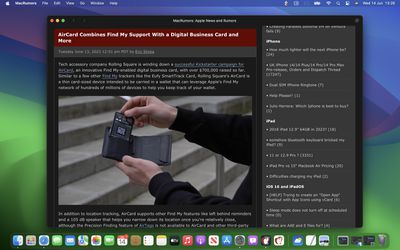
On opening the web app, you'll notice its window includes a simplified toolbar with navigation buttons (note: Website developers can control whether these are shown). As you can see in the image, the MacRumors theme color for the site blends into the toolbar for a more seamless look.
web app MacRumors macos
In terms of navigation, the scope of the web app is dictated by the host of the webpage – in this case www.macrumors.com – so you can navigate anywhere within the MacRumors website, but if you click a link outside of the host page, such as the MacRumors Forums, which is separately hosted at forums.macrumors.com, this will open the linked webpage in Safari. Therefore, if you are a frequenter of both the MacRumors website and the MacRumors Forums, you should create separate web apps for each.

Web developers have the ability to refine the scope of a web app to a specific path on their site if they wish. For example, MacRumors could theoretically provide a facility to make web apps dedicated to navigating only how-to articles or guides. This is something MacRumors may implement in the future.

Website Logins and Notifications

By default, Safari copies a website's cookies to its web app. So if you create a MacRumors Forums web app and you were logged into your account at the time, you will remain logged in inside the web app. Even if you weren't logged in, you can do so within the web app with minimal effort, since Apple has integrated support for Password and Passkey AutoFill.

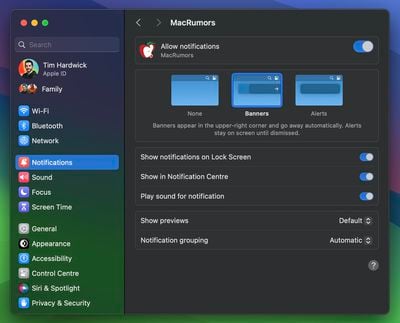
If a website already supports web push notifications – as MacRumors does – and you have signed up to them, you will receive web app push notifications that display the corresponding MacRumors icon, giving you more context than a standard Safari notification and icon would.

The web app icon in the Dock will also show a badge when a notification is received. Web app notifications are silent by default, although developers can change them to play a sound. However, the end decision over sound and icon badges is left to the user in System Settings -> Notifications.
web app notifications mr
Web apps also respect Focus modes, so you can include or exclude them from allowed notifications based on what you're doing. Lastly, with privacy in mind, Apple has added options to control web apps' access to camera, microphone, and location in System Settings -> Privacy & Security, just like for native apps.

For those who wish to delve further into macOS Sonoma, it is currently available to download as a developer beta, although caution is warranted, as beta versions can be unstable and buggy. For those willing to wait, the official public release is expected to land in the fall.


Related Forum: macOS Sonoma

Popular Stories

apple pro tell logo

Apple Launching Five New Products Today

Thursday November 5, 2026 12:59 am PST by
Apple is launching five new products on Friday, November 6, following pre-orders that opened last week, including its first touchscreen MacBook Pro models. The following new products will be available from today: iPad mini with OLED display and A20 Pro chip iMac with M6 chip 14-inch MacBook Pro with M6 chip 14-inch MacBook Pro with OLED touchscreen 16-inch MacBook Pro with OLED...
duo aquarium

More Fun iPhone Duo Apps: 30 New Picks to Try

Friday November 6, 2026 3:27 pm PST by
When the iPhone Duo launched, we shared a list of some of the fun apps developers created for the new form factor. Two weeks out, developers are continuing to come up with fresh ideas, so we thought we'd share some of our favorites. Games Marbles Unhinged ($2.99) - Marbles Unhinged is a marble maze designed for the Duo. When you fold it, the floor turns into a ramp. If you stand the top...
silver iphone 18 pro

Apple Rumored to Drop the iPhone's Action Button Next Year

Friday November 6, 2026 6:07 am PST by
Apple plans to merge the iPhone's Action button with the Camera Control starting next year, according to the leaker known as "Instant Digital." In a new post on Weibo, the leaker claimed that a single press of the combined button would open the camera, while a long press would trigger the function assigned to the Action button. They explicitly clarified that the dedicated Action button would ...

Top Rated Comments

45 months ago
This was the biggest eyeroll moment of the WWDC keynote for me. (I liked all the rest)

PWA's are a thing for years and years. They even got a spokesperson and demo for pinning a webapp and made it sound like they invented something magical and revolutionary that will enrich people's lives.

Can't believe it took them so long to add something that has been considered 'a basic feature' for years on other platforms and browsers.
Score: 46 Votes (Like | Disagree)
45 months ago
The fact that subdomains (forums.maxrumors.com) need their own web app is not ideal. It could definitely break web apps for some sites that use subdomains for load balancing or other purposes such as login.


Score: 12 Votes (Like | Disagree)
45 months ago
Nice to see MacOS finally catching up to iPadOS/iOS in this regard
Score: 11 Votes (Like | Disagree)
bigjnyc Avatar
45 months ago

This was the biggest eyeroll moment of the WWDC keynote for me. (I liked all the rest)

PWA's are a thing for years and years. They even got a spokesperson and demo for pinning a webapp and made it sound like they invented something magical and revolutionary that will enrich people's lives.

Can't believe it took them so long to add something that has been considered 'a basic feature' for years on other platforms and browsers.
Is this your first Apple keynote? They do this with at least 2 or 3 features every. single. year. It never fails and is a running joke at this point.
Score: 9 Votes (Like | Disagree)
45 months ago

This was the biggest eyeroll moment of the WWDC keynote for me. (I liked all the rest)

PWA's are a thing for years and years. They even got a spokesperson and demo for pinning a webapp and made it sound like they invented something magical and revolutionary that will enrich people's lives.

Can't believe it took them so long to add something that has been considered 'a basic feature' for years on other platforms and browsers.
It's apple, what do you expect . They self congratulated themselves for the "new" 15" design, almost sucking their own *censored* , and people cheering up

Still , the implementation is nice , and with the power apple has , it might make their web app and guidelines respected by devs

In all fairness I've no idea why theyve been waiting so long while iOS had it a deceny ago already

But yeah apple can afford to be late in any area they want
Score: 8 Votes (Like | Disagree)
mattopotamus Avatar
45 months ago

Does it need to remain in the dock or can that be deleted? Does it show up as an application in the Applications folder?
It does not need to remain in the dock. You can remove it there and still access it through finder or spotlight search.
Score: 7 Votes (Like | Disagree)
Latest Stories
Apple Taking New Approach to Developing iOS 28 and macOS 28
1 hour ago
Early Apple Black Friday Deals on Apple Watch, MacBook Air, and More
20 hours ago
'Backglow' Lets You Customize New MacBook Pro's Glowing Apple Logo
20 hours ago
Top Stories: Apple Product Launches, iOS 27.3 Beta, and More
1 day ago
More Fun iPhone Duo Apps: 30 New Picks to Try
2 days ago
Hands-On With Apple's New OLED Touchscreen MacBook Pro
2 days ago
Apple Store With All-New Design Opening Soon in Southern California
2 days ago
Control the Glowing Apple Logo on Your New MacBook Pro
2 days ago
Apple Shares New 'Apple Card: Apply and Use in Minutes' Ad
2 days ago
Apple Says More Than 100,000 Apps Optimized for iPhone Duo, Here's What's Still Missing
2 days ago
Early Black Friday Deals Kickoff With Steep Discounts on Apple Watch Ultras and More
2 days ago
The MacRumors Show: iOS 27.3 Looks Like a Huge Update
2 days ago
Best Buy's Black Friday Event Begins With Sitewide Savings on Apple, TVs, More
2 days ago
Apple Releasing Yet Another Two New Products Next Week
2 days ago
MacBook Air Drops to Lowest Price in Months With Amazon's $250 Discount
2 days ago
Apple Rumored to Drop the iPhone's Action Button Next Year
2 days ago
Apple's Extended Return Policy Now in Effect for 2026 Holiday Season
2 days ago
Apple Music Classical Updated With New Icon and Refreshed Design
2 days ago
OLED iPad Mini, M6 iMac, and New MacBook Pros Available From Today
2 days ago
Apple Surveys iPhone Duo Buyers About Crease and Camera
3 days ago
Apple's First Touchscreen Mac is Now Arriving to Customers
3 days ago
Claude Gets Personal Finance Feature With Bank Account Linking
3 days ago
Apple Arcade Adds Crossy Road Rush and NBA 2K27
3 days ago
Apple's New HomeView Smart Home Hub: Here's How Much RAM It Has
3 days ago
iPad Mini vs. iPad Air Buyer's Guide: Now Just $50 Apart
3 days ago
First iOS 27.3 and macOS Golden Gate 27.3 Public Betas Now Available
3 days ago
Apple Announces a New Mac Sales Record
3 days ago
Paid $200 for Logic Pro? Apple Says You Won't Get This New Feature
3 days ago
Instagram's Edits Video Editor is Now Available on Mac
3 days ago
Prevent Siri and Search From Accessing Specific iPhone Apps
3 days ago