

iOS 17 and macOS Sonoma Add Passkey Support to Your Apple ID - MacRumorsOpen MenuShow RoundupsShow Forums menuVisit ForumsOpen Sidebar
Skip to Content

iOS 17 and macOS Sonoma Add Passkey Support to Your Apple ID

Starting with iOS 17, iPadOS 17, and macOS Sonoma, users with an Apple ID will automatically be assigned a passkey, allowing them to sign into their Apple ID with Face ID or Touch ID instead of their password on various Apple sign-in pages, including icloud.com, appleid.apple.com, appstoreconnect.apple.com, and more.
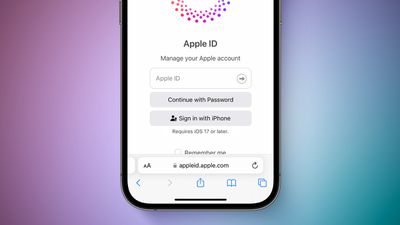
iOS 17 Passkey With Apple ID Feature 3
Passkeys are a more secure alternative to passwords. Apple explains:

A passkey is a cryptographic entity that's not visible to you, and it's used in place of a password. A passkey consists of a key pair, which—compared to a password—profoundly improves security. One key is public, registered with the website or app you're using. The other key is private, held only by your devices.

Passkey support for Apple IDs will also be available for third-party apps and websites that support the "Sign in with Apple" feature.

Users running beta versions of iOS 17, iPadOS 17, and macOS Sonoma can test this functionality on supported Apple sign-in pages starting today, but it does not yet appear to be available for everyone. All users with an Apple ID will be able to sign in with a passkey once the software updates are released to the public later this year.

Passkey support on the Apple ID page was spotted earlier by Twitter user @aaronp613.

Related Forums: iOS 17, iPadOS 17, macOS Sonoma

Popular Stories

iCloud iPhone 17 Pro

iPhone Users Who Pay for iCloud Storage Get Two New Perks on iOS 27

Thursday July 2, 2026 6:10 am PDT by
If you pay for certain iCloud+ storage plans beyond the 5GB that Apple offers for free, you will receive two more perks on iOS 27 at no additional cost. A summary of the two new iCloud+ perks on iOS 27:Increased daily usage limits for some new Apple Intelligence features, including image generation in the revamped Image Playground app. HomeKit Secure Video cameras receive generated video...
iPhone 4 on Black Feature

Apple Facing One of Its Worst Leaks Since the iPhone 4

Thursday July 2, 2026 9:53 am PDT by
Apple supplier Tata Electronics recently suffered a cyberattack that resulted in thousands of confidential files being published on the dark web, and this reportedly included some photos and documents related to the upcoming iPhone 18 Pro. We have elected not to share any of the leaked photos in this story due to the illegal nature in which they were obtained, but they can easily be found...
American Express Gold Apple Pay Feature

American Express Announces New Apple Pay Feature

Tuesday June 30, 2026 10:27 am PDT by
American Express today announced that you can now redeem Membership Rewards points when checking out with Apple Pay on the web and in apps on the iPhone and iPad. When checking out with Apple Pay on iOS 18 or iPadOS 18 or later, tap on your eligible American Express card (Platinum, Gold, Green, and others) and select the Membership Rewards points option. You can use points to cover all or...

Top Rated Comments

Windoes Avatar
40 months ago

This is great for all people
Corrected
Score: 25 Votes (Like | Disagree)
40 months ago

Sounds like a very good idea, but what do you do to get support on a Windows machine?
You would scan the QR code displayed on the Windows device with your iPhone.
Score: 14 Votes (Like | Disagree)
40 months ago

Unfortunately on iOS, the backup to Face-ID for the iPhone's Keychain or PassKeys is the iPhone's passcode. So anyone that has access to your phone and knows the passcode, can use the phone's passcode to log-in to iCloud or Apple ID with this feature.
Anyone who has access to your phone and knows your passcode, can already view all your data on your device. They wouldn’t even need to log in to iCloud.
Score: 10 Votes (Like | Disagree)
40 months ago

“more secure alternative to passwords” that is… a pretty loaded claim

useful, necessary, probably the future: sure. more dummy-proof, quite likely. more secure… hmmmmmmm… wellllll…
Passkeys remove the biggest threat to passwords - phishing.
Score: 8 Votes (Like | Disagree)
ipedro Avatar
40 months ago

Unfortunately on iOS, the backup to Face-ID for the iPhone's Keychain or PassKeys is the iPhone's passcode. So anyone that has access to your phone and knows the passcode, can use the phone's passcode to log-in to iCloud or Apple ID with this feature.
This is a problem, I agree, but one that’s more of a cultural problem than a tech issue and is fairly easy to avoid.

People are so used to typing in their PIN every time they unlock their phone if they’re not using biometric unlock.

People need to be taught to never use their PIN in public and if they absolutely must, then guard it like you do your bank card PIN.

There could be some technology enabled backup solutions like adding a hierarchy of devices with more power over the others, whereas my home Mac can override my iPhone’s lock and revert security changes recently made by the iPhone.
Score: 8 Votes (Like | Disagree)
40 months ago
Unfortunately on iOS, the backup to Face-ID for the iPhone's Keychain or PassKeys is the iPhone's passcode. So anyone that has access to your phone and knows the passcode, can use the phone's passcode to log-in to iCloud or Apple ID with this feature.
Score: 8 Votes (Like | Disagree)

















