Apple Pay Express Mode Now Available in New South Wales - MacRumorsOpen MenuShow RoundupsShow Forums menuVisit ForumsOpen Sidebar
Skip to Content

Apple Pay Express Mode Now Available in New South Wales

The government of New South Wales in Australia today announced that the Opal ticketing system now supports Express Mode for Apple Pay payments, allowing the fare card to be added to the Wallet app on a compatible iPhone or Apple Watch for tap-and-go payments across the public transport network.

opal express transit
Express Transit mode allows users to pay for rides without having to wake or unlock their iPhone or Apple Watch, or open the Opal app. The mode also bypasses the need to authenticate with Face ID, Touch ID, or a passcode. Users simply need to hold their iPhone or Apple Watch near the contactless payment reader until a checkmark appears on the display.

Transport for NSW undertook a staggered rollout of Express Mode across the 25,000 card readers on the Opal network, starting with ferries and light rail, then train stations, and then the thousands of Opal readers on buses, which finished this week.

"Commuters in the Hunter, Illawarra, Blue Mountains and everywhere in between will benefit from being the first public transport users in Australia to benefit from the mass roll out of this initiative," said NSW transport minister Jo Haylen. "It will make life so much easier for the almost two million transport passengers who use contactless payments with a digital wallet in NSW."

How to Set Up Express Transit on iPhone

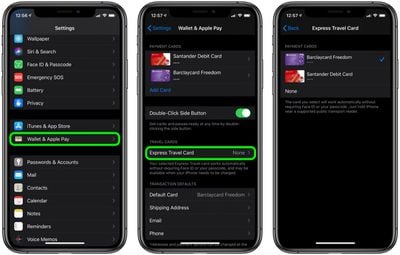
  1. Launch the Settings app on your iPhone.
  2. Tap Wallet & Apple Pay.
  3. Tap Express Transit Card.
  4. Tap one of your cards in the list to use it with Express Transit. A tick will appear next to the card you select. The default option is None.
  5. Authenticate your device using ‌Touch ID‌ or ‌Face ID‌.

settings
If your bank card doesn't support Express Transit, you'll get an error message telling you that the card is incompatible. If no error message appears, you're good to tap-and-go.

How to Set Up Express Transit on Apple Watch

  1. Launch the Watch app on your iPhone.
  2. Tap Wallet & Apple Pay.
  3. Tap Express Transit Card.
  4. Tap one of your cards in the list to use it with Express Transit. A tick will appear next to the card you select. The default option is None.
  5. Authenticate by entering your passcode on your Apple Watch.
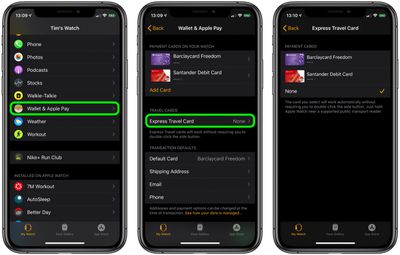
watch settings
If your bank card doesn't support Express Transit, you'll get an error message telling you that the card is incompatible. If no message appears, you're all set.


Popular Stories

wallet app transit new york

Apple Pay for Transit Now Works in These 12 U.S. Cities

Tuesday April 28, 2026 3:50 pm PDT by
Several major U.S. cities support the Apple Pay for transit feature that Apple has rolled out, providing a simple way for those who use public transportation to pay for rides. Apple Pay for transit works in Atlanta, the Bay Area, Boston, Chicago, Los Angeles, New York, Orange County, Philadelphia, Portland, San Diego, Seattle, and Washington, DC. Some of these cities have supported Apple...
Apple Card iPhone 16 Pro Feature

Apple Card Promo to Offer Free AirPods Pro 3

Friday May 15, 2026 8:59 am PDT by
Starting as early as next week, customers who sign up for an Apple Card at Apple's retail stores in the U.S. will receive $249 cash back when they purchase AirPods Pro 3, according to Bloomberg's Mark Gurman. The promotion has yet to be officially announced by Apple, so exact terms and conditions are not available at this time. AirPods Pro 3 are priced at $249 in the U.S., so customers who...
Apple WWDC25 iOS 26 CarPlay Light mode 250609

Six Popular iPhone Apps Now Available on CarPlay

Thursday May 14, 2026 9:10 am PDT by
Apple's CarPlay system for accessing iPhone apps on a vehicle's dashboard screen has received six popular apps in recent weeks: ChatGPT, Perplexity, Grok, Google Meet, WhatsApp, and the indie artist streaming platform Audiomack. Make sure you have the latest version of each app and they will automatically appear on CarPlay. ChatGPT Starting with iOS 26.4, CarPlay supports voice-based...

Top Rated Comments

37 months ago

It's very smart of Apple to do this. They won't make any money from this kind of deal but it eventually locks people into their iPhones further so they can't switch away easily. Use your iPhone as a transit payment method, credit card, driver's license, car key, house key, etc. Suddenly, one day, you depend on your iPhone for pretty much everything and it's impossible to switch.

Luckily, I'm an AAPL shareholder so lock away.
Nope. In NYC, the system works with NFC-enabled credit cards and Android phones with NFC -- as well as the dedicated OMNY card you can buy (with cash, even, for users who don't have access to banks). I'd imagine this Australian system works much the same way, and even just in the article photo you can see the credit card logos above the reader.

So, no, nobody is "locked" into using an Apple device, fortunately. As a transit user and a taxpayer, I'd be rightly pissed if any one company had a monopoly on contactless fares, regardeless of what it means for your stock holdings.
Score: 8 Votes (Like | Disagree)
adrianjagielak Avatar
37 months ago
You can even use the Express Transit card when your iPhone is powered off

https://support.apple.com/en-us/guide/security/sec90cd29d1f
Score: 5 Votes (Like | Disagree)
37 months ago

Do people in Australia call NSW ”Wales”?
No
Score: 4 Votes (Like | Disagree)
37 months ago
Good to hear about this. Hopefully this feature expands to more locations.
Score: 3 Votes (Like | Disagree)
ElectricPotato Avatar
37 months ago

Do people in Australia call NSW ”Wales”?
Crikey! I was in Wales when a dingo drank my Fosters.
Score: 3 Votes (Like | Disagree)
x86dude Avatar
37 months ago
Interesting comment in the ABC TV news report : “We did it because most (NSW transit) users, use Apple devices”.
Score: 3 Votes (Like | Disagree)