

Everything New in iOS 17 Beta 6 - MacRumorsOpen MenuShow RoundupsShow Forums menuVisit ForumsOpen Sidebar
Skip to Content

Everything New in iOS 17 Beta 6

We're likely less than a month away from the launch of iOS 17 and iPadOS 17, which means beta testing will soon be wrapping up. Apple is now providing weekly beta updates, seeding out the sixth beta today.

General iOS 17 Feature Blue Green
As we approach the end of the beta testing period, updates are getting smaller with Apple focusing on crucial refinements and polish, but there are still a few changes in the latest beta worth highlighting.

Messages App

In the Messages app, you can now long press on the "+" button to bring up the photo picker rather than tapping and having to choose the Photos option from the list.

Phone App

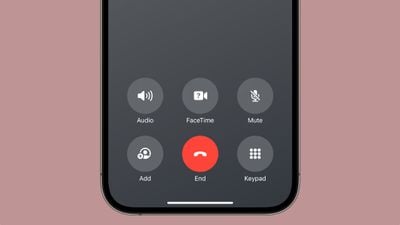
In an earlier beta, Apple moved the red end call button in the Phone app from the bottom middle of the interface to the bottom right. Given that people are so used to tapping in the middle, this was not a popular change.
ios 17 beta six phone app
In beta 6, Apple moved the end call button back to the middle, returning it to where it is located in iOS 16 and earlier.

Mood Tracking

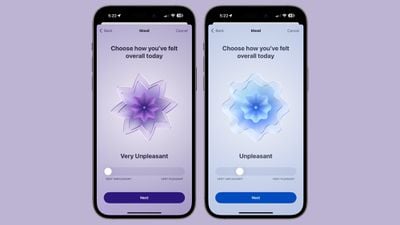
Apple has further tweaked the animations that are used for the moods in the mood tracking feature. The rings around each mood now animate quicker around each shape, and there are more rings.
ios 17 beta 6 mood tracking

Photos Splash Screen

There's a new splash screen when you first open the ‌Photos‌ app, and it lets you know about the new features.

ios 17 photos splash screen

Display & Brightness

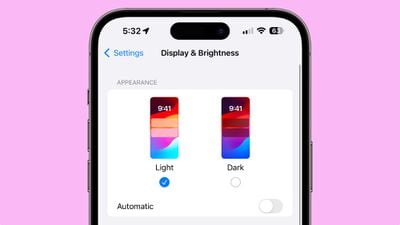
In the Display & Brightness section of the Settings app, the wallpaper icon has been updated to an iOS 17 wallpaper.
ios 17 beta 6 settings

More iOS 17 Beta 6 Features

Know of a feature that we left out in this list? Let us know in the comments below.

Related Forums: iOS 17, iPadOS 17

Popular Stories

iOS 27 Next to iPhone

Here's When iOS 27 Rolls Out Today in Every Time Zone [Update: It's Out]

Sunday September 13, 2026 3:00 am PDT by
Update 10:04 a.m.: iOS 27 is rolling out now, though it may take a bit for all users to see it, so keep checking! Apple is about to release iOS 27, which will finally deliver more advanced Siri AI capabilities as well as a variety of other refinements, improvements, and new features to iPhones. It's Apple's biggest software update of the year, and Apple announced at Wednesday's iPhone event...
iOS 27 Icon iPhone

iOS 27 Available Now With These 8 New Features

Monday September 14, 2026 9:00 am PDT by
Update — 10 a.m. Pacific Time: Apple has released iOS 27. During its iPhone 18 Pro and iPhone Duo event last week, Apple announced that iOS 27 will be released widely on Monday, September 14. iOS 27 should be available around 10 a.m. Pacific Time / 1 p.m. Eastern Time today via the Settings app, under General → Software Update. Below, we have highlighted eight new features and...
Apple iCloud Plus expansion hero

iCloud+ Now Includes Apple TV, Apple Arcade, and Curated Apple Music Stations in Over 100 Countries

Tuesday September 15, 2026 1:43 am PDT by
Apple today announced a new subscription initiative that turns paid iCloud+ subscriptions into a broader services bundle in more than 100 countries. In select countries, Apple says every paid iCloud+ plan, including the cheapest 50GB tier, now includes Apple TV and Apple Arcade "at no additional cost," while family sharing extends the storage, TV and Arcade access to up to five people....

Top Rated Comments

Bawstun Avatar
40 months ago
Apple needs new software designers. This is ridiculous.

Example: the long-press on + to immediately go to the photo picker.

STUPID. Not intuitive at all, even in the slightest.

Most people send PHOTOS in their texts more than they use stickers, avatars, location data and other features.

So rather than make a PHOTO button front and center and easily accessible, they expect you to think of long-pressing a simple button in order to introduce the shortcut.

Who thinks that way? Nobody. No one. Not a single person would think, intuitively, to hold down + as a fast way to bring up photos.

Ridiculous. I’m so tired of having to use Google or YouTube to search how to perform simple functions that a 3-year old used to be able to figure out with iOS. It’s like nothing matters anymore.
Score: 39 Votes (Like | Disagree)
40 months ago
Hoping this gets rid of the disappearing text entry box in Messages.
Score: 29 Votes (Like | Disagree)
40 months ago
Six betas in and they have not fixed a single issue of the hundred I've reported. The beta is more refined, and just as crappy UX as the first one.
Score: 23 Votes (Like | Disagree)
ghostface147 Avatar
40 months ago

Apple needs new software designers. This is ridiculous.

Example: the long-press on + to immediately go to the photo picker.

STUPID. Not intuitive at all, even in the slightest.

Most people send PHOTOS in their texts more than they use stickers, avatars, location data and other features.

So rather than make a PHOTO button front and center and easily accessible, they expect you to think of long-pressing a simple button in order to introduce the shortcut.

Who thinks that way? Nobody. No one. Not a single person would think, intuitively, to hold down + as a fast way to bring up photos.

Ridiculous. I’m so tired of having to use Google or YouTube to search how to perform simple functions that a 3-year old used to be able to figure out with iOS. It’s like nothing matters anymore.
Well let us know when you apply and get the job to make the design decisions for them.
Score: 19 Votes (Like | Disagree)
TheYayAreaLiving 🎗️ Avatar
40 months ago
This is a neat feature! Excellent!


View post on X
Score: 14 Votes (Like | Disagree)
adammusic Avatar
40 months ago
PLEASE SWAP THE AUDIO AND MUTE BUTTONS BACK IN THE PHONE APP ALSO

SO STUPID WHY WOULD ANYONE MOVE ANY OF THOSE ICONS INSANE
Score: 11 Votes (Like | Disagree)















