iPhone 15 Pro: Here's Everything the New Action Button Can Do - MacRumorsOpen MenuShow RoundupsShow Forums menuVisit ForumsOpen Sidebar
Skip to Content

iPhone 15 Pro: Here's Everything the New Action Button Can Do

Apple's newly announced iPhone 15 Pro and iPhone 15 Pro Max models introduce a new Action button that replaces the traditional Ring/Silent switch – a staple of the iPhone since it launched in 2007. Here's a rundown of its functions.
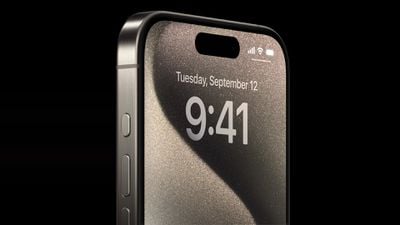
Apple iPhone 15 Pro lineup Action button 230912
The all-new Action button replaces the single-function switch used to toggle between ring and silent, offering additional options so users can choose between quickly accessing the camera or flashlight, activate Voice Memos, Focus modes, Translate, and accessibility features like Magnifier. Users can also associate it with Shortcuts for more options.

A press-and-hold gesture with fine-tuned haptic feedback and visual cues in the Dynamic Island ensure the new Action button launches the intended action, which users can customize in Settings and assign to different actions. Here's what it can be programmed to do:

  • Accessibility: Access to various accessibility settings, such as VoiceOver, Zoom, AssistiveTouch, Live Speech, and more.
  • Shortcuts: Open your favorite app, or run a shortcut created in or downloaded from the Shortcuts app, such as sending a message, playing a playlist, or controlling smart home devices.
  • Silent Mode: Like the Ring/Silent switch on existing iPhone models, toggle silent mode on or off, which will mute or unmute the ringer and alerts.
  • Camera: Take a photo, selfie, video, portrait, or portrait selfie with a single press of the Action button.
  • Flashlight: Turn on or off the flashlight on the back of the device.

  • Focus: Activate or deactivate a Focus mode.
  • Magnifier: Activate the Magnifier app to use the iPhone's camera as a magnifying glass to zoom in on small text or objects.
  • Translate: Launch the Translate app and start a conversation or text translation with a single press of the Action button.
  • Voice Memos: Start or stop recording a voice memo with the Voice Memos app.

iphone 15 pro action button settings
The standard iPhone 15 and iPhone 15 Plus models retain the traditional Ring/Silent switch, making the "Action" button one of the key differentiating features of the ‌iPhone 15 Pro and iPhone 15 Pro Max, and also something that makes the new models‌ stand out from their predecessors.

Popular Stories

iCloud iPhone 17 Pro

iPhone Users Who Pay for iCloud Storage Get Two New Perks on iOS 27

Thursday July 2, 2026 6:10 am PDT by
If you pay for certain iCloud+ storage plans beyond the 5GB that Apple offers for free, you will receive two more perks on iOS 27 at no additional cost. A summary of the two new iCloud+ perks on iOS 27:Increased daily usage limits for some new Apple Intelligence features, including image generation in the revamped Image Playground app. HomeKit Secure Video cameras receive generated video...
iPhone 4 on Black Feature

Apple Facing One of Its Worst Leaks Since the iPhone 4

Thursday July 2, 2026 9:53 am PDT by
Apple supplier Tata Electronics recently suffered a cyberattack that resulted in thousands of confidential files being published on the dark web, and this reportedly included some photos and documents related to the upcoming iPhone 18 Pro. We have elected not to share any of the leaked photos in this story due to the illegal nature in which they were obtained, but they can easily be found...
American Express Gold Apple Pay Feature

American Express Announces New Apple Pay Feature

Tuesday June 30, 2026 10:27 am PDT by
American Express today announced that you can now redeem Membership Rewards points when checking out with Apple Pay on the web and in apps on the iPhone and iPad. When checking out with Apple Pay on iOS 18 or iPadOS 18 or later, tap on your eligible American Express card (Platinum, Gold, Green, and others) and select the Membership Rewards points option. You can use points to cover all or...

Top Rated Comments

MacFan782040 Avatar
37 months ago
Now that we have 25 ways to access the camera and flashlight, can we please make the 2 home buttons customizable.

Edit: that’s weird I literally posted the same thing
Score: 21 Votes (Like | Disagree)
oneteam Avatar
37 months ago
So now we have 25 different ways to access the camera
Score: 17 Votes (Like | Disagree)
37 months ago
If it is only one action… this is the lamest thing ever. I hope it is more than just 1 action.
Score: 15 Votes (Like | Disagree)
k.alexander Avatar
37 months ago
So can it be set up for two actions?
Press and HOLD for Silent,
AND
Quick press for another custom action from the list above?

OR is it just one or the other?
Score: 15 Votes (Like | Disagree)
37 months ago
I hope you can’t activate the silent button while it’s in your pocket. Hopefully only works when the screen is on/screen is on and unlocked.
Score: 12 Votes (Like | Disagree)
37 months ago
What about double press, triple press, press and hold, etc... the possibilities were unlimited but they decided to just allow one press for one action. LAME.
Score: 10 Votes (Like | Disagree)